
FOR WOOCOMMERCE STORES & MEDIA-HEAVY WORDPRESS SITES
Store WordPress media for $6/TB with Backblaze B2
The cheapest cloud storage for WordPress. 1.5 MB plugin, free egress through Cloudflare.
All 10 cloud providers free • No credit card required
TL;DR
Backblaze B2 is the cheapest cloud storage for WordPress at $0.006/GB/month ($6/TB). With Cloudflare as a CDN partner, egress is free and unlimited. CloudSync Master Pro connects to B2 via its S3-compatible API in a 1.5 MB plugin with no SDK bloat. First 10 GB of storage is always free. Start with the free plugin on WordPress.org, upgrade to Pro ($89/yr) for bulk upload, WooCommerce signed URLs, and configurable performance settings.
Storage costs add up faster than you think
Most conversations about cloud storage focus on egress fees. That’s the right conversation for high-traffic sites. But for stores and publishers with large media libraries and moderate traffic, the storage bill is the bigger line item.
A WooCommerce store with 5,000 products and 10 images per product in multiple sizes easily racks up 200 GB of media. On Amazon S3, that’s $4.60/month just to store it. On Cloudflare R2, it’s $3.00/month. On Backblaze B2, it’s $1.20/month.
The difference compounds. Over a year, storing 200 GB costs $55.20 on S3, $36.00 on R2, and $14.40 on B2. For 500 GB, the annual costs become $138.00 (S3), $90.00 (R2), and $36.00 (B2).
Unlike egress, you can’t cache your way out of storage fees. Every GB stored costs money every month, forever.
B2 is built for people who pay attention to those numbers.
Save up to 96% compared to Amazon S3
Here’s what you actually pay across the three most popular S3-compatible providers, using a mid-size WordPress site: 50 GB of media, 100,000 monthly pageviews, 6 images per page at 200 KB average. Based on B2 pricing, S3 pricing, and R2 pricing.
Monthly cost comparison
| Cost component | Amazon S3 | Cloudflare R2 | Backblaze B2 | B2 + Cloudflare CDN |
|---|---|---|---|---|
| Storage (50 GB) | $1.15 | $0.75 | $0.30 | $0.30 |
| PUT requests (500/mo) | $0.003 | $0.002 | Free | Free |
| GET requests (600K/mo) | $0.24 | $0.22 | $0.24 | $0.24 |
| Egress (120 GB) | $10.80 | $0.00 | $1.20 | $0.00 |
| Monthly total | $12.19 | $0.97 | $1.74 | $0.54 |
| Annual total | $146.28 | $11.64 | $20.88 | $6.48 |
The B2-only column includes B2’s standard egress rate of $0.01/GB (beyond the free allowance). The B2 + Cloudflare CDN column reflects the Bandwidth Alliance partnership where Cloudflare pulls from B2 at zero cost.
At different storage volumes
| Storage | Amazon S3/yr | Cloudflare R2/yr | B2 + Cloudflare/yr | Savings vs S3 |
|---|---|---|---|---|
| 10 GB | ~$72 | ~$5 | ~$1.44 | 98% |
| 50 GB | ~$146 | ~$12 | ~$6.48 | 96% |
| 200 GB | ~$340 | ~$42 | ~$21.60 | 94% |
| 1 TB | ~$1,350 | ~$198 | ~$86.40 | 94% |
B2 + Cloudflare beats both S3 and R2 at every tier. The gap is most dramatic at higher storage volumes, where B2’s $0.006/GB rate stretches furthest.
Where R2 wins over B2: if you’re already on Cloudflare and want the simplest possible setup, R2 is native to the Cloudflare dashboard. No second vendor, no Bandwidth Alliance configuration. See the R2 landing page for that setup. Where S3 wins: if you need AWS ecosystem features like lifecycle policies, Glacier archival, or IAM-level access controls. See the S3 landing page for enterprise setups.
B2 wins when you want the lowest possible bill and don’t mind managing two services (Backblaze + Cloudflare).
Backblaze B2 WordPress plugin options
Not every WordPress cloud storage plugin supports B2. Here’s where each stands:
| Plugin | B2 Support | How | Plugin Size | Price | Item Limits |
|---|---|---|---|---|---|
| CloudSync Master Pro | Yes | S3-compatible API | 1.5 MB | $89/yr | Unlimited |
| CloudSync Master Free | Yes | S3-compatible API | 1.5 MB | Free | Unlimited |
| Media Cloud | Yes | Native B2 + S3 API | 87 MB | $36–$228/yr | Unlimited |
| WP Offload Media | No | N/A | 23 MB | $39–$349/yr | 5K–Unlimited |
| WP-Stateless | No (GCS only) | N/A | 10 MB | Free | Unlimited |
WP Offload Media does not support Backblaze B2 and hasn’t announced plans to add it. If B2 is your provider, WP Offload Media is not an option.
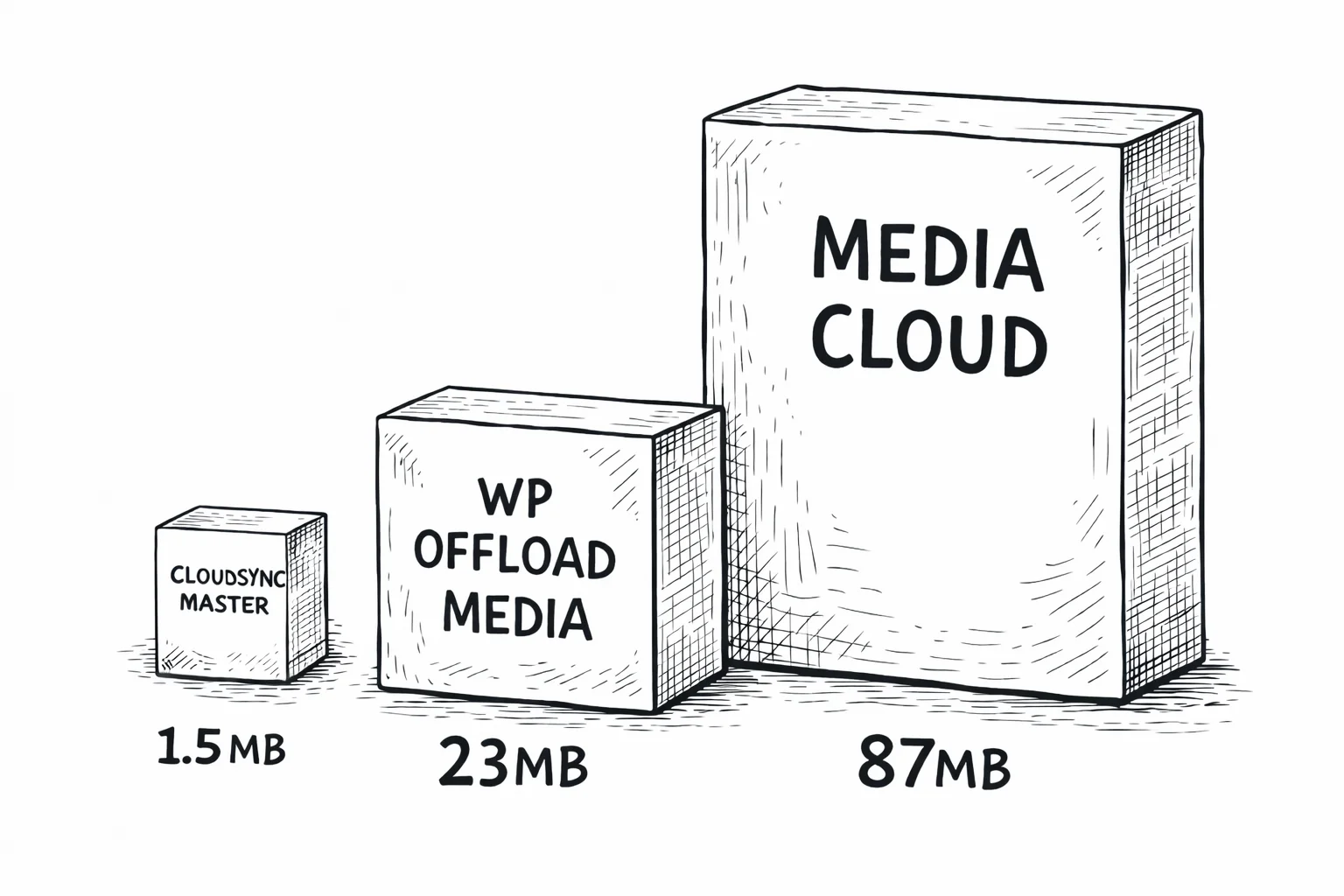
Media Cloud does support B2, both through the older native B2 API and the newer S3-compatible endpoint. But at 87 MB, it bundles SDKs for services you’ll never use. That’s 58× the size of CloudSync Master.
CloudSync Master connects to B2 through the S3-compatible API using a custom Signature V4 implementation. No bundled SDKs, no 15,000-file dependency trees. The same 1.5 MB plugin that connects to S3 and R2 connects to B2. For a detailed comparison, see CloudSync Master vs WP Offload Media.
1.5 MB
CloudSync Master
23 MB
WP Offload Media
87 MB
Media Cloud
Performance after offloading
A WooCommerce store with 14,000 product images saw these improvements after moving media from local storage to cloud storage with CDN delivery using CloudSync Master Pro.
48 → 94
PageSpeed Score
5.2s → 1.1s
GTmetrix Load Time
8.4 GB → 340 MB
Backup Size
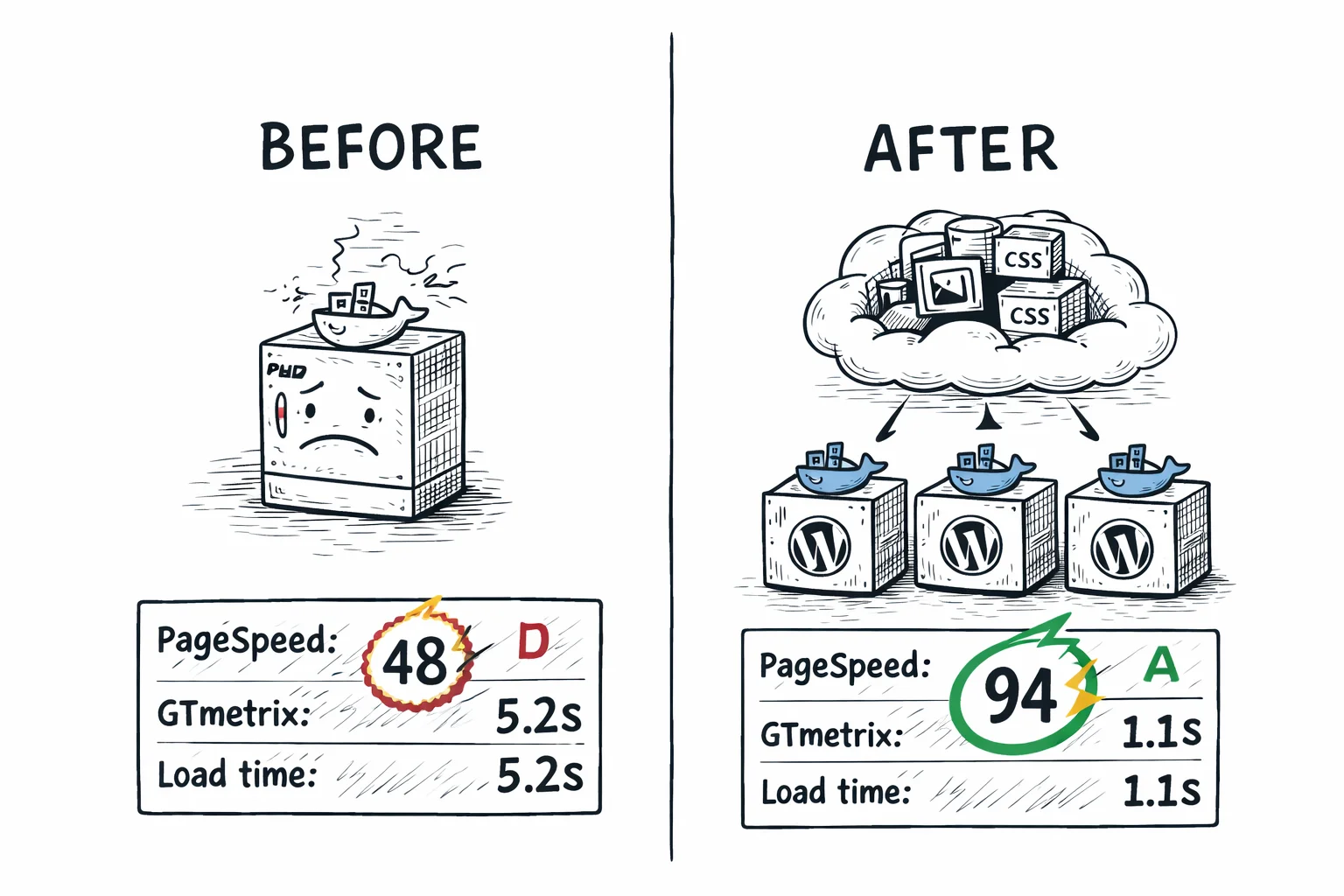
Those numbers come from offloading to cloud storage with CDN delivery. The provider doesn’t change the outcome much since the CDN cache determines what visitors experience, not the origin. B2 with Cloudflare CDN delivers the same frontend performance as S3 with CloudFront or R2 with a custom domain.
The difference is what you pay for that performance. For the detailed performance breakdown with methodology, see the S3 offloading page or R2 offloading page.
How to migrate to B2 from other providers
Already storing media on S3, R2, DigitalOcean Spaces, or Google Cloud Storage? Just add your B2 account and switch to it. CloudSync Master migrates files in the background with zero downtime — available in both Free and Pro.
From another cloud provider
- Add your B2 account in CloudSync Master settings.
- Switch the active account to B2.
- The plugin starts migrating files automatically in the background.
- During migration, any files not yet transferred are served from your previous provider — zero downtime, no broken images.
- Once all files are migrated, everything is served from B2 automatically.
There’s no manual migration step and no need to update anything after migration completes. The fallback mechanism means your site stays live throughout the entire process.
From WP Offload Media or Media Cloud
- Install CloudSync Master Pro alongside your existing plugin.
- Use the Import feature to adopt cloud metadata from WP Offload Media, Media Cloud, WP-Stateless, or WP Media Folder Cloud.
- Add your B2 account and switch to it as the active account.
- The plugin migrates files from S3 to B2 automatically in the background, falling back to S3 for anything not yet transferred.
- Once migration completes, deactivate and remove the old plugin.
Zero downtime throughout. Your site never goes down because the fallback mechanism serves files from S3 until they’ve been migrated to B2.
From local storage (first-time offloading)
If you’ve never used cloud storage, the process is even simpler. Connect to B2, use the bulk upload tool to send your existing library to B2, and new uploads go there automatically from that point forward. The setup tutorial below covers this step by step.
30-day money-back guarantee included.
Who this is for
This plugin is built for:
- WooCommerce stores with large catalogs (500+ products) where storage volume drives the bill. B2’s $0.006/GB means 100 GB of product media costs $0.60/month, not $2.30.
- Budget-conscious site owners who want cloud storage benefits without AWS complexity or Cloudflare vendor lock-in. B2 has the simplest pricing model of any major provider.
- WordPress sites with video content or large downloadable files. A 2 GB product download on S3 costs $0.18 in egress per customer. On B2 + Cloudflare, it costs nothing.
- Developers and freelancers building client sites who need a reliable, cheap storage backend they can set up in minutes and forget about.
This might not be for you if:
- You need advanced lifecycle policies to automatically tier objects to cold storage. B2 doesn’t have storage classes comparable to S3 Glacier or Intelligent-Tiering.
- Your site has fewer than 100 images and minimal traffic. At that scale, the cost difference between providers is pennies, and offloading adds complexity that isn’t worth it.
- You need fine-grained access control policies on individual objects. B2 application keys are scoped to buckets, not individual files. S3’s IAM policies are more granular.
- You want everything in one vendor’s dashboard. B2 + Cloudflare means managing two services. Cloudflare R2 puts storage and CDN in one place.
B2 features that matter for WordPress
Free egress through Cloudflare — pay only for storage
This is B2’s killer advantage and the reason it competes with R2 on total cost despite having standard egress rates.
Backblaze is a member of the Cloudflare Bandwidth Alliance. When Cloudflare pulls content from a B2 bucket, the egress is free. Not discounted. Free. Unlimited. This applies to Cloudflare’s free plan too.
In practice, this means you set up Cloudflare as a CDN in front of your B2 bucket, and every image, video, and file served through Cloudflare costs zero in data transfer. Visitors hit Cloudflare’s cache first. Cache misses pull from B2 at no egress cost. Cache hits never touch B2 at all.
The same partnership exists with Fastly, bunny.net, and CacheFly. If you use any of those CDNs, B2 egress is free through them as well.
Works with every tool you already use
If your tools work with Amazon S3, they already work with Backblaze B2. B2’s S3-compatible API means CloudSync Master connects using the same Signature V4 authentication it uses for S3 and R2 — you just change the endpoint URL and credentials. No new SDKs to learn, no migration headaches for your existing workflows.
The S3-compatible endpoint looks like: s3.us-west-004.backblazeb2.com (the region segment varies based on your bucket’s location). You’ll get the exact URL when you create your bucket.
10 GB free forever
B2’s free tier includes 10 GB of storage with no time limit. Not a 12-month trial like AWS Free Tier. Not a limited promotional offer. The first 10 GB is always free. For small WordPress sites, portfolio sites, or development environments, you may never pay a storage bill at all.
The free tier also includes 2,500 free Class B and 2,500 free Class C API calls per day. For most small sites, that covers normal read operations.
Most sites pay zero egress — even without Cloudflare
Even without the Bandwidth Alliance, B2 includes free egress equal to 3× your average monthly storage. Store 100 GB and you get 300 GB of free outbound transfer per month. For many WordPress sites with moderate traffic, this alone eliminates egress costs entirely.
If you exceed the free allowance, egress is $0.01/GB, which is still 89% cheaper than S3’s $0.09/GB.
Ransomware can’t touch your backups
B2 supports Object Lock, which prevents files from being deleted or modified for a specified retention period. If your server gets compromised, locked backup files in B2 can’t be encrypted or deleted by ransomware — they’re immutable until the retention period expires. This is critical for WordPress backup files stored in B2. S3 has this feature too. R2 does not.
Upload your entire library in under an hour (Pro)
CloudSync Master uploads with 5 parallel connections in the free version. Pro lets you configure 1–20 concurrent upload connections, so your initial media library upload to B2 finishes in under an hour instead of file-by-file crawling. Set concurrency higher on dedicated servers, lower on shared hosting.
Free vs Pro: which version do you need?
If you’re testing B2 or run a small site within the 10 GB free tier, start with the free version. For WooCommerce stores, sites with existing libraries that need bulk upload, or anyone migrating from S3 or another provider, Pro pays for itself quickly.
| Feature | Free | Pro |
|---|---|---|
| 10 cloud providers | Yes | Yes |
| Backblaze B2 support | Yes | Yes |
| Auto-upload new media | Yes | Yes |
| URL rewriting | Yes | Yes |
| Delete local copies | Yes | Yes |
| Competitor import (4 plugins) | Yes | Yes |
| Cross-provider migration | Yes | Yes |
| Import from cloud | Yes | Yes |
| Plugin size | 1.5 MB | 1.5 MB |
| Cloud storage accounts | 1 | Unlimited |
| Bulk upload existing library | No | Yes |
| WooCommerce & EDD signed URLs | No | Yes |
| 4 image optimizer integrations | No | Yes |
| Auto WebP/AVIF serving | No | Yes |
| 6 cache plugin integrations | No | Yes |
| CSS/JS offloading | No | Yes |
| Priority support | No | Yes |
| Price | Free | $89/yr |
| Download free | Recommended for production sites |
B2 cost breakdown: what you’ll actually pay
B2’s pricing has fewer components than S3, and the free tier covers more ground than you’d expect.
B2 pricing (current as of 2026)
| Component | Price | Free Allowance |
|---|---|---|
| Storage | $0.006/GB/month ($6/TB) | First 10 GB always free |
| Egress (standard) | $0.01/GB | 3× avg. monthly storage |
| Egress (CDN partner) | $0.00 | Unlimited via Cloudflare, Fastly, bunny.net |
| Class B calls (downloads) | $0.004/10,000 | 2,500/day free |
| Class C calls (lists, etc.) | $0.004/10,000 | 2,500/day free |
| Class A calls (uploads) | Free | Always free |
Upload operations (Class A) are free. You never pay to put files into B2. That’s unusual. S3 charges $0.005 per 1,000 PUT requests. R2 charges $4.50 per million writes. B2 charges nothing.
Real-world monthly costs with Cloudflare CDN
Small blog (5 GB, 10K pageviews)
$0.00/mo
Within 10 GB free tier. Egress via Cloudflare $0.00. API calls within daily free allowance.
Mid-size WooCommerce (50 GB, 50K pageviews)
~$0.42/mo
Storage $0.30 + egress $0.00 (Cloudflare) + API ~$0.12
Large catalog site (200 GB, 200K pageviews)
~$1.68/mo
Storage $1.20 + egress $0.00 (Cloudflare) + API ~$0.48
Same 200 GB scenario on S3
~$28/mo
Storage $4.60 + egress ~$21.60 + API ~$1.80
Annual savings: B2 + Cloudflare vs S3 (200 GB scenario)
$315/year
~$28/mo on S3 vs ~$1.68/mo on B2 + Cloudflare: that’s a 94% reduction
Without Cloudflare CDN, the large catalog site would pay $1.20 storage + API $0.48 = about $1.68/month. B2’s built-in free egress allowance (3× storage) means many sites pay zero egress even without a CDN partner.
Step-by-step setup tutorial
Eliminate egress fees completely: the Cloudflare + B2 setup
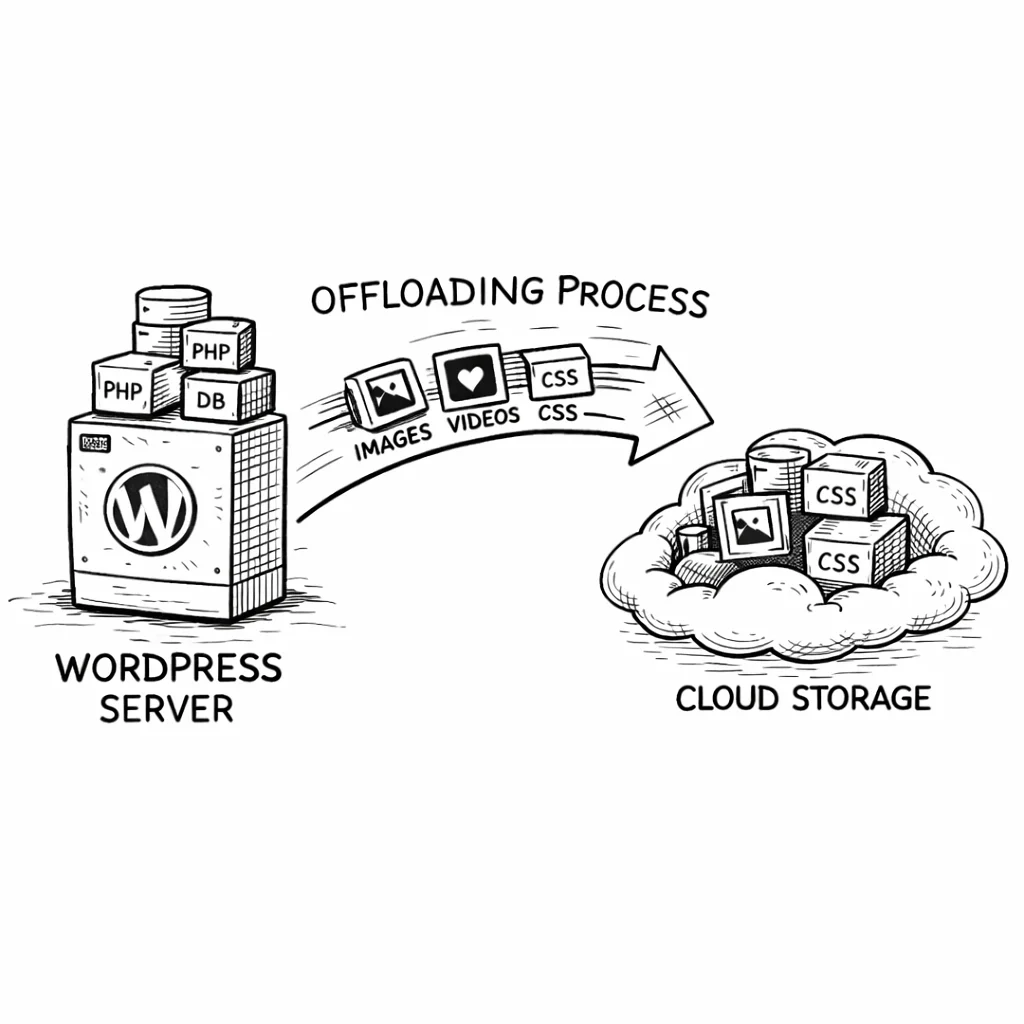
This deserves its own section because it’s the single biggest cost optimization available for WordPress media hosting. Most people don’t realize you can combine two free services (Cloudflare free plan + B2’s free tier) with the Bandwidth Alliance to get a zero-cost media delivery pipeline.
How the Bandwidth Alliance works
Cloudflare and Backblaze are physically interconnected at multiple data centers. When Cloudflare requests a file from B2, the data travels over private interconnections instead of public internet transit. Because neither company pays transit fees for this traffic, Backblaze doesn’t charge you for it. This isn’t a promotional discount. It’s a structural cost reduction that’s been in place since 2018.
What this means for your WordPress site
Without the Bandwidth Alliance, here’s what 1 TB of monthly egress costs across providers:
| Provider | 1 TB Egress Cost |
|---|---|
| Amazon S3 | $92.16 |
| Google Cloud Storage | $120.00 |
| DigitalOcean Spaces | $10.24 (after 1 TB included) |
| Backblaze B2 (standard) | $10.24 |
| Cloudflare R2 | $0.00 |
| Backblaze B2 via Cloudflare | $0.00 |
B2 + Cloudflare matches R2’s zero egress. The difference is B2’s storage is 60% cheaper ($0.006/GB vs $0.015/GB).
The catch (there’s always a catch)
The zero-egress benefit only works when traffic goes through Cloudflare’s proxy. Direct downloads from B2’s S3 endpoint that bypass Cloudflare will incur standard B2 egress charges. This matters for:
- API integrations that pull from B2 directly
- WooCommerce digital downloads if configured to serve from the origin URL instead of the CDN URL
- Any tool or script hitting the B2 endpoint without going through your CDN subdomain
Make sure all public-facing URLs use your Cloudflare CDN domain, not the raw B2 endpoint. CloudSync Master handles this automatically when you set a CDN URL in the plugin settings.
Other CDN partners with free B2 egress
Cloudflare isn’t the only option. These CDN providers also have Bandwidth Alliance agreements with Backblaze:
- Fastly: free B2 egress for Fastly customers
- bunny.net: free B2 egress, one of the cheapest CDNs overall
- CacheFly: free B2 egress
If you’re already using one of these CDNs, you get the same zero-egress benefit without switching to Cloudflare. Set up the CDN to pull from your B2 bucket and configure the CDN domain in CloudSync Master’s settings.
Scaling WordPress with B2
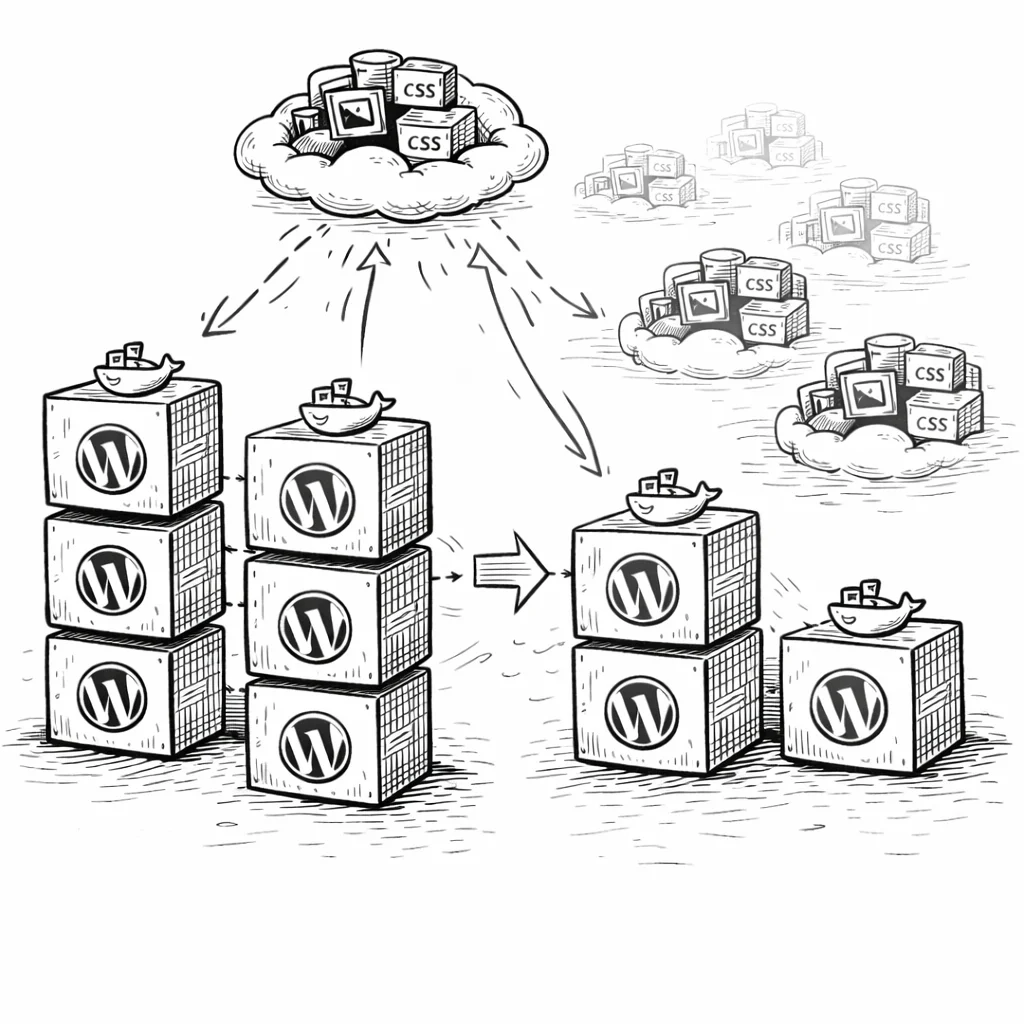
For multi-server WordPress setups, B2 provides the same architectural decoupling as S3 or R2: storage lives outside your server, so adding more servers doesn’t create media sync problems.
Load-balanced environments
Two WordPress servers behind a load balancer both read from and write to the same B2 bucket. No rsync scripts. No NFS mounts. Spin up a new server, install the plugin, and media is immediately available because state lives in the shared database and B2, not on local disk.
Cost predictability for growing sites
B2’s pricing structure makes costs easy to forecast. Storage grows linearly at $0.006/GB. Egress through Cloudflare stays at $0.00 regardless of traffic. Upload operations are free. The only variable cost is read API calls, and those are cheap ($0.004/10,000 beyond the daily free allowance). For a site adding 5 GB of media per month and growing traffic steadily, the monthly B2 cost increase is $0.03. That kind of predictability is useful when you’re planning budgets.
Why store owners trust CloudSync Master
Built by 1TeamSoftware, developers of enterprise WordPress and WooCommerce solutions used by thousands of store owners. Available on WordPress.org with 1,000+ active installations. Tested up to WordPress 6.7.
Every paid license includes a 30-day money-back guarantee, priority support, and ongoing updates. The plugin works with WooCommerce, Multisite, and all major hosting providers.
If it doesn’t work for your setup, you get your money back. No questions.
Simple, transparent pricing
No per-item limits. No hidden fees. Start free, upgrade when you’re ready. B2’s pricing is the most budget-friendly in cloud storage, and it’s unlikely to get cheaper. Locking in a CloudSync Master Pro license today means you’re set up to take advantage of B2 + Cloudflare’s zero-egress combination regardless of future pricing changes.
Free
$0
Available on WordPress.org
- ✅ All 10 cloud providers (1 account)
- ✅ Auto-upload new media
- ✅ URL rewriting to cloud/CDN
- ✅ Delete local after upload
- ✅ Competitor import (4 plugins)
- ✅ Cross-provider migration
- ❌ Bulk upload existing media
- ❌ WooCommerce & EDD signed URLs
- ❌ CSS/JS offloading
- ❌ Auto WebP/AVIF
Pro Monthly
$19/month
Cancel anytime
- ✅ Everything in Free
- ✅ Bulk upload existing media
- ✅ WooCommerce & EDD signed URLs
- ✅ Auto WebP/AVIF serving
- ✅ CSS/JS offloading
- ✅ Priority support
Pro: 1 Site
$89/year
Unlimited media items
- ✅ Everything in Free
- ✅ Bulk upload existing media
- ✅ WooCommerce & EDD signed URLs
- ✅ CSS/JS offloading
- ✅ 4 image optimizer integrations
- ✅ Auto WebP/AVIF serving
- ✅ 6 cache plugin integrations
- ✅ Cross-provider migration
- ✅ Priority support
MOST POPULAR
Pro: 3 Sites
$199/year
$66/site/year, saving 25%
- ✅ Everything in Pro
- ✅ 3 WordPress sites
- ✅ Centralized license
- ✅ Ideal for freelancers
Frequently asked questions
Common questions about Backblaze B2 and WordPress media offloading.
B2 provides 99.999999999% (eleven 9s) durability, the same figure Amazon quotes for S3. Your files are replicated across multiple drives and locations within B2’s data centers. Backblaze has been storing data since 2007 and manages over 3 exabytes. For WordPress media, B2’s reliability is not a concern.
B2 exposes an endpoint that accepts the same S3 API calls and Signature V4 authentication that Amazon S3 uses. CloudSync Master sends identical requests to B2 that it sends to S3, with only the endpoint URL changed. You don’t need separate B2-specific code or SDKs. Any tool or plugin that supports custom S3 endpoints can connect to B2.
Yes. The Bandwidth Alliance partnership between Backblaze and Cloudflare works on all Cloudflare plans, including the free one. You get free egress from B2 through Cloudflare regardless of what you pay Cloudflare. The free plan includes CDN caching, which handles the delivery side.
B2 has two APIs. The native B2 API uses B2-specific endpoints and authentication. The S3-compatible API uses standard S3 endpoints and Signature V4 auth. CloudSync Master uses the S3-compatible API because it’s the same protocol used for all 10 supported providers. The S3-compatible API covers all the operations WordPress media offloading needs. Some advanced B2 features (like certain lifecycle rules) are only available through the native API, but those aren’t relevant for media offloading.
B2 has fewer geographic regions than S3 (primarily US West and EU Central), so origin latency can be higher for visitors far from those locations. However, when you use a CDN (Cloudflare, Fastly, bunny.net), the CDN cache handles delivery from 300+ edge locations worldwide. Origin speed only matters for cache misses, which are a small fraction of total requests. In practice, B2 + Cloudflare CDN delivers media as fast as S3 + CloudFront for end users.
B2 gives you free egress equal to 3× your average monthly stored data. If you store 50 GB, you get 150 GB of free outbound transfer per month. This is separate from the Bandwidth Alliance. If you don’t use Cloudflare or another CDN partner, this allowance often covers your entire egress bill. Exceed it and you pay $0.01/GB, which is still 89% less than S3.
Yes. Add your B2 account in CloudSync Master and switch to it as the active account. The plugin migrates files in the background automatically and falls back to the old provider for anything not yet transferred, so your site never goes down. Once migration completes, everything serves from B2 automatically. Available in both Free and Pro.
Yes. The plugin doesn’t add any storage overhead beyond your actual media files. If your WordPress media library is under 10 GB, you’ll stay within B2’s free tier indefinitely. API calls have a daily free allowance (2,500 Class B and 2,500 Class C per day), which is sufficient for most small sites. Combined with Cloudflare’s free CDN, a small WordPress site can run with $0.00 in cloud storage costs.
B2 has fewer regions (primarily US and EU, not 30+ like S3). It lacks S3’s advanced lifecycle policies for transitioning objects to cold storage tiers. IAM-level access control is simpler: you scope application keys to buckets, not individual objects or prefixes. There’s no equivalent to S3 Intelligent-Tiering or Glacier. For WordPress media offloading specifically, none of these limitations matter. Your images need to be hot, accessible, and cheap. That’s exactly what B2 does.
Backblaze offers a data processing addendum and stores data in their EU data center (located in the Netherlands) if you select the EU region when creating your bucket. This satisfies GDPR data residency requirements for most use cases. Review Backblaze’s compliance documentation for your specific situation, especially if you handle sensitive personal data in media files.
Yes. CloudSync Master offloads WooCommerce product images, gallery images, and downloadable files to B2 just like any other WordPress media. The Pro version adds WooCommerce-specific signed URLs for protected downloads and integrates with four image optimizers to serve product images in WebP or AVIF format. Combined with Cloudflare CDN, your product catalog loads from edge servers worldwide at zero egress cost.
B2 is significantly cheaper for storage: $0.006/GB versus $5/month for 250 GB on DigitalOcean Spaces (effectively $0.02/GB). Spaces includes 1 TB of outbound transfer in its base plan, while B2 relies on the Cloudflare Bandwidth Alliance for free egress. If you already use DigitalOcean droplets and want everything in one dashboard, Spaces is convenient. If you want the lowest possible storage bill and don’t mind adding Cloudflare, B2 wins on cost. CloudSync Master supports both providers, so you can migrate between them without re-uploading. See the DigitalOcean Spaces setup for a direct comparison.
Stop overpaying for WordPress media storage
Storage costs never go down — your media library only grows. Every month you wait, you’re paying more than you need to. Start offloading to B2 today — 10 GB is free forever.
B2 gives you eleven-nines durability at one-quarter the price of S3. Storage at $0.006/GB, free uploads, free egress through Cloudflare, and an S3-compatible API that works with the same tools as Amazon.
CloudSync Master Pro connects WordPress to B2 in a 1.5 MB plugin with no item limits and support for 9 other providers. Start free on WordPress.org, and if you outgrow B2 or need a different provider for a specific project, migrate to S3, R2, Google Cloud Storage, or DigitalOcean Spaces without re-uploading anything.
30-day money-back guarantee included. All paid plans include plugin updates and priority support. Tested up to WordPress 6.7.
See how CloudSync Master works with Amazon S3 | Cloudflare R2 | Google Cloud Storage | DigitalOcean Spaces