
FOR WOOCOMMERCE STORES & MEDIA-HEAVY WORDPRESS SITES
WordPress media offload for $5/month flat — no pricing surprises, no spreadsheets
DigitalOcean Spaces. Built-in CDN included. 1.5 MB plugin, 5-minute setup.
All 10 cloud providers free • No credit card required
TL;DR
DigitalOcean Spaces costs $5/month flat for 250 GB storage and 1 TB transfer with a built-in CDN at no extra charge. No per-request fees, no egress surprises. CloudSync Master Pro connects to Spaces via its S3-compatible API in a 1.5 MB plugin. Start with the free plugin on WordPress.org (full Spaces support), upgrade to Pro ($89/yr) for bulk upload, WooCommerce signed URLs, and configurable performance settings.
Stop doing pricing math — offload WordPress media for a flat $5/month
You want to offload images from your WordPress server. Simple goal. But the moment you look at cloud storage pricing, you’re reading about PUT request tiers, GET request classes, egress bands by region, and monthly minimums for storage classes you don’t understand.
DigitalOcean built Spaces for people who don’t want to think about that.
A freelancer managing five client sites on DigitalOcean droplets doesn’t want to estimate monthly API calls for each site. They want a number they can put on an invoice. $5/month is that number. It covers 250 GB of storage, 1 TB of outbound transfer, and a CDN that’s enabled with a checkbox. No variable line items. No end-of-month surprises. For the majority of small-to-medium WordPress sites, everything fits within that $5 base.
This is why agencies and freelancers choose Spaces over S3 or GCS: predictability beats optimization. You don’t need to be a cloud pricing expert. You don’t need a spreadsheet to forecast next month’s bill. You tell the client “$5/month for media hosting” and that’s exactly what it costs — whether they get 10,000 visitors or 100,000.
The problem until now: most WordPress cloud storage plugins only support S3, GCS, or maybe R2. If you’re on DigitalOcean and want to keep your media in the same ecosystem as your server, your options were limited to WP Offload Media (which does support Spaces but starts limiting you at 5,000 items) or configuring a custom S3-compatible endpoint in a plugin that may or may not handle it cleanly.
CloudSync Master treats DigitalOcean Spaces as a first-class provider. Same 1.5 MB plugin, same S3-compatible Signature V4 authentication, same feature set. Connect to Spaces today, migrate to S3 or R2 tomorrow if your needs change.
Know your exact cloud bill before you upload a single file — DO Spaces vs S3 vs R2
Here are the real numbers for a mid-size WordPress site: 50 GB of media, 100,000 monthly pageviews, 6 images per page at 200 KB average. Based on Spaces pricing, S3 pricing, and R2 pricing.
Monthly cost comparison
| Cost component | Amazon S3 | Cloudflare R2 | DigitalOcean Spaces |
|---|---|---|---|
| Storage (50 GB) | $1.15 ($0.023/GB) | $0.75 ($0.015/GB) | $5.00 (flat, includes 250 GB) |
| PUT requests (500/mo) | $0.003 | $0.002 | $0.00 (included) |
| GET requests (600K/mo) | $0.24 | $0.22 | $0.00 (included) |
| Egress (120 GB) | $10.80 ($0.09/GB) | $0.00 | $0.00 (within 1 TB included) |
| CDN | CloudFront extra | Included | Included |
| Monthly total | $12.19 | $0.97 | $5.00 |
| Annual total | $146.28 | $11.64 | $60.00 |
Spaces isn’t the cheapest line item on this table. R2 wins at $0.97/month. But Spaces is the most predictable. You know exactly what you’ll pay before you upload a single file. No pricing calculator needed, no surprise bills when traffic spikes, no estimating request volumes.
The $5 flat rate includes things that are separate line items on other providers. S3 charges for requests. GCS charges for egress. Even R2, while free on egress, charges per operation. With Spaces, requests and transfer are bundled in.
At different scales
| Scenario | Amazon S3/yr | Cloudflare R2/yr | DigitalOcean Spaces/yr |
|---|---|---|---|
| 10 GB, 50K views/mo | ~$72 | ~$5 | $60 |
| 50 GB, 100K views/mo | ~$146 | ~$12 | $60 |
| 200 GB, 200K views/mo | ~$340 | ~$42 | $60 |
| 500 GB, 500K views/mo | ~$900 | ~$120 | ~$120 |
The pattern: Spaces is a flat $60/year for anything under 250 GB storage and 1 TB monthly transfer. That covers a lot of WordPress sites. At 200 GB and 200K pageviews, you’re still within the $5 base, while S3 costs nearly 6× more.
The crossover happens around 500 GB stored or 1+ TB monthly transfer. Past 250 GB, Spaces charges $0.02/GB for additional storage. Past 1 TB, additional transfer is $0.01/GB. At high volumes, Cloudflare R2 and Backblaze B2 become cheaper because their per-GB rates are lower.
Where S3 wins: enterprise features, lifecycle policies, 30+ regions, IAM granularity. See the S3 offloading page.
Where R2 wins: zero egress at any scale, Cloudflare CDN integration. See the R2 offloading page.
Where B2 wins: cheapest raw storage at $0.006/GB with free egress through Cloudflare. See the B2 offloading page.
Where Spaces wins: predictable $5/month bill with everything included. One invoice line item. No math.
DigitalOcean Spaces WordPress plugin options compared
Here’s where each WordPress cloud storage plugin stands on DigitalOcean Spaces support:
| Plugin | DO Spaces Support | How | Plugin Size | Price | Item Limits |
|---|---|---|---|---|---|
| CloudSync Master Pro | Yes | S3-compatible API | 1.5 MB | $89/yr | Unlimited |
| CloudSync Master Free | Yes | S3-compatible API | 1.5 MB | Free | Unlimited |
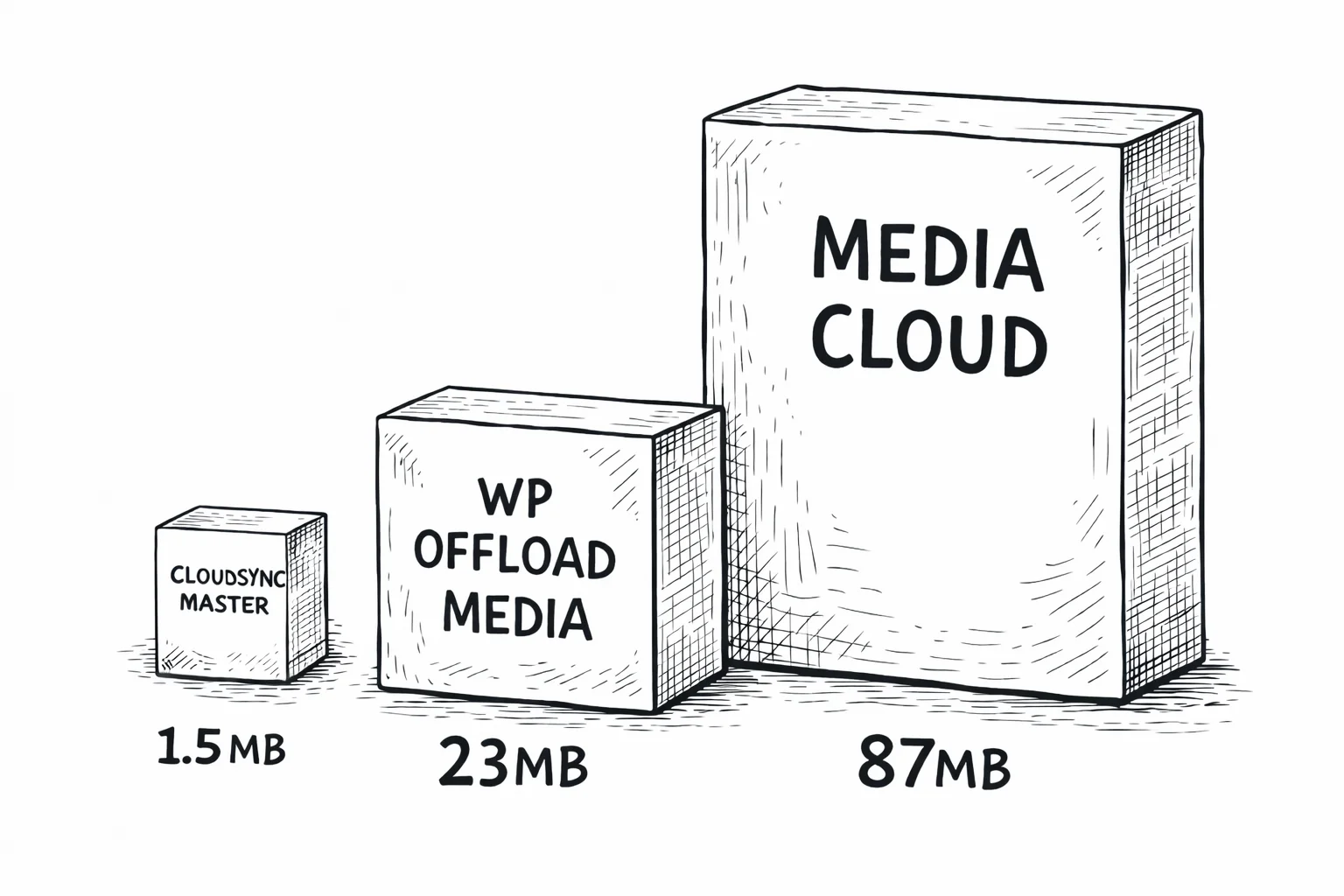
| WP Offload Media | Yes | S3-compatible API | 23 MB | $39–$349/yr | 5K–Unlimited |
| Media Cloud | Yes | S3 + native API | 87 MB | $36–$228/yr | Unlimited |
| WP-Stateless | No (GCS only) | N/A | 10 MB | Free | Unlimited |
WP Offload Media does support DigitalOcean Spaces, but its $39/year tier limits you to 5,000 media items. A WooCommerce store with 1,000 products and 6 images each hits that cap immediately. You’d need the $99/year plan for 40,000 items, or $349/year for unlimited. CloudSync Master Pro is $89/year with no item cap.
Media Cloud also supports Spaces but weighs 87 MB. That’s 58× larger than CloudSync Master. It ships with SDKs for services you’ll never touch.
WP-Stateless is Google Cloud Storage only and doesn’t support any S3-compatible providers.
CloudSync Master connects to Spaces through the S3-compatible API using a custom Signature V4 implementation. No bundled SDKs. The same 1.5 MB plugin handles all 10 providers. For a detailed comparison, see CloudSync Master vs WP Offload Media.
1.5 MB
CloudSync Master
23 MB
WP Offload Media
87 MB
Media Cloud
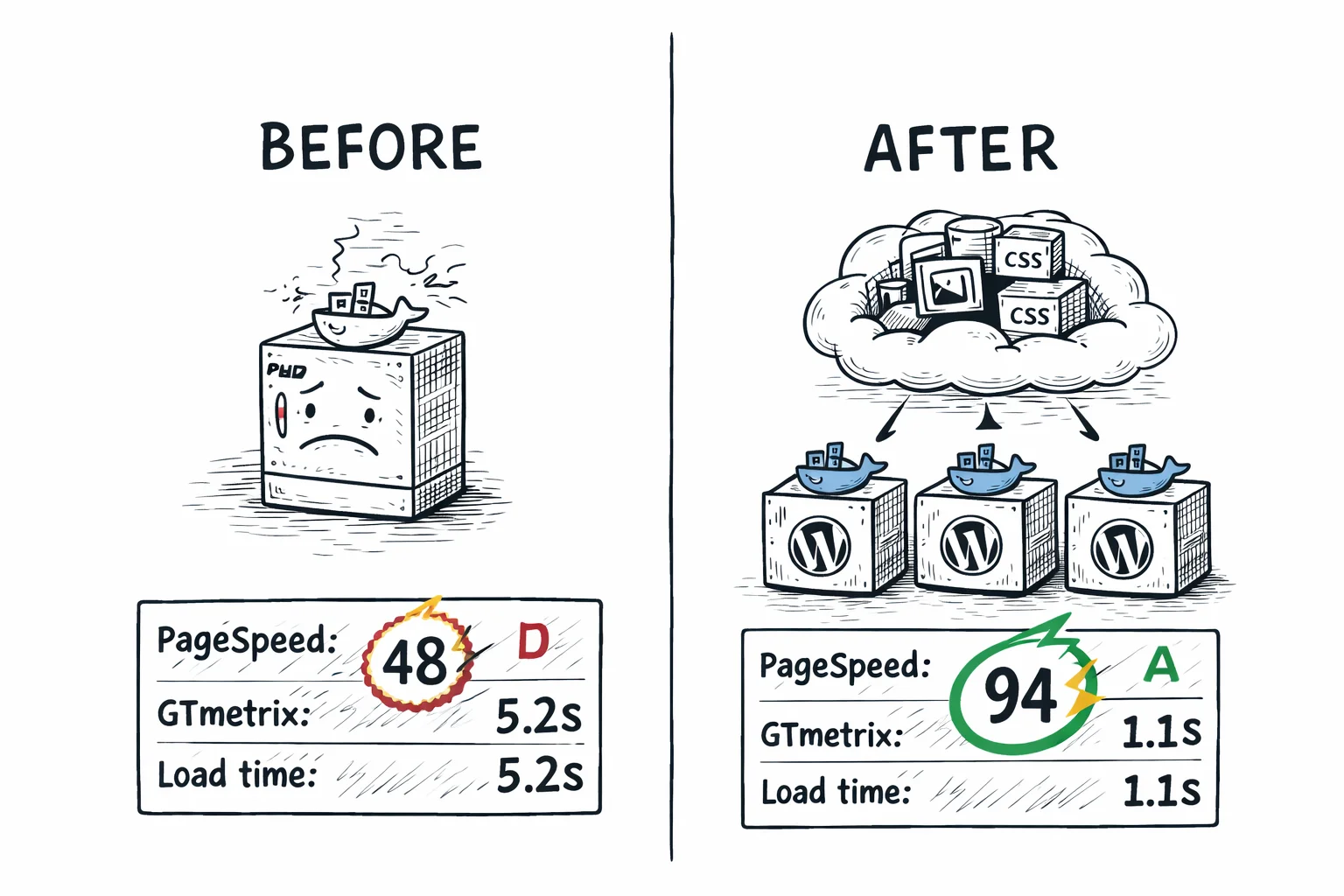
PageSpeed 48 to 94, load time 5.2s to 1.1s — with $5/month DigitalOcean Spaces
A WooCommerce store with 14,000 product images saw these improvements after moving media from local storage to cloud storage with CDN delivery using CloudSync Master Pro.
48 → 94
PageSpeed Score
5.2s → 1.1s
GTmetrix Load Time
8.4 GB → 340 MB
Backup Size
The built-in CDN that delivered those results is free — included in the $5/month base price. No separate CloudFront setup, no DNS changes. Enable the CDN checkbox on your Space and your visitors start getting fast images from DO’s edge network immediately.
Once assets are cached at edge locations, Spaces delivers the same frontend performance as S3 with CloudFront or R2 with a custom domain. The difference is you didn’t spend 30 minutes configuring a separate CDN service to get there. For the detailed performance breakdown with methodology, see the S3 offloading page or R2 offloading page.
DigitalOcean Spaces features that matter for WordPress
Fast global delivery included — no extra CDN bill
Your visitors get fast images globally without you paying for a separate CDN. Enable the Spaces CDN with a single toggle in the DigitalOcean console — no CloudFront distribution, no Cloudflare configuration, no DNS changes. The CDN endpoint looks like yourspace.nyc3.cdn.digitaloceanspaces.com and caches content at DigitalOcean’s edge locations.
With S3, you’d set up CloudFront separately ($0.085/GB for data transfer). With GCS, you’d configure Cloud CDN ($0.02–$0.08/GB). With Spaces, CDN delivery is included in the $5/month fee. For most WordPress sites, this is the simplest path from “I need a CDN” to “my visitors are already getting fast images.” You can also attach a custom domain (like cdn.yoursite.com) to the Spaces CDN for branded URLs.
S3-compatible API — works with every tool you already use
Spaces uses the same S3-compatible API protocol and Signature V4 authentication as Amazon S3. CloudSync Master connects the same way it connects to S3, R2, and B2. You change the endpoint URL and credentials, and everything works. The endpoint format is <region>.digitaloceanspaces.com (for example, nyc3.digitaloceanspaces.com).
Connect in 30 seconds — no IAM roles, no JSON policies
Creating credentials for Spaces takes about 30 seconds. Go to API → Spaces Keys in the DigitalOcean console, click “Generate New Key,” and you get an access key and secret. Done. No IAM users, no JSON policy documents, no role assignments. Compare that to AWS, where you create an IAM user, write a JSON policy, attach it, generate credentials, and hope you scoped it correctly. If you value your time over optimizing every cent, Spaces keeps it simple.
DigitalOcean API and CLI (doctl)
If you manage infrastructure with code, DigitalOcean’s API and doctl CLI handle Spaces alongside droplets, load balancers, and databases. Create a Space, set CORS rules, manage lifecycle policies, and monitor usage from the same tool you use for everything else on DO.
WordPress Multisite support
CloudSync Master Pro works with WordPress Multisite on DigitalOcean Spaces. Each subsite can have its own Space, or you can use a shared Space with per-site path prefixes. Network-level configuration applies to all subsites.
Serve images from the region closest to your customers
DigitalOcean Spaces is available in 9 regions: NYC3 (New York), SFO3 (San Francisco), AMS3 (Amsterdam), SGP1 (Singapore), FRA1 (Frankfurt), SYD1 (Sydney), BLR1 (Bangalore), LON1 (London), and TOR1 (Toronto). That’s fewer than AWS’s 30+ regions, but covers North America, Europe, Asia-Pacific, and Australia. Pick the region closest to your visitors for the lowest origin latency, and the built-in CDN handles delivery to everyone else regardless of where they are.
Simplicity is the feature. No IAM wizards. No pricing calculators. No CDN configuration. Spaces is for people who’d rather spend 5 minutes setting up media offloading and get back to building their site.
How to migrate to or from DigitalOcean Spaces
From another cloud provider to DO Spaces
Already storing media on S3, R2, Backblaze B2, or Google Cloud Storage? Cross-provider migration is available in both Free and Pro.
- Add your Spaces account in CloudSync Master settings.
- Switch the active account to Spaces.
- The plugin starts migrating files automatically in the background.
- During migration, any files not yet transferred are served from your previous provider — zero downtime, no broken images.
- Once all files are migrated, everything is served from Spaces automatically.
There’s no manual migration step and no need to update anything after migration completes. The fallback mechanism means your site stays live throughout the entire process.
From DigitalOcean Spaces to another provider
This is the migration most plugins can’t handle cleanly. Maybe your site outgrew the $5/month tier. Maybe you need R2’s zero egress at higher volumes or B2’s $0.006/GB storage. Add the new provider account in CloudSync Master and switch to it as the active account. The plugin migrates files in the background automatically, falling back to Spaces for anything not yet transferred. Zero downtime, no broken URLs.
From WP Offload Media or Media Cloud
- Install CloudSync Master Pro alongside your existing plugin.
- Use the Import feature to adopt cloud metadata from WP Offload Media, Media Cloud, WP-Stateless, or WP Media Folder Cloud.
- Configure your Spaces connection (or keep the existing one).
- If switching providers, run cross-provider migration.
- Deactivate and remove the old plugin.
Zero downtime. Your files move, your URLs update, and your old plugin’s data is cleanly replaced.
30-day money-back guarantee included.
Who this is for
This plugin is built for:
- DigitalOcean droplet users who want media storage in the same ecosystem as their server. One console and one billing account. If your WordPress site already runs on a DO droplet, Spaces is the most natural media backend.
- Freelancers and agencies who need a number they can put on an invoice. “$5/month for media hosting” is a line item any client understands. No estimating API calls, no end-of-month surprises, no explaining why last month’s cloud bill was $14 instead of $8. S3 and GCS pricing requires a spreadsheet to forecast. Spaces requires a single number.
- Agencies managing multiple client sites on DigitalOcean. Standardize on one lightweight plugin across all deployments. Every client gets the same $5/month Spaces cost, same configuration interface, same support. Predictability scales: 5 clients means $25/month total for media hosting, and you know that number before the month starts.
- WordPress sites under 250 GB that fit in the $5/month base. If your media library is under 250 GB and monthly transfer stays under 1 TB, you’re paying a flat $5 regardless of traffic spikes, crawlers, or seasonal peaks.
This might not be for you if:
- You need the absolute cheapest option at scale. Past 250 GB storage or 1 TB transfer, overage rates add up. Cloudflare R2 (zero egress) and Backblaze B2 ($0.006/GB storage) are cheaper for large libraries.
- You need advanced storage tiers. Spaces has one storage class. No equivalent to S3 Intelligent-Tiering, GCS Autoclass, or S3 Glacier. If you want automatic cost optimization for old, rarely-accessed files, S3 or GCS have those features.
- Your site serves 5+ TB per month in transfer. The overage rate of $0.01/GB past 1 TB means 5 TB of extra transfer adds $40 on top of the $5 base. R2’s zero egress handles that better.
- You don’t use any other DigitalOcean services. Without the ecosystem advantage (same console, same billing, same support), Spaces is just another S3-compatible provider with fewer regions and fewer features than the alternatives.
Free vs Pro: which version do you need?
If you’re testing Spaces or run a small site, start with the free version. For WooCommerce stores, sites with existing media libraries that need bulk upload, or anyone migrating from another plugin or provider, Pro pays for itself through time saved.
| Feature | Free | Pro |
|---|---|---|
| 10 cloud providers | ✓ | ✓ |
| DigitalOcean Spaces support | ✓ | ✓ |
| Auto-upload new media | ✓ | ✓ |
| URL rewriting | ✓ | ✓ |
| Delete local copies | ✓ | ✓ |
| Competitor import (4 plugins) | ✓ | ✓ |
| Cross-provider migration | ✓ | ✓ |
| Import from cloud | ✓ | ✓ |
| Plugin size | 1.5 MB | 1.5 MB |
| Cloud storage accounts | 1 | Unlimited |
| Bulk upload existing library | No | Yes |
| WooCommerce & EDD signed URLs | No | Yes |
| 4 image optimizer integrations | No | Yes |
| Auto WebP/AVIF serving | No | Yes |
| 6 cache plugin integrations | No | Yes |
| CSS/JS offloading | No | Yes |
| Priority support | No | Yes |
| Price | Free | $89/yr |
| Download free | Recommended for production sites |
DO Spaces cost breakdown: what you’ll actually pay
Spaces pricing is the simplest in the industry. There are two numbers to remember.
Spaces pricing (current as of 2026)
| Component | Price | Included in $5/mo base |
|---|---|---|
| Storage | $0.02/GB/month | First 250 GB |
| Outbound transfer | $0.01/GB | First 1 TB/month |
| CDN delivery | $0.00 extra | Included |
| PUT/GET requests | $0.00 extra | Included |
| Uploads (ingress) | Free | Always free |
That’s it. No Class A/B operation tiers. No per-request pricing. No egress vs CDN transfer distinction. Storage and transfer, with generous included amounts, and everything else bundled in. Based on DigitalOcean Spaces pricing.
Real-world monthly costs
Small blog (5 GB, 10K pageviews)
$5.00/mo
Everything fits within the $5 base. Storage is 5 of 250 GB. Transfer is ~12 GB of 1 TB. On R2, this might cost $0.00 within R2’s free tier.
Mid-size WooCommerce (50 GB, 100K pageviews)
$5.00/mo
Storage is 50 of 250 GB. Transfer is ~120 GB of 1 TB. Still within the base. On S3, this costs $12.19.
Large catalog site (200 GB, 200K pageviews)
$5.00/mo
Storage is 200 of 250 GB. Transfer is ~240 GB of 1 TB. Still within the base. S3 would cost ~$28/month.
Very large site (500 GB, 500K pageviews)
$10.00/mo
250 GB over the included amount at $0.02/GB = $5 extra. Transfer within 1 TB base. R2 would cost ~$3.50/month at this scale.
The value: predictable pricing under 250 GB
$60/year flat
For anything under 250 GB storage and 1 TB monthly transfer — that covers the majority of WordPress sites. No surprise bills.
Simple, transparent pricing
No per-item limits. No hidden fees. Start free, upgrade when you’re ready. DigitalOcean’s Spaces pricing is already simple. Your WordPress plugin shouldn’t complicate it.
Free
$0
Available on WordPress.org
- ✅ All 10 cloud providers (1 account)
- ✅ Auto-upload new media
- ✅ URL rewriting to cloud/CDN
- ✅ Delete local after upload
- ✅ Competitor import (4 plugins)
- ✅ Cross-provider migration
- ❌ Bulk upload existing media
- ❌ WooCommerce & EDD signed URLs
- ❌ CSS/JS offloading
- ❌ Auto WebP/AVIF
Pro Monthly
$19/month
Cancel anytime
- ✅ Everything in Free
- ✅ Bulk upload existing media
- ✅ WooCommerce & EDD signed URLs
- ✅ Auto WebP/AVIF serving
- ✅ CSS/JS offloading
- ✅ Priority support
Pro — 1 Site
$89/year
Unlimited media items
- ✅ Everything in Free
- ✅ Bulk upload existing media
- ✅ WooCommerce & EDD signed URLs
- ✅ CSS/JS offloading
- ✅ 4 image optimizer integrations
- ✅ Auto WebP/AVIF serving
- ✅ 6 cache plugin integrations
- ✅ Cross-provider migration
- ✅ Priority support
MOST POPULAR
Pro — 3 Sites
$199/year
$66/site/year — save 25%
- ✅ Everything in Pro
- ✅ 3 WordPress sites
- ✅ Centralized license
- ✅ Ideal for freelancers
Step-by-step setup tutorial
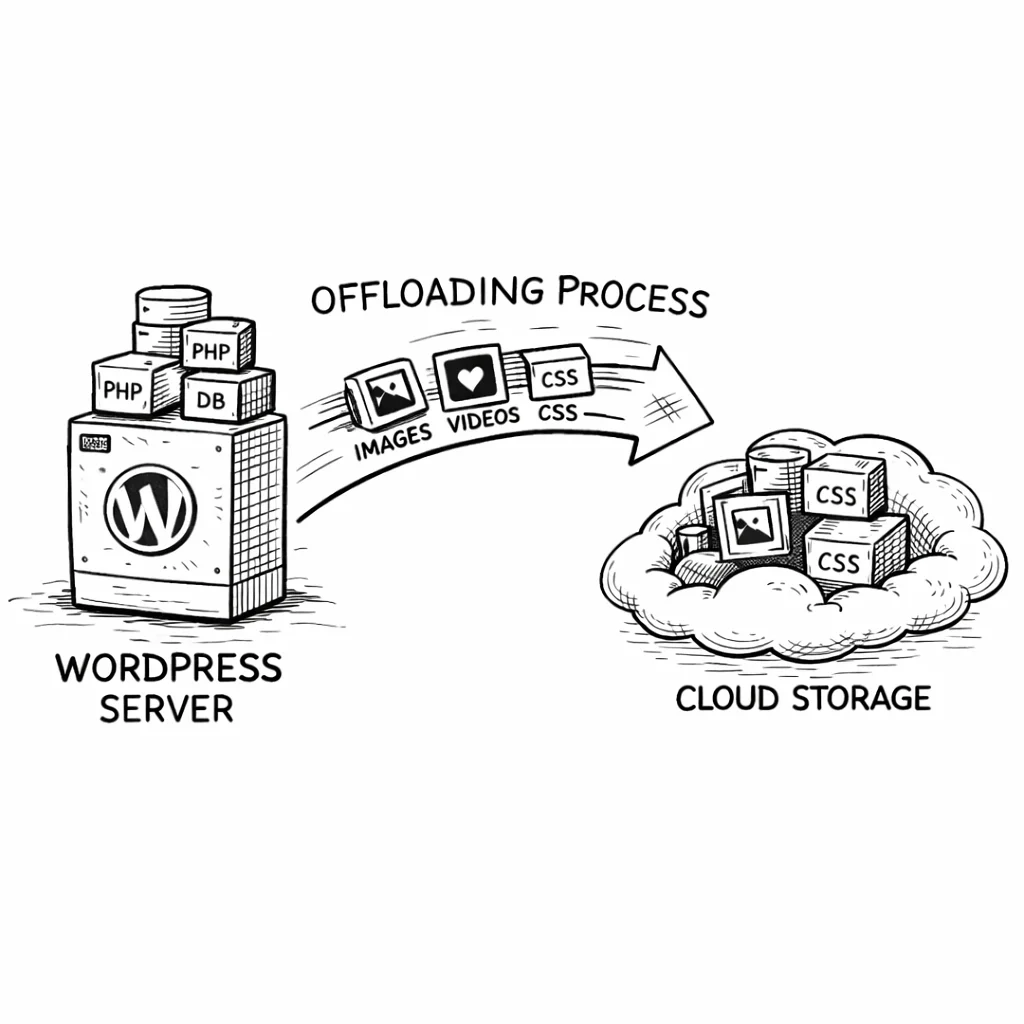
Scale WordPress without scaling your cloud bill — DigitalOcean Spaces
For multi-server WordPress setups, Spaces provides the same storage-compute separation as S3 or R2: media lives outside your server, so adding more servers doesn’t create sync problems.
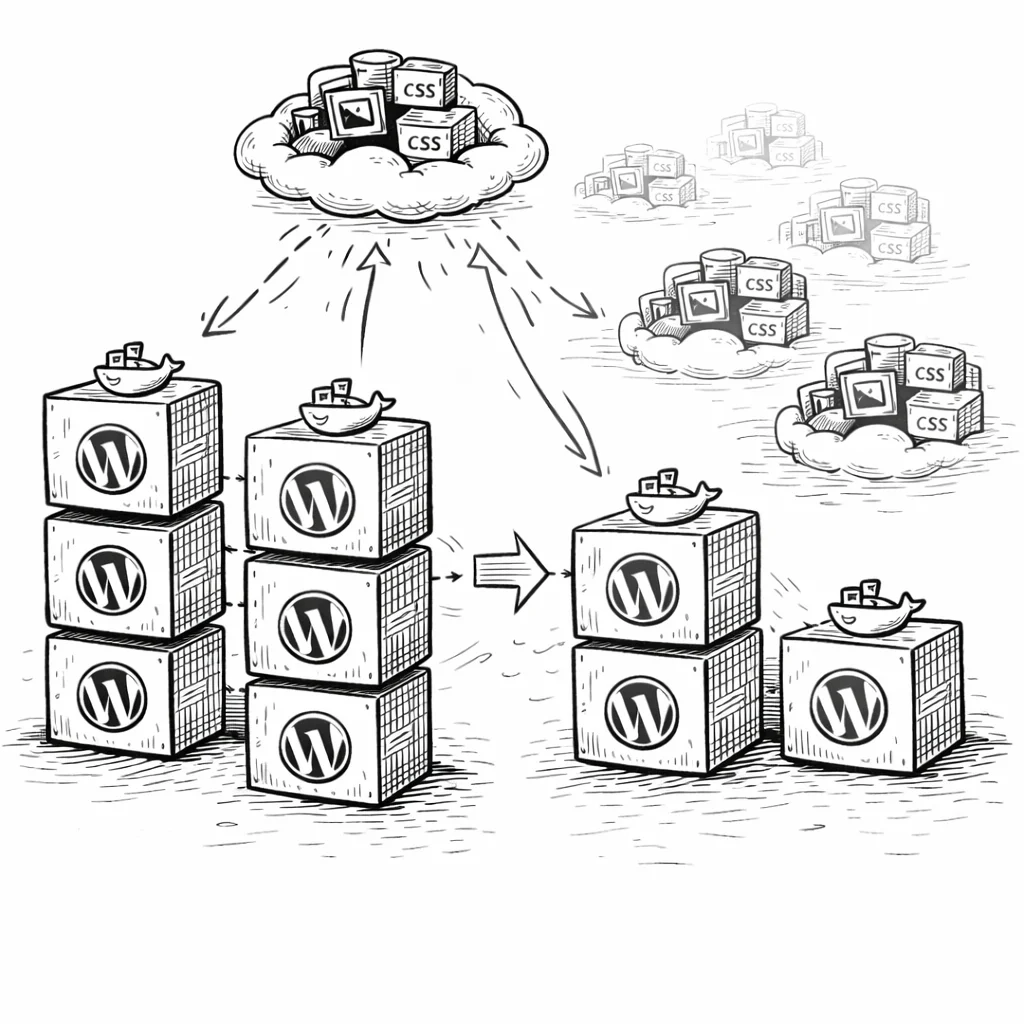
Load-balanced environments
Two or more WordPress droplets behind a DigitalOcean Load Balancer all read from and write to the same Space. No rsync scripts and no NFS mounts to maintain. Spin up a new droplet, install the plugin, and media is immediately available because state lives in the shared database and Spaces.
If you’re using DigitalOcean’s managed databases for MySQL, you already have a shared database. Adding Spaces for shared media storage completes the picture: your WordPress deployment is fully stateless at the application layer.
Budget predictability for growing sites — and the agencies behind them
The flat $5/month rate makes capacity planning simple. Your Spaces bill doesn’t fluctuate with traffic spikes, crawler activity, or seasonal peaks (as long as you’re within the 250 GB / 1 TB limits). For agencies billing clients monthly, this is the difference between “your cloud costs were $14.37 this month” and “$5/month, every month, like we agreed.” A number you can put on an invoice. A number the client never questions.
Why store owners trust CloudSync Master
Built by 1TeamSoftware, developers of enterprise WordPress and WooCommerce solutions used by thousands of store owners. CloudSync Master is available on WordPress.org and follows the same standard plugin review process as every listed plugin.
Every paid license includes a 30-day money-back guarantee, priority support, and ongoing updates. The plugin is tested up to WordPress 6.7 and works with WooCommerce, Multisite, and all major hosting providers.
If it doesn’t work for your setup, you get your money back. No questions.
Frequently asked questions
Common questions about DigitalOcean Spaces and WordPress media offloading.
Spaces is a solid choice for WordPress media, especially if you already use DigitalOcean. The $5/month flat rate covers 250 GB of storage and 1 TB of transfer with a built-in CDN. For small-to-medium WordPress sites, that’s everything you need in one predictable line item. The S3-compatible API means any plugin that supports S3-compatible storage can connect to Spaces. The main limitation is fewer regions (9 vs 30+ on AWS) and no storage tiers for cost optimization on large, aging media libraries.
$5/month flat gets you 250 GB storage and 1 TB outbound transfer. Additional storage is $0.02/GB/month and additional transfer is $0.01/GB. A WordPress site with 50 GB of media and 100K pageviews per month fits entirely within the $5 base. There are no per-request fees and the built-in CDN is included. Check the official Spaces pricing page for the latest rates.
Yes. The CDN is built in and included at no extra cost. Enable it with a single toggle in the DigitalOcean console. The CDN caches content at DigitalOcean’s edge locations and serves it from the location nearest to each visitor. You can also attach a custom domain to the CDN endpoint for branded URLs. With S3, you’d pay separately for CloudFront. With GCS, you’d pay separately for Cloud CDN. Spaces bundles it.
Spaces is simpler and cheaper for small-to-medium sites. $5/month flat vs. S3’s variable pricing that depends on storage, requests, and egress. S3 wins on features: 30+ regions, storage classes (Glacier, Intelligent-Tiering), granular IAM policies, lifecycle rules, and deep integration with the AWS ecosystem. For a WordPress site under 250 GB that just needs to offload images with CDN delivery, Spaces does the job at a fixed cost. For enterprise deployments with compliance requirements and complex access controls, S3 is the better fit.
Yes. CloudSync Master Pro offloads WooCommerce product images, gallery images, and downloadable files to Spaces. For digital products, the Pro version generates time-limited signed URLs so customers can download purchases without exposing direct file links. The free version handles product image offloading. The Pro version adds WooCommerce-specific features like signed download URLs and image optimizer integrations for WebP/AVIF product images.
Spaces is available in NYC3 (New York), SFO3 (San Francisco), AMS3 (Amsterdam), SGP1 (Singapore), FRA1 (Frankfurt), SYD1 (Sydney), BLR1 (Bangalore), LON1 (London), and TOR1 (Toronto). Pick the region closest to your visitors for lowest origin latency. The built-in CDN caches content at edge locations globally, so origin region matters less once the CDN is enabled. If you need coverage in regions DO doesn’t offer (like South America or the Middle East), S3 or GCS have broader regional availability.
CloudSync Master uses the S3-compatible API with Signature V4 authentication. The endpoint format is <region>.digitaloceanspaces.com (for example, nyc3.digitaloceanspaces.com). You enter your Spaces access key, secret key, bucket name, and region in the plugin settings. The plugin sends the same authenticated requests it sends to S3, R2, and B2. No DigitalOcean-specific SDK is bundled. The entire plugin is 1.5 MB.
Yes. Add your Spaces account in CloudSync Master and switch to it as the active account. The plugin migrates files in the background automatically and falls back to the old provider for anything not yet transferred, so your site never goes down. Once migration completes, everything serves from Spaces automatically. You can also migrate in the other direction — from Spaces to S3, R2, or B2 — using the same approach. Available in both Free and Pro.
Yes. Spaces implements the S3 API with Signature V4 authentication. Tools, libraries, and plugins built for Amazon S3 work with Spaces by changing the endpoint URL and credentials. CloudSync Master uses this compatibility to treat Spaces identically to S3, R2, and other S3-compatible providers. The Spaces documentation lists supported S3 API operations.
Yes. After enabling the CDN on your Space, enter the CDN endpoint URL (like https://yourspace.nyc3.cdn.digitaloceanspaces.com or your custom domain) in the CloudSync Master CDN URL setting. The plugin rewrites all media URLs to use that CDN domain. Visitors get images from the nearest CDN edge location instead of hitting the Spaces origin directly.
A single Space can store an unlimited number of objects. Individual file uploads are capped at 5 GB through a single PUT request, but the S3-compatible multipart upload API supports files up to 5 TB. CloudSync Master uses standard single-part uploads, which is more than enough for WordPress media files. Most images are under 10 MB and most videos under 1 GB. If you need to store very large files (video archives, database dumps), upload them through doctl or an S3-compatible CLI that handles multipart uploads automatically.
Stop estimating cloud costs — start offloading to DigitalOcean Spaces
Stop estimating cloud costs. Stop worrying about traffic spikes blowing your budget. $5/month, every month. 250 GB storage, 1 TB transfer, built-in CDN, no per-request fees. Start today — it takes 5 minutes.
CloudSync Master Pro connects WordPress to Spaces in a 1.5 MB plugin with no item limits and support for 9 other providers. Start free on WordPress.org, and if you outgrow Spaces or need a different provider for a specific project, migrate to S3, R2, Backblaze B2, or Google Cloud Storage without re-uploading anything.
30-day money-back guarantee included. All paid plans include plugin updates and priority support. Tested up to WordPress 6.7.
See how CloudSync Master works with Amazon S3 | Cloudflare R2 | Backblaze B2 | Google Cloud Storage