
FOR WOOCOMMERCE STORES & MEDIA-HEAVY WORDPRESS SITES
Keep your WordPress media in Google’s ecosystem — without getting locked into a single-provider plugin
Simple Google Cloud setup. One-click OAuth in Pro. No vendor lock-in. Autoclass cuts storage costs automatically.
All 10 cloud providers free • No credit card required
TL;DR
If your team already lives in Google Cloud, GCS is the natural home for your WordPress media. One-click OAuth setup in Pro, Autoclass that cuts storage costs 30-50% without manual rules, and multi-regional buckets that survive entire data center outages. The catch with other GCS plugins? They lock you in. CloudSync Master Pro gives you first-class GCS support in a 1.5 MB plugin — and lets you migrate to S3, R2, or B2 tomorrow without re-uploading a single file. Start free on WordPress.org, upgrade to Pro ($89/yr) for bulk upload, WooCommerce signed URLs, and configurable performance settings.
You chose Google Cloud for a reason — but the only GCS plugin locked you in permanently
You chose Google Cloud for a reason. Your team knows the console. Your infrastructure runs there. Your billing, IAM, and monitoring all live in one place. Keeping your WordPress media in GCS means one less vendor, one less dashboard, one less set of credentials to manage.
But the only WordPress plugin that fully supported Google Cloud Storage — WP-Stateless — came with a trap. It locked you into a single provider with no exit plan. If Google changes pricing (they’ve done it before), if your hosting moves off GCP, or if a client needs a different provider, you’re starting from scratch. New plugin, new setup, re-uploading everything.
Agencies managing 20+ WordPress sites can’t standardize on WP-Stateless because half their clients aren’t on Google. Developers building sites that might change hands need flexibility baked in from day one.
CloudSync Master Pro supports GCS with the same first-class integration, but it also supports S3, R2, B2, DigitalOcean Spaces, MinIO, Wasabi, and any S3-compatible endpoint. If you need to move providers next year, you migrate through the plugin without re-uploading a single file.
The real cost of Google Cloud Storage — and why it’s worth it when you’re already on Google
Let’s be upfront: Google Cloud Storage is not the cheapest option per GB. But raw price-per-GB misses the point when your infrastructure is already on Google. Here are the real numbers for a mid-size WordPress site: 50 GB of media, 100,000 monthly pageviews, 6 images per page at 200 KB average. Based on GCS pricing, S3 pricing, and R2 pricing.
Monthly cost comparison
| Cost component | Amazon S3 | Cloudflare R2 | Google Cloud Storage |
|---|---|---|---|
| Storage (50 GB) | $1.15 ($0.023/GB) | $0.75 ($0.015/GB) | $1.00 ($0.020/GB) |
| Write ops (500/mo) | $0.003 | $0.002 | $0.003 |
| Read ops (600K/mo) | $0.24 | $0.22 | $0.24 |
| Egress (120 GB) | $10.80 ($0.09/GB) | $0.00 | $14.40 ($0.12/GB) |
| Monthly total | $12.19 | $0.97 | $15.64 |
| Annual total | $146.28 | $11.64 | $187.68 |
Yes, GCS costs more per GB. But here’s what the raw numbers don’t show:
Autoclass erases the storage gap. That $1.00/month storage cost? With Autoclass, it drops to ~$0.50/month as older images automatically shift to cheaper tiers. S3’s Intelligent-Tiering requires manual setup and has a per-object monitoring fee. R2 and B2 have no equivalent.
Cloud CDN shrinks the egress gap. CDN cache hits don’t incur GCS egress. With an 80%+ cache hit ratio, that $14.40 egress drops to under $3. And if you’re already running Cloud CDN for your application, adding media delivery is incremental — not a new line item.
Total cost of ownership matters more than per-GB price. When your WordPress runs on GCE or GKE, server-to-GCS transfers are free within the same region. Your ops team already knows Cloud Console. You’re not onboarding a new vendor, managing separate billing, or learning a different IAM system. That operational simplicity has real value that doesn’t show up in a cost table.
At different scales
| Scenario | Amazon S3/yr | Cloudflare R2/yr | GCS/yr | GCS + Autoclass + CDN/yr |
|---|---|---|---|---|
| 10 GB, 50K views/mo | ~$72 | ~$5 | ~$90 | ~$38 |
| 50 GB, 100K views/mo | ~$146 | ~$12 | ~$188 | ~$72 |
| 200 GB, 200K views/mo | ~$340 | ~$42 | ~$440 | ~$145 |
With Autoclass and Cloud CDN, GCS becomes competitive with S3 — and you get the ecosystem integration S3 can’t match on Google’s platform. If cost is your only concern, Cloudflare R2 or Backblaze B2 will save you more. But if you’re already paying for Google Cloud, adding a separate storage vendor creates complexity that costs more than the per-GB difference.
Google Cloud Storage WordPress plugin options compared
Here’s where each WordPress cloud storage plugin stands on GCS support:
| Plugin | GCS Support | How | Plugin Size | Price | Item Limits |
|---|---|---|---|---|---|
| CloudSync Master Pro | Yes | S3-compatible XML API | 1.5 MB | $89/yr | Unlimited |
| CloudSync Master Free | Yes | S3-compatible XML API | 1.5 MB | Free | Unlimited |
| WP-Stateless | Yes | Native JSON API | 10 MB | Free | Unlimited |
| Media Cloud | Yes | Native + S3 API | 87 MB | $36–$228/yr | Unlimited |
| WP Offload Media | Yes | Native API | 23 MB | $39–$349/yr | 5K–Unlimited |
WP-Stateless is the established GCS plugin, but it only supports Google Cloud Storage. No S3, no R2, no B2. If you ever need to change providers, you’re rebuilding from scratch.
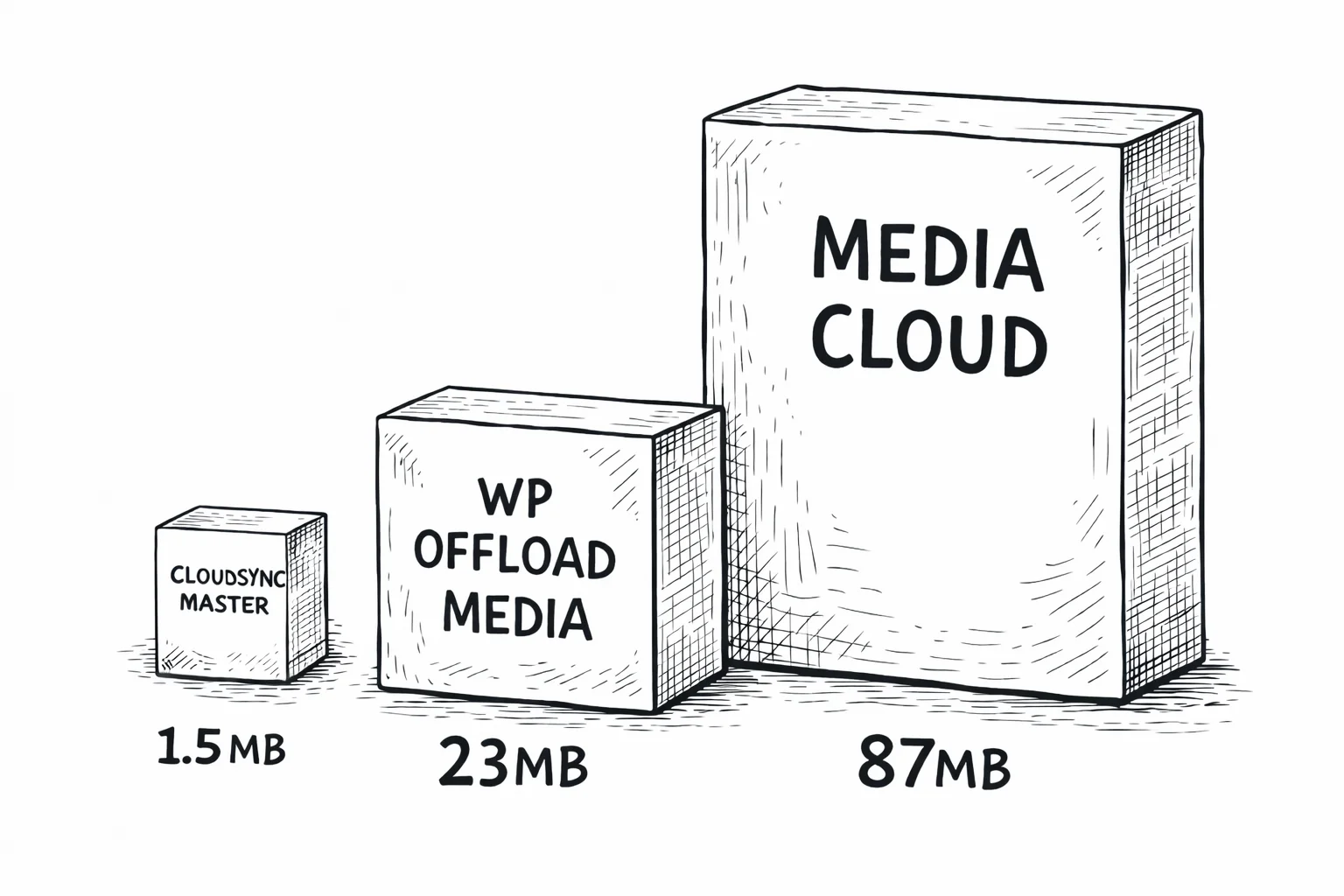
WP Offload Media supports GCS but doesn’t support R2, B2, or most S3-compatible providers. It’s 23 MB and charges per media item on lower tiers. Media Cloud supports GCS but at 87 MB, it’s 58× larger than CloudSync Master.
CloudSync Master Pro connects to GCS through the S3-compatible XML API using a custom Signature V4 implementation. Same 1.5 MB plugin, same protocol it uses for S3, R2, and every other provider. No bundled Google SDK. For a detailed comparison, see CloudSync Master vs WP Offload Media.
1.5 MB
CloudSync Master
23 MB
WP Offload Media
87 MB
Media Cloud
Performance after offloading to GCS
A WooCommerce store with 14,000 product images saw these improvements after moving media from local storage to cloud storage with CDN delivery using CloudSync Master Pro.
48 → 94
PageSpeed Score
5.2s → 1.1s
GTmetrix Load Time
8.4 GB → 340 MB
Backup Size
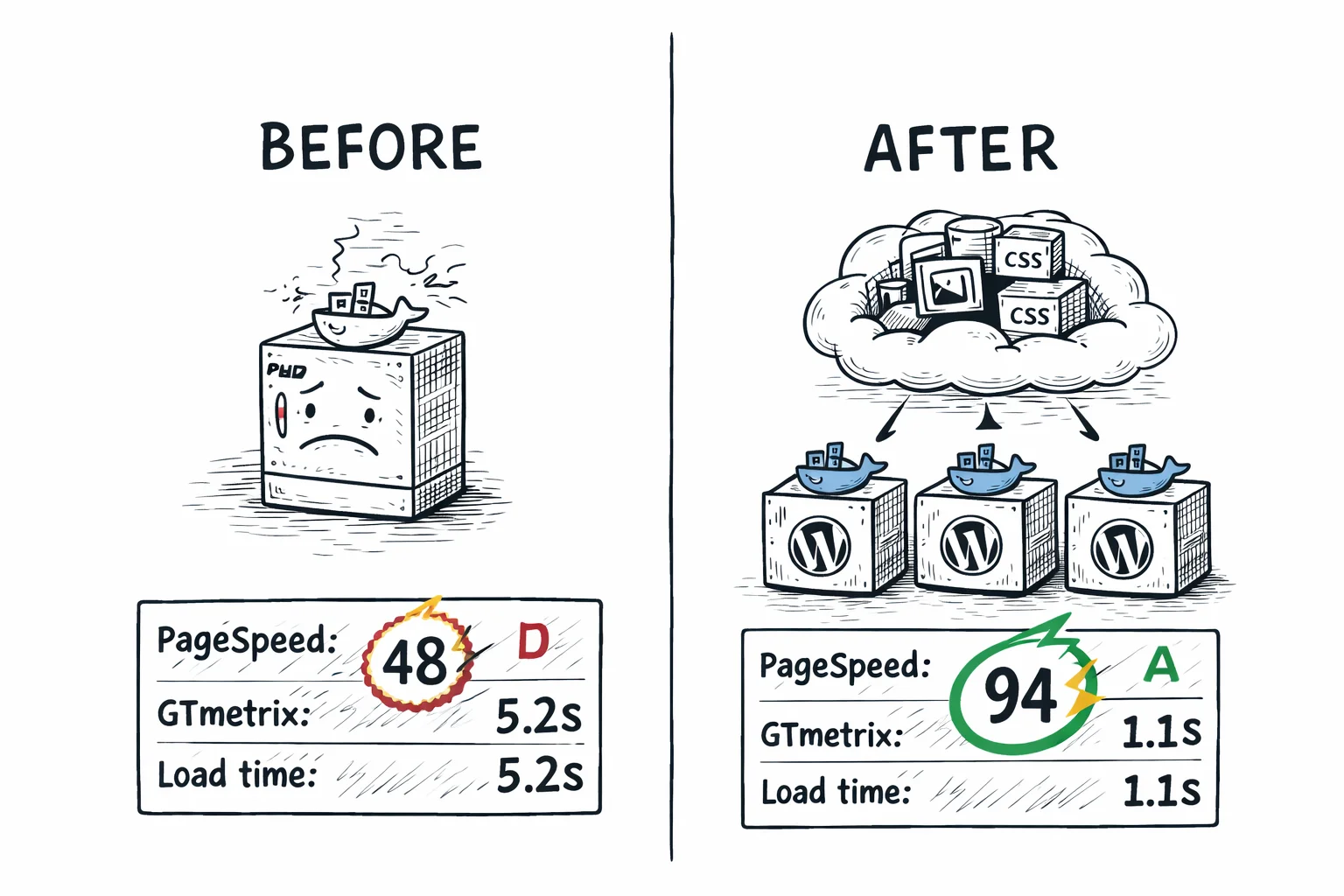
Moving media off your WordPress server to Google Cloud Storage with CDN delivery produces the same performance gains as any cloud provider. The CDN cache determines what visitors experience, not the origin storage.
The backup size reduction is especially relevant for GCS users. When your media lives in Google Cloud Storage (which provides 99.999999999% durability across multi-regional buckets), your WordPress backups only need to cover the database and theme files. For the detailed performance methodology, see the S3 offloading page or R2 offloading page.
How to migrate to GCS or from WP-Stateless
From WP-Stateless to CloudSync Master (staying on GCS)
This is the most common migration for GCS users. You’re happy with Google Cloud Storage but want multi-provider support.
- Install CloudSync Master Pro alongside WP-Stateless.
- Use the Import feature to adopt existing cloud metadata from WP-Stateless.
- Configure your GCS connection in CloudSync Master (same bucket, same credentials).
- Verify URLs are rewriting correctly.
- Deactivate and remove WP-Stateless.
Your files stay in the same GCS bucket. Nothing gets re-uploaded. The plugin simply takes over URL rewriting and media management using the metadata imported from WP-Stateless.
From another cloud provider to GCS
- Add your GCS account in CloudSync Master settings.
- Switch the active account to GCS.
- The plugin starts migrating files automatically in the background.
- During migration, any files not yet transferred are served from your previous provider — zero downtime, no broken images.
- Once all files are migrated, everything is served from GCS automatically.
There’s no manual migration step and no need to update anything after migration completes. The fallback mechanism means your site stays live throughout the entire process.
From GCS to another provider
This is the migration WP-Stateless can’t do. Add the new provider account in CloudSync Master and switch to it as the active account. The plugin migrates files in the background automatically, falling back to GCS for anything not yet transferred. Zero downtime, no broken image links.
30-day money-back guarantee included.
Who this is for
This plugin is built for:
- WordPress sites hosted on Google Cloud Platform. If you’re running on GCP (through Google Cloud, Kinsta, or another GCP-based host), using GCS for media keeps everything in one ecosystem with low-latency internal networking.
- Agencies on Google Workspace and GCP. If your team already lives in Google’s ecosystem with billing, IAM, and monitoring set up, adding GCS storage is a natural extension. No new vendor relationships needed.
- WP-Stateless users who want a migration safety net. Keep using GCS today, but have the option to move to S3, R2, or B2 tomorrow without rebuilding your media pipeline.
- Sites needing multi-regional availability. GCS multi-regional buckets replicate across continents automatically. For global WordPress sites that need the highest availability guarantees, this matters.
- APAC-focused businesses. Google has strong regional presence in markets like Japan, Singapore, Sydney, and Mumbai where AWS coverage is thinner or more expensive.
This might not be for you if:
- Your primary concern is cost and you’re not already on Google Cloud. Without the ecosystem integration, GCS egress at $0.12/GB is the most expensive among major providers. Cloudflare R2 (zero egress) or Backblaze B2 ($0.006/GB storage) will save you more money.
- You have fewer than 100 images and minimal traffic. At that scale, cloud offloading adds complexity without meaningful benefit.
- You don’t use any other Google Cloud services. Without the ecosystem advantage, GCS is just expensive S3.
- You need the simplest possible billing. GCS pricing has more variables than R2 or B2 (storage classes, network service tiers, regional vs multi-regional, egress tiers). If you want a straightforward bill, R2 is simpler.
GCS features that save you time and money
Save 30-50% on storage automatically — without touching a single setting
This is the GCS feature most relevant to media-heavy WordPress sites. Autoclass monitors how often each object is accessed and automatically moves it between storage classes: Standard ($0.026/GB) for frequently accessed files, Nearline ($0.015/GB) for files accessed less than once a month, and Coldline ($0.007/GB) for files accessed less than once a quarter.
The transitions happen automatically. You don’t set lifecycle rules or guess which files are “hot” vs “cold.” For a WooCommerce store with 200 GB of media where only 30% is actively accessed, Autoclass could cut effective storage cost from $5.20/month to around $2.80/month. S3 has Intelligent-Tiering (similar concept, more complex setup). R2 and B2 have no equivalent.
Your images survive entire data center outages
GCS multi-regional buckets replicate across multiple geographic regions automatically. A “US” multi-regional bucket stores copies across at least two US regions. If an entire data center goes offline, your media is still accessible from another region. Combined with Cloud CDN, you get geographic redundancy at the origin and edge caching at 100+ points of presence.
Visitors worldwide get images in under 100ms
Cloud CDN integrates directly with GCS buckets. CDN cache hits don’t incur GCS egress charges, so the more traffic your site gets, the less you pay in raw GCS egress. Cloud CDN pricing ($0.02–$0.08/GB depending on region) is cheaper than standard GCS egress ($0.12/GB) and provides edge caching latency benefits.
Works with every S3 tool you already use
GCS provides an S3-compatible XML API alongside its native JSON API. The XML API supports Signature V4 authentication, which means tools built for S3 work with GCS by changing the endpoint to storage.googleapis.com. This is how CloudSync Master connects: the same Signature V4 implementation for GCS, S3, R2, and B2. One protocol, 10 providers.
One dashboard for everything — Google Cloud Console
Google Cloud Console has a cleaner interface than the AWS or Azure dashboards. Storage Browser lets you navigate buckets visually, upload files with drag and drop, and set permissions without writing JSON policy documents. If your team already manages infrastructure through Cloud Console, your WordPress media lives in the same place as everything else.
WordPress Multisite support
CloudSync Master Pro works with WordPress Multisite on GCS. Each subsite can have its own bucket, or you can use a shared bucket with per-site path prefixes. Network-level configuration applies to all subsites.
Free vs Pro: which version do you need?
If you’re testing GCS or running a small site within the free tier (5 GB Standard storage), start with the free version. For WooCommerce stores, sites with existing media libraries that need bulk upload, or anyone migrating from WP-Stateless to gain multi-provider flexibility, Pro pays for itself through time saved.
| Feature | Free | Pro |
|---|---|---|
| 10 cloud providers | ✓ | ✓ |
| Google Cloud Storage support | ✓ | ✓ |
| Auto-upload new media | ✓ | ✓ |
| URL rewriting | ✓ | ✓ |
| Delete local copies | ✓ | ✓ |
| Competitor import (4 plugins) | ✓ | ✓ |
| Cross-provider migration | ✓ | ✓ |
| Import from cloud | ✓ | ✓ |
| Plugin size | 1.5 MB | 1.5 MB |
| Cloud storage accounts | 1 | Unlimited |
| Bulk upload existing library | No | Yes |
| WooCommerce & EDD signed URLs | No | Yes |
| 4 image optimizer integrations | No | Yes |
| Auto WebP/AVIF serving | No | Yes |
| 6 cache plugin integrations | No | Yes |
| CSS/JS offloading | No | Yes |
| Priority support | No | Yes |
| Price | Free | $89/yr |
| Download free | Recommended for production sites |
GCS cost breakdown: what you’ll actually pay
GCS pricing has more moving parts than R2 or B2. Here’s the honest breakdown — and how Autoclass and Cloud CDN change the math.
GCS pricing (as of 2026)
| Component | Price | Free Tier |
|---|---|---|
| Standard storage | $0.020/GB/month (US multi-region) | 5 GB/month (Always Free) |
| Nearline storage | $0.010/GB/month | — |
| Coldline storage | $0.004/GB/month | — |
| Class A ops (writes) | $0.005/1,000 | 5,000/month (Always Free) |
| Class B ops (reads) | $0.004/10,000 | 50,000/month (Always Free) |
| Egress (0–1 TB) | $0.12/GB | 1 GB/month (Always Free) |
| Egress (1–10 TB) | $0.11/GB | — |
| Egress (10 TB+) | $0.08/GB | — |
| Uploads (ingress) | Free | Always free |
Google’s Always Free tier includes 5 GB of Standard storage, 5,000 Class A operations, and 50,000 Class B operations per month. Unlike AWS’s 12-month free tier, Google’s Always Free tier doesn’t expire.
Real-world monthly costs: before and after optimization
Small blog (5 GB, 10K pageviews)
~$1.45/mo
Without optimization. With Cloud CDN (80% cache hit ratio), egress drops to ~$0.29 plus CDN fees.
Mid-size WooCommerce (50 GB, 100K pageviews)
$15.64 → ~$6/mo
With Autoclass + Cloud CDN: storage drops to ~$0.70, egress drops with CDN caching. Operational simplicity included.
Large catalog site (200 GB, 500K pageviews)
$75.70 → ~$25-30/mo
With Autoclass + Cloud CDN: storage from $5.20 to ~$2.80, CDN eliminates 80%+ of egress costs.
Same 200 GB scenario on R2
~$2.59/mo
GCS costs more even with optimization. The question: is one console, one billing, one IAM worth the difference?
The bottom line: total cost of ownership
Autoclass + Cloud CDN
GCS may cost more per GB, but when you’re already on Google Cloud you save on operations time, vendor management, and infrastructure complexity. One console for everything.
Simple, transparent pricing
No per-item limits. No hidden fees. Start free, upgrade when you’re ready. Google Cloud pricing is complex enough on its own. Your WordPress plugin shouldn’t add to that complexity.
Free
$0
Available on WordPress.org
- ✅ All 10 cloud providers (1 account)
- ✅ Auto-upload new media
- ✅ URL rewriting to cloud/CDN
- ✅ Delete local after upload
- ✅ Competitor import (4 plugins)
- ✅ Cross-provider migration
- ❌ Bulk upload existing media
- ❌ WooCommerce & EDD signed URLs
- ❌ CSS/JS offloading
- ❌ Auto WebP/AVIF
Pro Monthly
$19/month
Cancel anytime
- ✅ Everything in Free
- ✅ Bulk upload existing media
- ✅ WooCommerce & EDD signed URLs
- ✅ Auto WebP/AVIF serving
- ✅ CSS/JS offloading
- ✅ Priority support
Pro: 1 Site
$89/year
Unlimited media items
- ✅ Everything in Free
- ✅ Bulk upload existing media
- ✅ WooCommerce & EDD signed URLs
- ✅ CSS/JS offloading
- ✅ 4 image optimizer integrations
- ✅ Auto WebP/AVIF serving
- ✅ 6 cache plugin integrations
- ✅ Cross-provider migration
- ✅ Priority support
MOST POPULAR
Pro: 3 Sites
$199/year
$66/site/year, save 25%
- ✅ Everything in Pro
- ✅ 3 WordPress sites
- ✅ Centralized license
- ✅ Ideal for freelancers
Step-by-step setup tutorial
Why Google Cloud Storage makes sense for WordPress
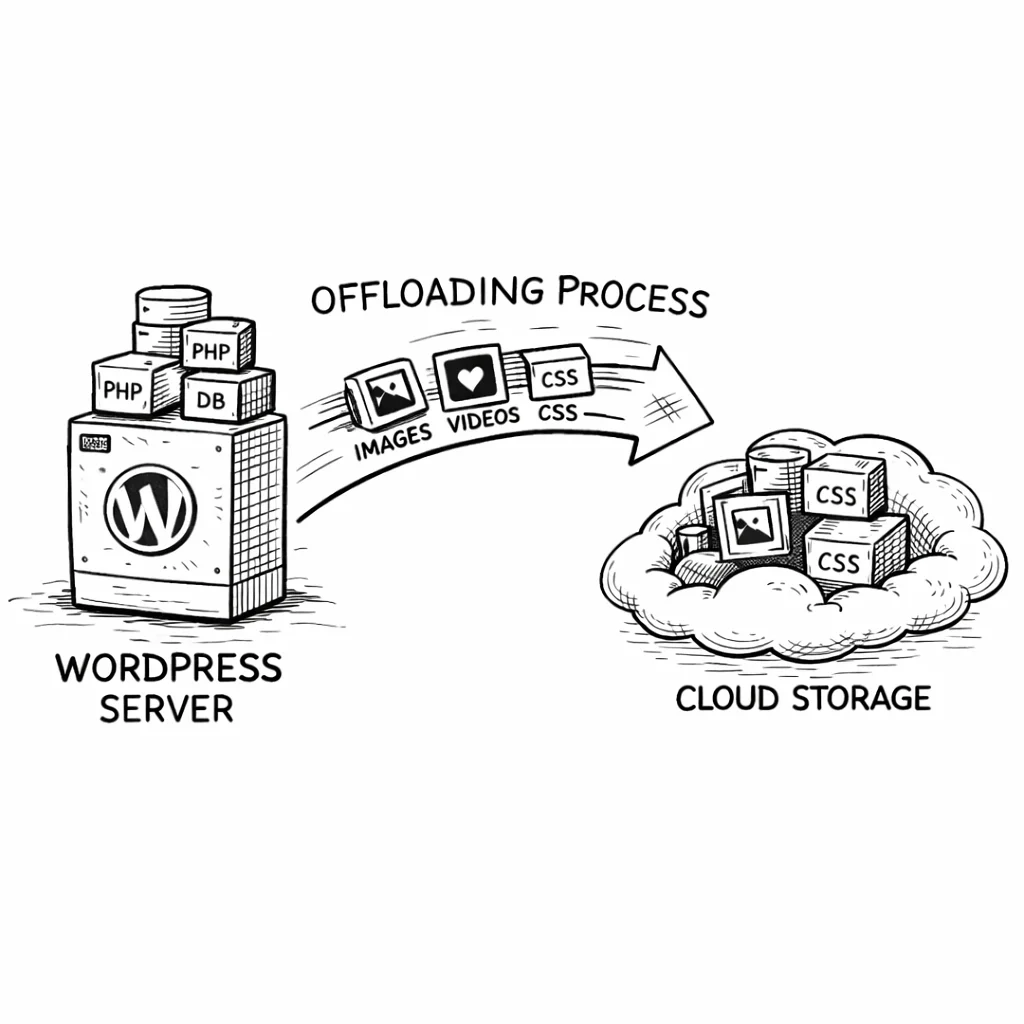
GCS isn’t the cheapest storage provider. The value proposition is different from R2 (zero egress) or B2 (cheapest storage). GCS makes sense when your infrastructure is already in Google’s ecosystem and you want one console, one billing account, and one set of IAM policies.
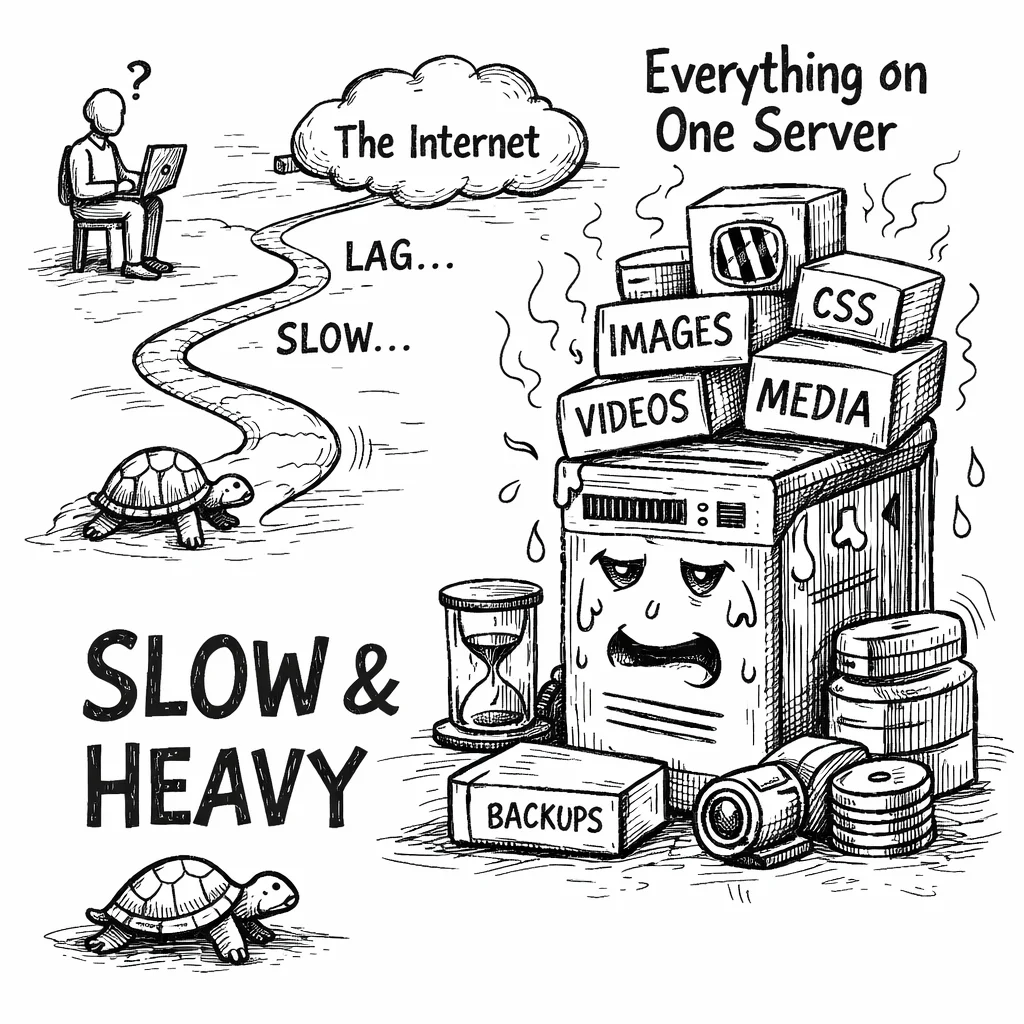
The ecosystem argument: If your WordPress site runs on Google Compute Engine, Google Kubernetes Engine, or a GCP-based managed host like Kinsta, your server-to-GCS data transfer is free within the same region. Uploads from your WordPress server to GCS cost nothing in network fees.
The Autoclass argument: No other provider automatically optimizes storage costs at the object level the way Autoclass does. For a WordPress site running for 5 years, the majority of images are attached to old content that gets minimal traffic. Autoclass tiers those images down without manual intervention.
The S3 compatibility argument: GCS speaks S3’s protocol through the XML API. CloudSync Master connects the same way it connects to S3, R2, and B2. Backup tools, CLI scripts, and third-party integrations that work with S3 work with GCS’s interoperability endpoint.
Scaling WordPress with GCS
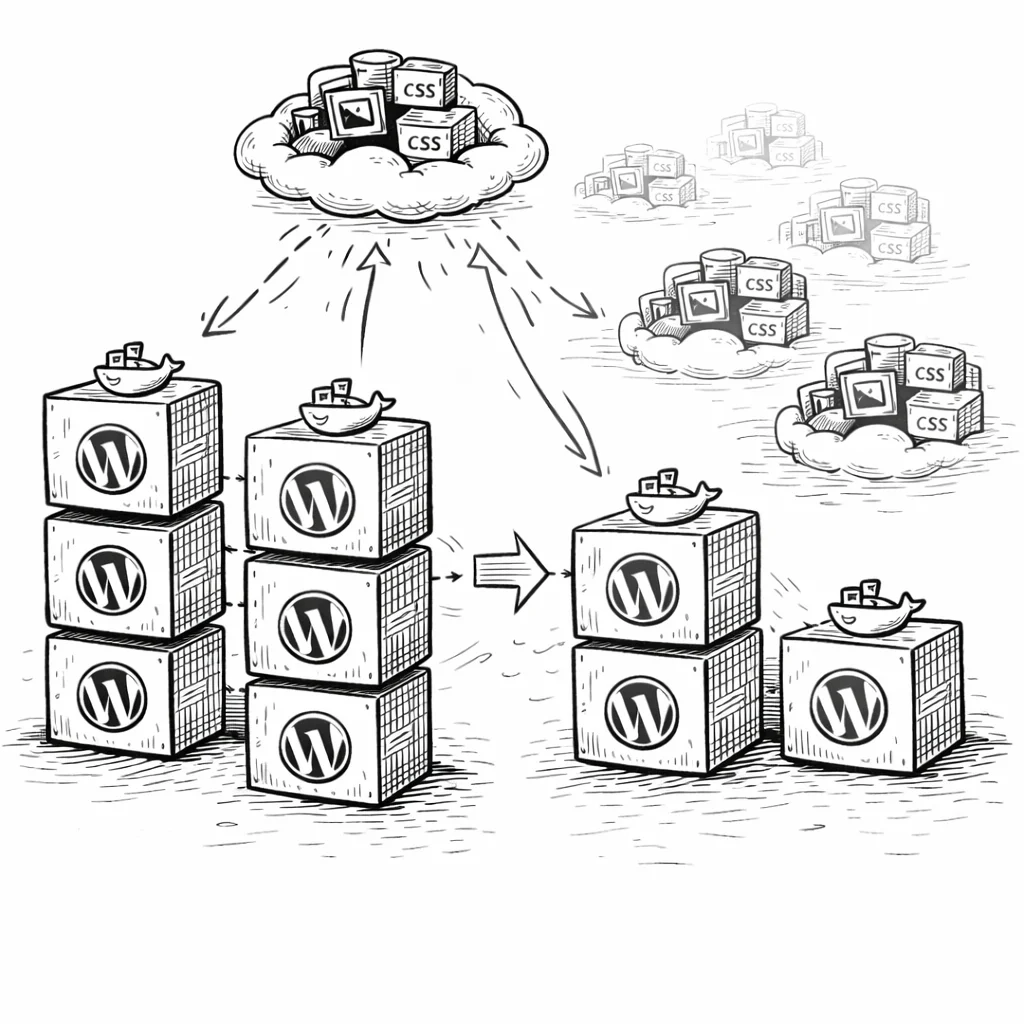
For multi-server WordPress deployments, GCS provides storage-compute separation with Google-specific advantages.
Load-balanced environments
Multiple WordPress instances behind a Google Cloud Load Balancer all read from and write to the same GCS bucket. No rsync, no NFS, no shared disk mounts. Spin up a new instance, install the plugin, and media is immediately available because state lives in the shared database and GCS.
GCP-native auto-scaling
If you’re running WordPress on GKE or managed instance groups, GCS is the natural storage layer. Auto-scaled pods don’t have persistent local storage, so media must live externally. Each new pod connects to the same bucket through CloudSync Master.
Multi-regional for global reach
A multi-regional GCS bucket combined with Cloud CDN gives you origin redundancy plus edge caching at 100+ points of presence. For global WooCommerce stores or multilingual publishers, this delivers consistent performance across continents without complex replication setups.
Why store owners trust CloudSync Master
Built by 1TeamSoftware, developers of enterprise WordPress and WooCommerce solutions used by thousands of store owners. CloudSync Master is available on WordPress.org and follows the same standard plugin review process as every listed plugin.
Every paid license includes a 30-day money-back guarantee, priority support, and ongoing updates. The plugin is tested up to WordPress 6.7 and works with WooCommerce, Multisite, and all major hosting providers.
If it doesn’t work for your setup, you get your money back. No questions.
Frequently asked questions
Common questions about Google Cloud Storage and WordPress media offloading.
GCS is a strong choice if you’re already in the Google ecosystem (running on GCP, using Google Workspace, managing infrastructure through Google Cloud Console). It offers multi-regional redundancy, Autoclass storage optimization, and native Cloud CDN integration. The tradeoff is cost: GCS egress at $0.12/GB is the most expensive among major providers. If you don’t have a Google ecosystem reason to use GCS, Cloudflare R2 or Backblaze B2 will save you significantly more money.
WP-Stateless only supports GCS. CloudSync Master supports GCS plus 9 other providers and can import WP-Stateless metadata for non-destructive switching. At 1.5 MB vs 10 MB, CloudSync Master is lighter and gives you cross-provider migration that WP-Stateless can’t offer.
Yes. CloudSync Master’s Import feature reads WP-Stateless’s metadata (which GCS bucket, which file paths) and adopts it. Your files stay in the same GCS bucket. No re-uploading, no broken URLs, no downtime. Install CloudSync Master alongside WP-Stateless, import the metadata, verify everything works, then deactivate WP-Stateless.
Autoclass automatically moves objects between storage classes (Standard, Nearline, Coldline) based on access frequency. Frequently viewed images stay on Standard; old images move to cheaper tiers. Enable it if you have a large library (50 GB+) spanning several years. Savings compound as more objects tier down.
GCS egress is $0.12/GB, making it the most expensive of the three. S3 charges $0.09/GB. R2 charges $0.00. For 100 GB of monthly egress: $12.00 (GCS), $9.00 (S3), $0.00 (R2). Cloud CDN reduces effective egress since cached content doesn’t incur GCS egress, but you pay CDN fees instead ($0.02–$0.08/GB).
Yes. Google’s Always Free tier includes 5 GB Standard storage, 5,000 Class A ops, 50,000 Class B ops, and 1 GB egress per month. Unlike AWS’s 12-month trial, Google’s doesn’t expire. A very small site under 5 GB could stay free indefinitely, though the 1 GB egress limit is tight for any site with real traffic.
Yes. Put Cloudflare (or any CDN) in front of your GCS bucket with a CNAME and enter the CDN domain in CloudSync Master’s CDN URL setting. This reduces GCS egress because the CDN caches content at its edge. However, unlike the Backblaze + Cloudflare Bandwidth Alliance, there’s no free-egress deal between GCS and Cloudflare. You’ll pay GCS egress for cache misses.
GCS has two APIs. The JSON API is Google-native and supports all GCS features. The S3-compatible XML API supports S3’s Signature V4 authentication and standard S3 operations, making it compatible with tools built for Amazon S3. CloudSync Master uses the XML API because it’s the same protocol used for all 10 supported providers. This means no Google SDK dependency and a consistent connection method across providers.
Google offers Data Processing Agreements and lets you choose specific EU storage regions (europe-west1 in Belgium, europe-west3 in Frankfurt). Buckets can be restricted to EU regions for data residency. Google Cloud holds ISO 27001 and SOC 2 certifications. Review Google’s compliance documentation for your specific regulatory needs.
Yes, but Autoclass is usually better for WordPress media. Lifecycle Management lets you set rules like “move to Nearline after 90 days,” but you’re guessing which files are still active. An old product image might still get thousands of views. Autoclass moves objects based on actual access data, so you don’t accidentally tier down files that visitors still need.
It depends on your needs. WP-Stateless is the most established GCS plugin, but it only supports Google Cloud Storage with no path to other providers. CloudSync Master connects to GCS through the S3-compatible XML API and also supports 9 other providers including S3, R2, and B2. For sites that may need multi-provider flexibility or migration options, CloudSync Master offers the broadest compatibility in a 1.5 MB plugin.
You need a GCS bucket with S3-compatible (interoperability) access enabled and HMAC keys generated for a service account. In your WordPress plugin settings, enter the access key, secret, bucket name, and the endpoint storage.googleapis.com. CloudSync Master connects through the S3-compatible XML API using Signature V4 authentication. The full setup takes about 10–15 minutes, and the plugin tests the connection automatically once you save your credentials.
Your team already knows Google Cloud. Your infrastructure is already there.
Stop managing a separate cloud storage vendor for your WordPress media. Connect your site to GCS in 30 seconds with CloudSync Master — and keep the freedom to migrate to any provider if your needs change.
CloudSync Master Pro gives you the same GCS support in a 1.5 MB plugin with the ability to migrate to 9 other providers. Import your WP-Stateless metadata, keep your files in the same bucket, and gain the ability to move to S3, R2, or B2 without re-uploading.
If cost is your primary concern, check out Cloudflare R2 (zero egress) or Backblaze B2 ($0.006/GB storage). For predictable flat-rate pricing, see DigitalOcean Spaces. For enterprise AWS setups, see the S3 offloading page.
30-day money-back guarantee included. All paid plans include plugin updates and priority support. Tested up to WordPress 6.7.
See how CloudSync Master works with Amazon S3 | Cloudflare R2 | Backblaze B2 | DigitalOcean Spaces