
FOR WORDPRESS USERS FED UP WITH PER-ITEM PRICING AND MISSING PROVIDERS
CloudSync Master — The Best WP Offload Media Alternative
The $89/yr, unlimited-item WP Offload Media alternative that actually supports Cloudflare R2.
Free on WordPress.org • 10 cloud providers • 1.5 MB plugin • One-click WP Offload import
Looking for a WP Offload Media alternative that doesn’t charge per item and actually supports Cloudflare R2? This complete 2026 comparison breaks down pricing, provider support, plugin size, performance features, and migration paths so you can decide whether CloudSync Master Pro is the right switch for your WordPress site.
Table of contents
- The hidden cost of per-item pricing
- Beyond S3: the case for Cloudflare R2
- The 23 MB SDK bloat problem
- Feature-by-feature comparison
- Performance: WebP, AVIF, and cache integration
- How to migrate from WP Offload Media
- WooCommerce stores: why item limits hurt the most
- Who switches and why
- Frequently asked questions
TL;DR
If you need a WP Offload Media alternative, CloudSync Master Pro offers three concrete advantages. 1) Flat-rate pricing ($89/yr for unlimited items) instead of WP Offload’s per-item tiers that scale up to $1,199/yr. 2) Native support for 10 cloud providers including Cloudflare R2, Backblaze B2, and Wasabi (WP Offload only supports 3, ignoring R2 entirely). 3) A 1.5 MB footprint that connects via direct API instead of bundling a 23 MB+ AWS SDK onto your server. You can migrate your existing WP Offload Media database tables to CloudSync in one click, without re-uploading a single file.
The hidden cost of per-item pricing
WP Offload Media helped pioneer media offloading for WordPress. Credit to Delicious Brains for what they built before selling it to WP Engine. But their pricing model penalizes you for growing.
They charge based on the total number of items in your Media Library. Here is how that scales:
| Media Library Size | WP Offload Media | CloudSync Master Pro |
|---|---|---|
| 2,000 items | $39/year (Bronze) | $89/year |
| 6,000 items | $59/year (Silver) | $89/year |
| 20,000 items | $149/year (Gold) | $89/year |
| 40,000 items | $199/year (Platinum) | $89/year |
| 100,000 items | $349/year (Adamantium) | $89/year |
| 500,000 items | $799/year | $89/year |
| Unlimited items | $1,199/year | $89/year |
Prices from WP Offload Media pricing page as of March 2026.
A real-world example: a WooCommerce store owner who migrated from Shopify had 3,500 products. Every product had a main image and three gallery images. That’s 14,000 images on day one. Adding variations and blog posts pushed them past 20,000 items in their first six months.
Their plugin cost jumped from $39/year to $149/year to $349/year. Not because they did anything wrong. Just because they kept adding products to their store.
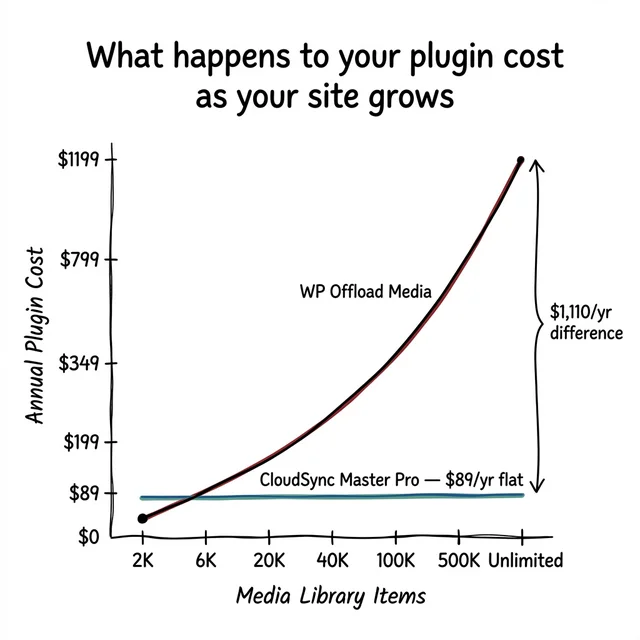
CloudSync Master charges a flat $89/year for unlimited items. Your offload plugin shouldn’t tax your media count. You pay for the plugin and the support, not a quota.
Beyond S3: the case for Cloudflare R2
This is the number one reason users search for a WP Offload Media alternative.
Amazon S3 is reliable. It’s also expensive if you have traffic. Amazon charges you pennies to store files but hits you with “egress fees” (bandwidth costs) every time a visitor loads an image. For a media-heavy site serving 500 GB/month, S3 egress alone runs about $45. For 5 TB, you’re looking at $450/month.
Cloudflare R2 uses S3-compatible APIs with the same durability guarantees but charges zero egress fees. You pay for storage only. The bandwidth is free.
For a site with 100 GB of media and 500 GB of monthly bandwidth, the math looks like this:
| Provider | Storage | Egress | Total/month |
|---|---|---|---|
| Amazon S3 | $2.30 | $45.00 | $47.30 |
| Google Cloud Storage | $2.00 | $60.00 | $62.00 |
| DigitalOcean Spaces | $2.00 | $5.00 | $7.00 |
| Backblaze B2 | $0.50 | $5.00 | $5.50 |
| Cloudflare R2 | $1.50 | $0.00 | $1.50 |
See Cloudflare R2 pricing and AWS S3 pricing for current rates.
If you run a photography portfolio, a digital download shop, or a media-heavy blog, switching from S3 to R2 can save more per month than your annual plugin license costs.
WP Offload Media does not support Cloudflare R2.
Despite years of users asking for it, WP Engine has kept the plugin locked to Amazon S3, Google Cloud Storage, and DigitalOcean Spaces. If you want to use R2, Wasabi, or Backblaze B2, you need a different plugin.
CloudSync Master supports Cloudflare R2, Backblaze B2, Amazon S3, Google Cloud Storage, DigitalOcean Spaces, Wasabi, Vultr Object Storage, Linode, MinIO, and any S3-compatible endpoint. Ten providers in the free version. No artificial lock-in.
The 23 MB SDK bloat problem
Look at your server’s filesystem after installing WP Offload Media. A fresh install is over 23 MB and contains more than 15,000 individual PHP files.
Why? Because WP Offload Media bundles the full aws-sdk-php library package.
Amazon’s SDK supports every AWS service: Machine Learning (SageMaker), IoT, database management, facial recognition (Rekognition). All that code ships to your WordPress server just so the plugin can upload a JPEG to an S3 bucket.
That code sits on your server consuming disk space. The autoloader parses dependency trees on every request, which can cause plugin conflicts and slow down your admin panel.
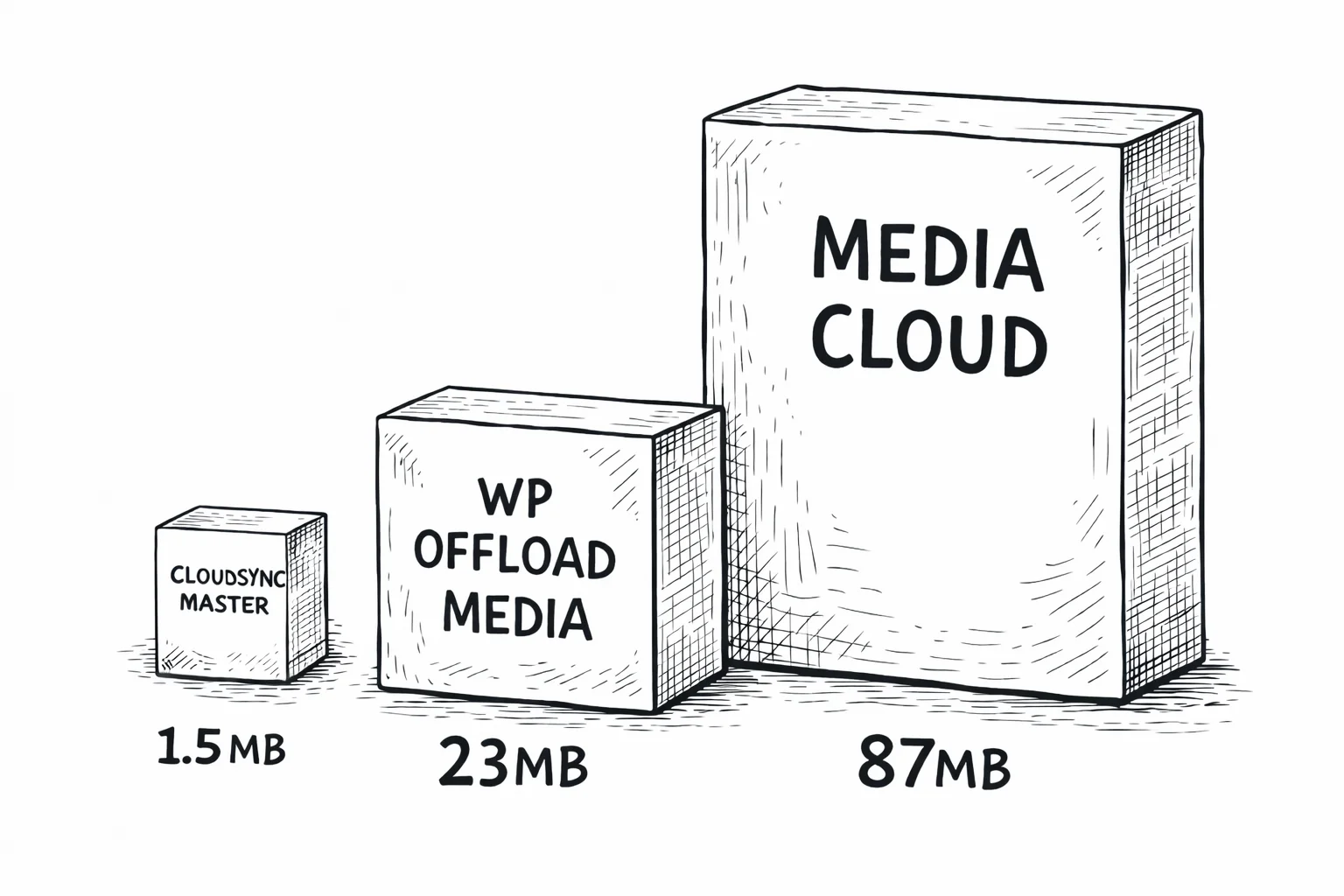
1.5 MB
CloudSync Master
23 MB
WP Offload Media
87 MB
Media Cloud
CloudSync Master Pro is under 1.5 MB total.
We built a custom implementation of AWS Signature V4 authentication specifically for WordPress. It generates the same secure, authenticated API calls that the official SDK does, without the other 22 MB of code your site doesn’t need.
Less code means fewer security vectors, fewer autoloader conflicts, and faster admin page loads.
Feature-by-feature comparison
Here’s how CloudSync Master Pro compares to WP Offload Media on the features that matter in production:
| Feature | CloudSync Master Pro | WP Offload Media Pro |
|---|---|---|
| Pricing | $89/yr flat (unlimited) | $39–$1,199/yr (per-item tiers) |
| Amazon S3 | ✔ | ✔ |
| Google Cloud Storage | ✔ | ✔ |
| DigitalOcean Spaces | ✔ | ✔ |
| Cloudflare R2 | ✔ | ✘ |
| Backblaze B2 | ✔ | ✘ |
| Wasabi | ✔ | ✘ |
| Vultr / Linode / MinIO | ✔ | ✘ |
| Plugin Size | 1.5 MB | 23 MB+ |
| Architecture | Custom SigV4 (no SDK) | Bundles AWS SDK |
| URL Rewriting | ✔ | ✔ |
| Auto-delete local files | ✔ | ✔ |
| Bulk Upload Tool | ✔ | ✔ |
| WooCommerce Signed URLs | ✔ | ✔ |
| Cloud Scanner | ✔ (find unlinked files) | ✔ |
| Custom S3-Compatible | ✔ | ✘ |
| Image Optimizer Sync | 4 integrations (ShortPixel, Imagify, EWWW, Smush) | ✘ |
| Auto WebP/AVIF Serving | ✔ | ✘ |
| Cache Plugin Integration | 6 integrations (WP Rocket, LiteSpeed, W3TC, etc.) | ✘ |
| Multiple Cloud Accounts | ✔ (unlimited) | ✘ (1 account) |
| Cross-provider Migration | ✔ (zero-downtime) | ✘ (must re-upload) |
| Competitor Import | WP Offload, Media Cloud, WP-Stateless, Next3 | ✘ |
Performance: WebP, AVIF, and cache integration
WP Offload Media treats media offloading as a logistics problem: move a file from server to bucket. Done.
CloudSync Master treats it as a performance problem. Moving the file is step one. Making it load faster for visitors is step two.
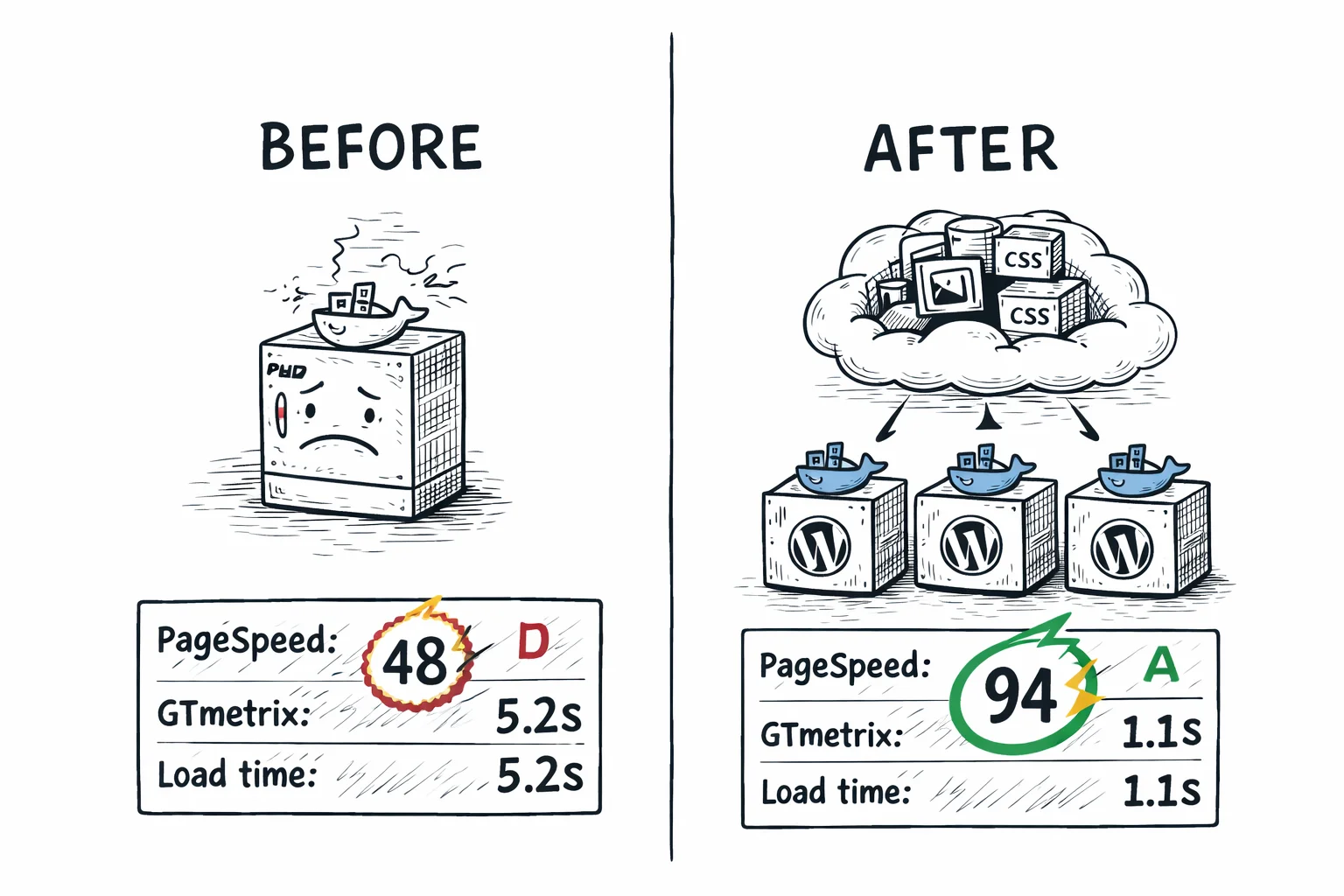
1. Image Optimizer Hooks: If you use ShortPixel, Imagify, EWWW, or Smush, they compress your images after WordPress generates thumbnails. CloudSync listens for these plugins. When they finish optimizing an image, CloudSync detects the change and syncs the smaller version to your cloud bucket automatically.
2. Auto WebP/AVIF Serving: CloudSync handles browser-aware format negotiation. If a visitor’s browser supports WebP or AVIF, CloudSync serves those formats from your cloud storage. Old browsers get the standard JPG/PNG. WP Offload Media has no equivalent; you need third-party add-ons.
3. Cache Integration: CloudSync works with WP Rocket, LiteSpeed Cache, W3 Total Cache, WP Super Cache, WP Fastest Cache, and Autoptimize. It clears the relevant cache entries when URLs change so visitors never see broken images.
How to migrate from WP Offload Media
If you have 50,000 files already offloaded to Amazon S3 via WP Offload Media, switching plugins sounds risky. You probably assume you have to download everything back to your server, deactivate the old plugin, activate the new one, and re-upload everything.
You don’t.
Here is what you actually do:
- Install CloudSync Master (the free version works for this).
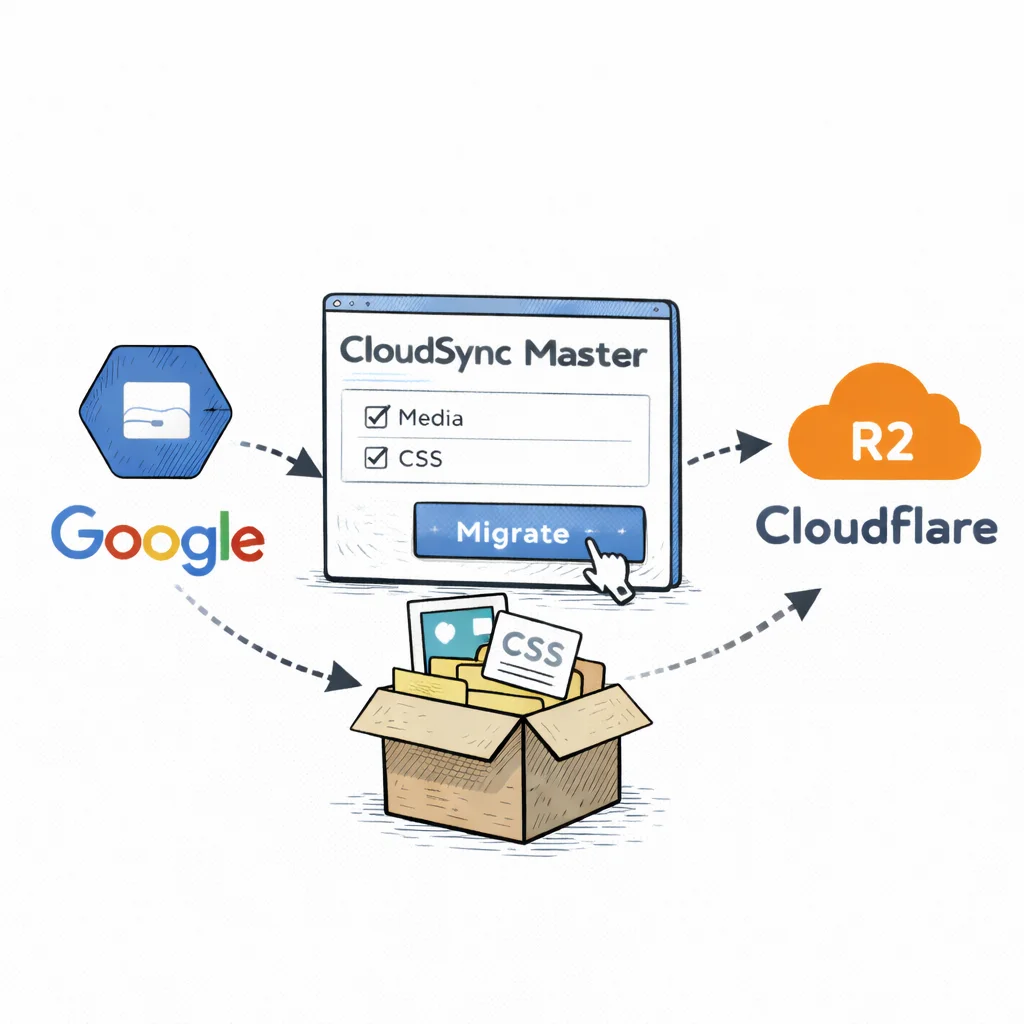
- Go to the Sync/Migrate tab and click Import from WP Offload Media.
- CloudSync reads the WP Offload Media database tables (
wp_as3cf_items) and translates those records into its own metadata format. - Your files stay untouched. Local files stay local, cloud files stay in the cloud.
- CloudSync takes over URL rewriting. Deactivate WP Offload Media.
The whole process takes seconds. No file transfers. No downtime. Your SEO equity stays intact because the frontend URLs don’t change.
Migrating from S3 to Cloudflare R2
What if you also want to escape S3 egress fees by moving your files to Cloudflare R2?
- Import your WP Offload S3 metadata into CloudSync (one click, as above).
- Add your Cloudflare R2 credentials in CloudSync’s settings.
- Switch your active provider to R2. CloudSync starts migrating files in the background automatically.
- While migration runs, CloudSync serves files from whichever provider has them. If a file has already moved to R2, it’s served from R2. If not yet, it falls back to S3. Visitors never see a broken image.
Compare this with WP Offload Media’s process for switching providers. Their own documentation says you need to “use the removal tool to remove all your offloaded media from your current bucket, change your settings and then offload your media to your new bucket.” If you used Object Versioning, your URLs will break.
WooCommerce stores: why item limits hurt the most
WooCommerce stores burn through media library items fast. A single product with a main image, three gallery images, and two variation images creates six media items. Multiply that by your product count:
| Products | Images per product | Total items | WP Offload tier needed | WP Offload cost |
|---|---|---|---|---|
| 500 | 4 | 2,000 | Bronze | $39/yr |
| 1,500 | 4 | 6,000 | Silver | $59/yr |
| 2,500 | 6 | 15,000 | Gold | $149/yr |
| 5,000 | 6 | 30,000 | Platinum | $199/yr |
| 10,000 | 6 | 60,000 | Adamantium | $349/yr |
Add blog posts, category images, banners, and PDF catalogs and those numbers climb faster than you’d expect.
CloudSync Master Pro costs $89/year regardless. No metering, no tier surprise on renewal day.
Both plugins support WooCommerce signed URLs for digital downloads. When a customer purchases a file, the plugin generates a temporary, expiring link to your cloud bucket. The customer downloads directly from the cloud, bypassing your web server.
Who switches and why
WooCommerce store owners who hit a pricing tier wall. A store with 5,000 products and 6 images each needs the $349/yr Adamantium tier from WP Offload. With CloudSync, that’s $89/yr. The savings compound every year.
Developers and agencies managing multiple client sites. WP Offload Media’s per-item pricing means every client site has a different cost. CloudSync’s flat rate makes quoting and budgeting predictable. The 1.5 MB footprint also means fewer support tickets from plugin conflicts.
Anyone who wants Cloudflare R2. If you’ve done the math on S3 egress fees and decided R2 is the right move, WP Offload Media can’t help you. CloudSync connects to R2 in about two minutes.
If you’re on the fence, the free version handles all 10 providers with no item limits. Install it alongside WP Offload Media, run the import, and compare before you commit to anything.
Frequently asked questions
Common questions about switching from WP Offload Media to CloudSync Master.
Yes. The free version on WordPress.org supports all 10 cloud providers (including R2 and B2), URL rewriting, and local file deletion. You can run the competitor import tool in the free version to verify it picks up all your metadata before making any billing changes.
Yes. CloudSync Master Pro supports signed, expiring URLs for WooCommerce and Easy Digital Downloads. When a customer buys a file, CloudSync generates a secure temporary link to your cloud bucket. The customer downloads directly from the cloud, bypassing your web server while keeping the file private.
WP Offload bundles the full aws-sdk-php library, which includes code to interact with every AWS service. CloudSync Master implements only the S3 SigV4 API calls needed for object storage. The result: 1.5 MB versus 23+ MB.
No. The CloudSync Master import tool maps the same custom domain or CDN URL you were using in WP Offload Media. Your <img> tags render the same URLs they did before the switch. Search engines won’t notice the change.
Yes. CloudSync Master Pro supports Multisite network activations. You can manage media for all subsites from the network admin panel, or configure separate buckets and API credentials per subsite.
No. WP Offload Media only supports Amazon S3, Google Cloud Storage, and DigitalOcean Spaces. It does not support Cloudflare R2, Backblaze B2, Wasabi, or any custom S3-compatible endpoint. CloudSync Master supports all of these in the free version.
According to their documentation, you need to remove all offloaded media from your current bucket, change settings, then re-offload everything to the new provider. If you used Object Versioning, your media URLs will break. CloudSync Master handles cross-provider migration in the background with automatic fallback, so nothing breaks during the transfer.
Make the switch
You don’t have to decide right now whether CloudSync Master is the right fit. The free version does everything you need to test it: 1. Install from WordPress.org (takes 30 seconds) → 2. Run the one-click WP Offload Media importer → 3. Verify your files, URLs, and CDN setup all work → 4. Decide whether to stay on free or upgrade to Pro.
Every Pro license includes a 30-day money-back guarantee, priority email support, and plugin updates. No credit card. No trial timer. No item limits on free.
Provider setup guides: Amazon S3 | Cloudflare R2 | Backblaze B2 | Google Cloud Storage | DigitalOcean Spaces