
FOR WOOCOMMERCE STORES & MEDIA-HEAVY WORDPRESS SITES
Cut cloud storage costs by 95% with Cloudflare R2
Zero egress fees. Connect to R2 in 5 minutes with a 1.5 MB plugin.
All 10 cloud providers free • No credit card required
TL;DR
Cloudflare R2 charges zero egress fees, making it 93% cheaper than Amazon S3 for WordPress media. CloudSync Master Pro is a 1.5 MB plugin (no SDK bloat) that connects to R2 in 5 minutes, supports zero-downtime migration from S3 or other providers, and has a free version with full R2 support. Start free, upgrade to Pro ($89/yr) when you need bulk upload, WooCommerce signed URLs, or configurable performance settings.
The problem with cloud storage egress fees
Amazon S3 charges you every time someone views an image on your site. Cloudflare R2 doesn’t. That single difference (zero egress fees) changes the cost math for every media-heavy WordPress site.
If you run a WooCommerce store with thousands of product photos or a content site with image-rich posts, data transfer charges from S3 can quietly become your biggest cloud expense.

Here’s what that looks like in practice. A WooCommerce store serving 100 GB of product images pays $50+ per month just so visitors can look at those photos. Scale to 500K pageviews and that’s $600 per year in pure egress waste. Every time someone browses your catalog, every time Google’s crawler indexes your product pages, every time a social media preview loads your images, you’re paying data transfer fees. The busier your store gets, the worse it hurts.
A Cloudflare R2 WordPress plugin eliminates that line item entirely. You pay for storage and write operations. Reads and downloads cost nothing.
This guide covers how to set up Cloudflare R2 with CloudSync Master Pro, a lightweight WordPress media offload plugin that connects to R2 (and 9 other providers including Backblaze B2 and DigitalOcean Spaces) without the SDK bloat. We walk through bucket creation, API tokens, R2’s S3-compatible setup process, real cost comparisons with S3, and how to migrate if you’re already on another provider.
Cloudflare R2 vs S3: real cost comparison for WordPress
Let’s run the actual numbers for a mid-size WordPress site: 20 GB of media files, 50,000 monthly pageviews, averaging 6 images per page at 200 KB each.
Monthly cost breakdown
| Cost Component | Amazon S3 | Cloudflare R2 |
|---|---|---|
| Storage (20 GB) | $0.46 ($0.023/GB) | $0.30 ($0.015/GB) |
| PUT requests (200 uploads) | $0.001 | $0.001 |
| GET requests (300K reads) | $0.12 | $0.11 |
| Egress (60 GB transferred) | $5.40 ($0.09/GB) | $0.00 |
| Monthly total | ~$6.00 | ~$0.41 |
| Annual total | ~$72 | ~$5 |
That’s roughly a 93% cost reduction based on current R2 pricing versus S3 pricing. And the gap widens as traffic grows.
At higher traffic
| Scenario | Amazon S3 | Cloudflare R2 | Savings |
|---|---|---|---|
| 50K pageviews/mo, 20 GB stored | ~$6/mo | ~$0.41/mo | 93% |
| 200K pageviews/mo, 50 GB stored | ~$24/mo | ~$0.98/mo | 96% |
| 1M pageviews/mo, 100 GB stored | ~$110/mo | ~$2.50/mo | 98% |
The pattern is clear: the more traffic you have, the more R2 saves you, because egress scales linearly with pageviews while R2 egress stays at zero.
If you’re currently on S3 and spending more than a few dollars a month on data transfer, switching to R2 pays for itself immediately. CloudSync Master Pro makes that migration straightforward. We cover the full process in the migration section below.
Cloudflare R2 WordPress plugin options compared
Most WordPress cloud storage plugins were built for S3 and never added R2 support. Here’s where each one stands:
| Plugin | R2 Support | Plugin Size | Price | Item Limits |
|---|---|---|---|---|
| CloudSync Master Pro | Yes, first-class | 1.5 MB | $89/yr | Unlimited |
| CloudSync Master Free | Yes, first-class | 1.5 MB | Free | Unlimited |
| Media Cloud | Yes | 87 MB | $36–$228/yr | Unlimited |
| WP Offload Media | No | 23 MB | $39–$349/yr | 5K–Unlimited |
| WP-Stateless | No (GCS only) | 10 MB | Free | Unlimited |
| Next3 Offload | Yes | 15 MB+ | $89–$649 | Varies |
WP Offload Media doesn’t support R2 at all. If you’re on WP Offload Media and want R2, you need to switch plugins. There’s no workaround. WP-Stateless is Google Cloud Storage only, so it doesn’t support S3-compatible providers either.
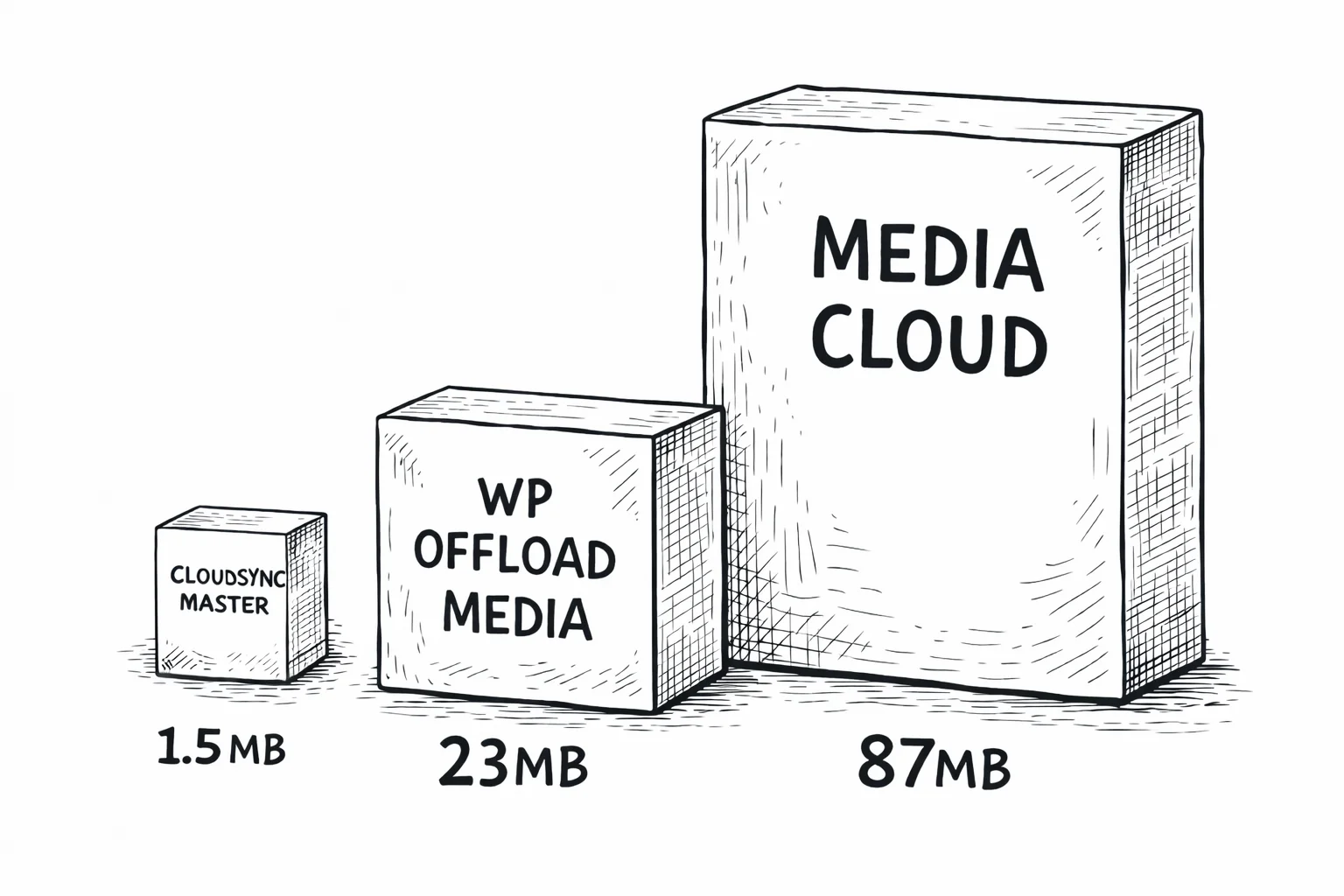
Media Cloud does support R2, but it weighs 87 MB. That’s 58× larger than CloudSync Master. Media Cloud bundles the full AWS SDK plus SDKs for multiple other services, most of which you’ll never use. All that code loads into PHP memory on every request.
CloudSync Master Pro is 1.5 MB because it uses a custom Signature V4 implementation instead of bundling SDKs. It sends the same authenticated requests to R2 that the SDK would, without the 15,000+ dependency files. Less code means less memory, faster autoloading, and fewer potential conflicts with your other plugins.
1.5 MB
CloudSync Master
23 MB
WP Offload Media
87 MB
Media Cloud
For a detailed feature-by-feature breakdown, see the full CloudSync Master vs WP Offload Media comparison.
Save $2,160/year with zero performance tradeoff — real R2 results
Actual numbers from a WooCommerce store that moved 14,000 product images from local storage to Cloudflare R2 + Cloudflare CDN using CloudSync Master Pro.
48 → 94
PageSpeed Score
5.2s → 1.1s
GTmetrix Load Time
512 → 280 MB
Server Memory Usage
8.4 GB → 340 MB
Backup Size
$0.00
Monthly Egress Cost
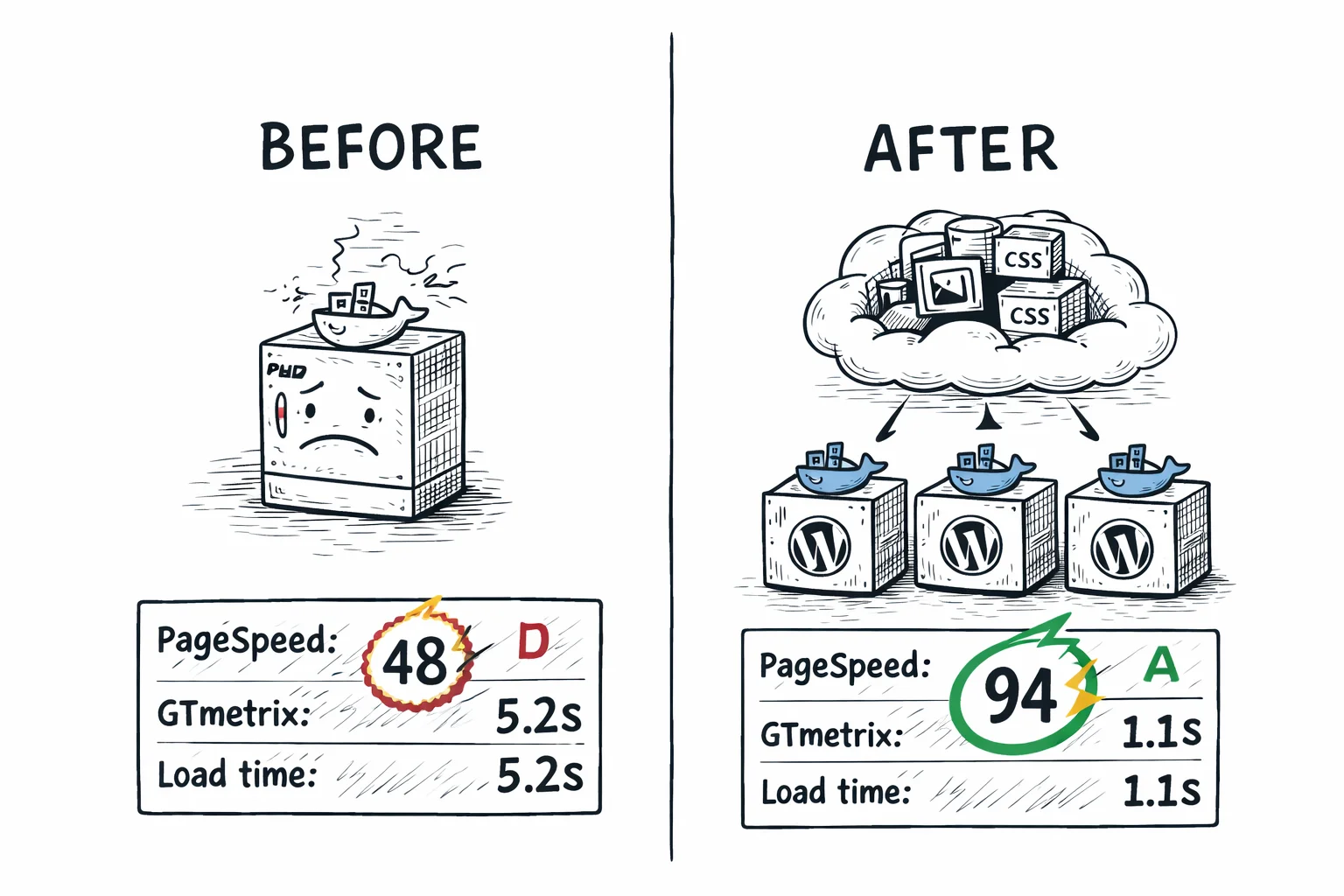
The PageSpeed jump came from a combination of offloading and WebP serving through CloudSync’s ShortPixel integration. But the TTFB improvement and memory reduction are directly from moving media off the server. Your WordPress instance stops burning CPU cycles on file serving and focuses on rendering pages.
The backup size drop from 8.4 GB to 340 MB is just as important. When your media lives in R2 (which provides 99.999999999% durability), your backup only needs to cover the database and theme files. Backup jobs that used to take 45 minutes now finish in under 2 minutes.
Switch from S3 to R2 with zero downtime
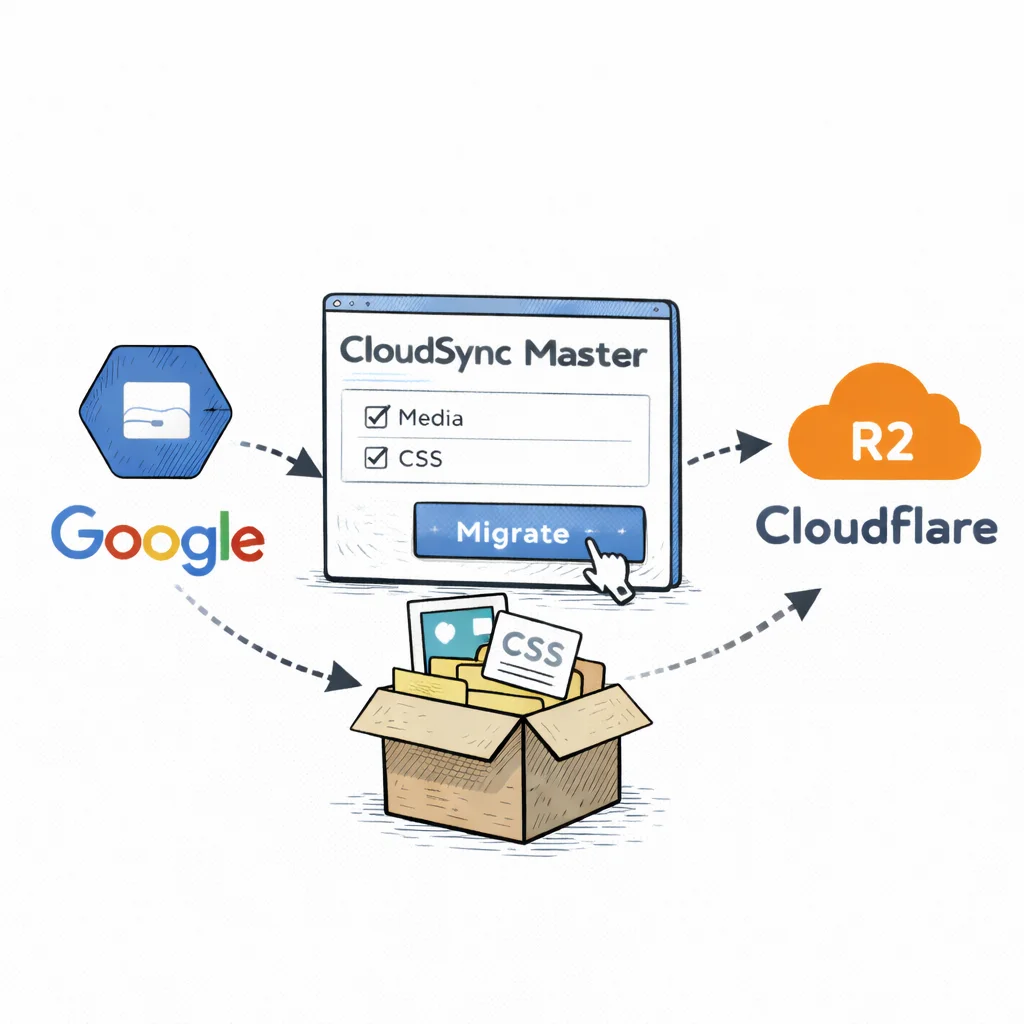
The S3-to-R2 path is the most common migration we see. You’re already paying S3 egress, R2 eliminates it, and both use the same S3-compatible API. Cross-provider migration is available in both Free and Pro.
How cross-provider migration works
- Add your R2 account in CloudSync Master settings.
- Switch the active account to R2.
- The plugin starts migrating files automatically in the background.
- During migration, any files not yet transferred are served from your previous provider — zero downtime, no broken images.
- Once all files are migrated, everything is served from R2 automatically.
There’s no manual “migrate from X to Y” step and no need to update your active provider after migration. The fallback mechanism means your site stays live with zero downtime throughout the entire process.
Coming from WP Offload Media or Media Cloud?
If you’re currently using another plugin with S3:
- Install CloudSync Master Pro alongside your current plugin.
- Use the Import feature to adopt existing cloud metadata from WP Offload Media, Media Cloud, WP-Stateless, or WP Media Folder Cloud.
- Once imported, add your R2 account and switch to it as the active account.
- The plugin migrates files from S3 to R2 automatically in the background, falling back to S3 for anything not yet transferred.
- Once migration completes, deactivate and remove the old plugin.
Zero downtime throughout. Your site never goes down because the fallback mechanism serves files from S3 until they’ve been migrated to R2.
Free version includes full R2 support. 5-minute setup. No credit card required.
Who this is for
This plugin is built for:
- WooCommerce stores with 1,000+ product images paying S3 egress fees every month. If your cloud storage bill grows with every pageview, R2 eliminates that cost entirely.
- Content publishers with image-heavy posts and growing traffic. Blogs, news sites, and media outlets where every article adds more images to serve.
- Agencies managing multiple WordPress sites on cloud storage. Standardize on one lightweight plugin across all client sites instead of juggling different solutions.
- Anyone migrating away from WP Offload Media for R2 support. WP Offload Media doesn’t support R2, and CloudSync Master Pro can import its metadata directly.
This might not be for you if:
- You need archival or cold storage with lifecycle policies (R2 has a single storage tier, no equivalent to S3 Glacier).
- Your site has fewer than 100 images and minimal traffic. At that scale, media offloading adds complexity without meaningful savings.
- You need data residency in a specific country. R2 uses broad location hints, not country-specific regions.
- You’re happy with your current S3 costs and don’t need to reduce them.
R2 features that matter for WordPress
Global delivery in under 100ms — no CDN setup required
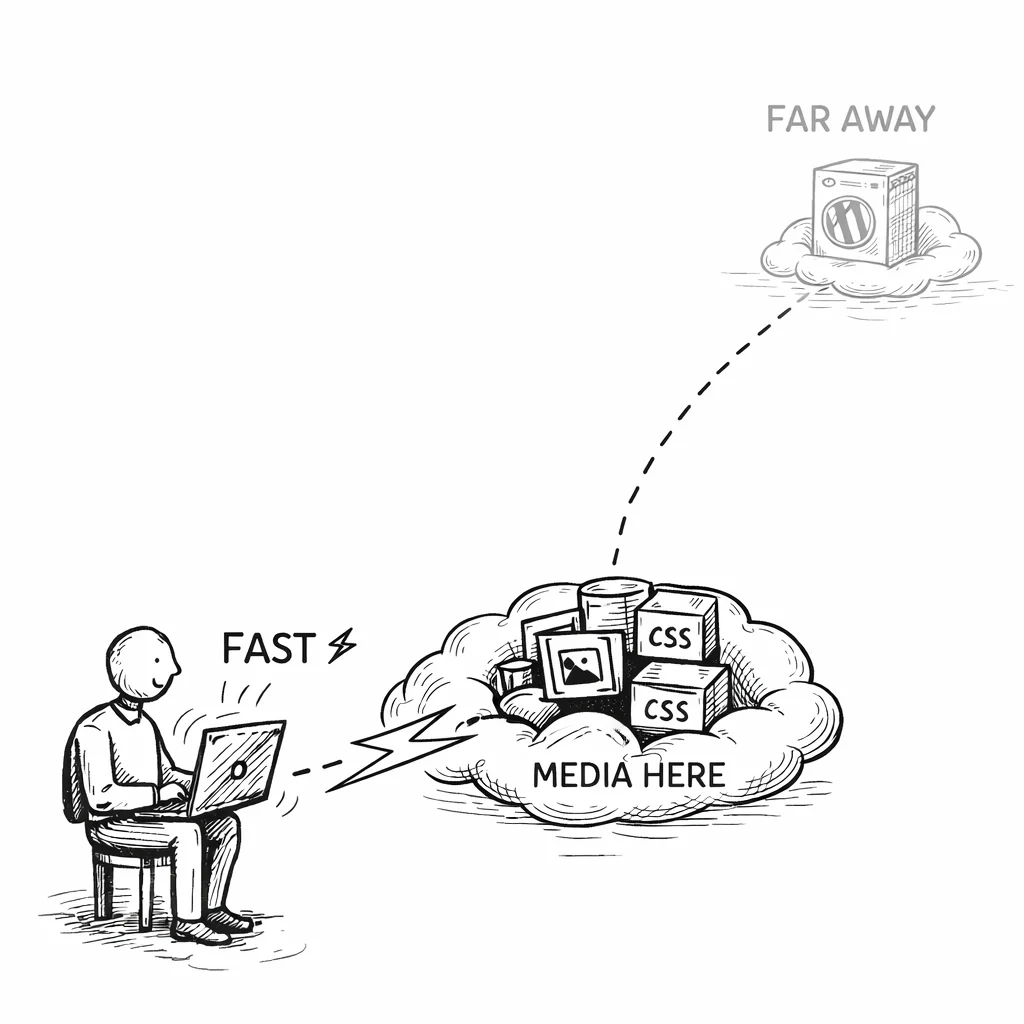
Your visitors get fast-loading images from 300+ Cloudflare edge locations worldwide, without configuring a separate CDN. When you attach a custom domain to an R2 bucket, Cloudflare’s CDN kicks in automatically. A visitor in Singapore gets images from a Singapore POP, not from wherever R2 stored the original. This is the equivalent of S3 + CloudFront, except you don’t set up a separate CloudFront distribution or pay for CloudFront data transfer.
Resize and transform images on the fly — without touching your server
Need on-the-fly image resizing, watermarking, or access control without touching your WordPress server? Cloudflare Workers can intercept requests to your R2 bucket and transform them at the edge. CloudSync Master doesn’t manage Workers directly, but if you’ve set up a Worker in front of your R2 bucket, the plugin works with it transparently since all requests go through the same custom domain.
Fine-tune caching to match your traffic patterns
Because R2 traffic flows through Cloudflare’s proxy, you can apply cache rules at the Cloudflare level. Set long TTLs for images (they rarely change), short TTLs for dynamic assets, and use cache purge when you update content. This level of caching control comes free with any Cloudflare plan.
S3-compatible — switch without relearning anything
R2 uses the same S3-compatible API protocol and Signature V4 authentication that Amazon S3 uses. For you, that means any tool or workflow you’ve built around S3 works with R2 after changing the endpoint URL and credentials. Your existing SDKs, authentication flows, and integrations all carry over unchanged.
WordPress Multisite support
CloudSync Master Pro is Multisite compatible, which means you can manage all your network’s media from one dashboard. Each subsite can have its own R2 bucket, or you can configure a shared bucket at the network level with per-site path prefixes. All subsites get the same zero-egress benefit.
Upload your full library while you sleep (Pro)
Offload your entire existing media library overnight with bulk upload. Pro supports 1-20 configurable concurrent connections, so your initial library upload finishes in under an hour instead of waiting for files to upload one at a time. Set it higher on beefy servers, lower on shared hosting. The free version auto-uploads new media with 5 parallel connections.
Two storage tiers, but no deep archive
R2 offers two storage classes: Standard ($0.015/GB/month) and Infrequent Access ($0.01/GB/month, launched 2024). There’s no equivalent to S3 Glacier or deep archive tiers. For most WordPress media use cases this doesn’t matter, since your images need to be instantly accessible. But if you need deep archival storage for old backups or rarely accessed files at Glacier-level pricing, S3’s broader range of storage classes is still an advantage.
Fewer regions than S3
S3 operates in 30+ specific regions worldwide. R2 uses broad location hints (North America, Europe, Asia-Pacific) with Cloudflare managing placement automatically. For WordPress media served through CDN, this is fine: the CDN cache is what determines latency for visitors, not the origin location. But if you have data residency requirements that mandate storage in a specific country, verify that R2’s location options meet your compliance needs.
Free vs Pro: which version do you need?
If you’re testing R2 or run a small personal site, start with the free version. For WooCommerce stores, sites with existing media libraries that need bulk upload, or anyone migrating from another cloud provider, Pro pays for itself in the first month through time saved alone.
| Feature | Free | Pro |
|---|---|---|
| 10 cloud providers | Yes | Yes |
| Cloudflare R2 support | Yes | Yes |
| Auto-upload new media | Yes | Yes |
| URL rewriting | Yes | Yes |
| Delete local copies | Yes | Yes |
| Competitor import (4 plugins) | Yes | Yes |
| Cross-provider migration | Yes | Yes |
| Import from cloud | Yes | Yes |
| Plugin size | 1.5 MB | 1.5 MB |
| Cloud storage accounts | 1 | Unlimited |
| Bulk upload existing library | No | Yes |
| WooCommerce & EDD signed URLs | No | Yes |
| 4 image optimizer integrations | No | Yes |
| Auto WebP/AVIF serving | No | Yes |
| 6 cache plugin integrations | No | Yes |
| CSS/JS offloading | No | Yes |
| Priority support | No | Yes |
| Price | Free | $89/yr |
| Download free | Recommended for production sites |
R2 cost breakdown: what you’ll actually pay
Cloudflare R2 pricing has three components, and they’re straightforward.
R2 pricing (as of 2026)
| Component | Price | Free Tier |
|---|---|---|
| Storage | $0.015 per GB/month | First 10 GB free |
| Class A operations (writes, lists) | $4.50 per million | First 1 million free |
| Class B operations (reads) | $0.36 per million | First 10 million free |
| Egress | $0.00 | Always free |
Real-world monthly costs
Small Blog (5 GB, 10K pageviews)
~$0.00/mo
Falls within R2’s free tier (10 GB storage, 10M Class B ops)
Mid-Size Site (20 GB, 50K pageviews)
~$0.41/mo
Storage $0.30 + reads $0.11 + egress $0.00
High-Traffic WooCommerce (100 GB, 500K pageviews)
~$2.59/mo
Storage $1.50 + reads $1.08 + egress $0.00
Same Scenario on S3
$56.30/mo
100 GB stored ($2.30) + 600 GB egress ($54.00)
Annual Savings: R2 vs S3 (100 GB scenario)
$644/year
$56.30/mo on S3 vs $2.59/mo on R2, a 95% reduction
The free tier is generous enough that many small WordPress sites will pay literally nothing for R2 storage and delivery.
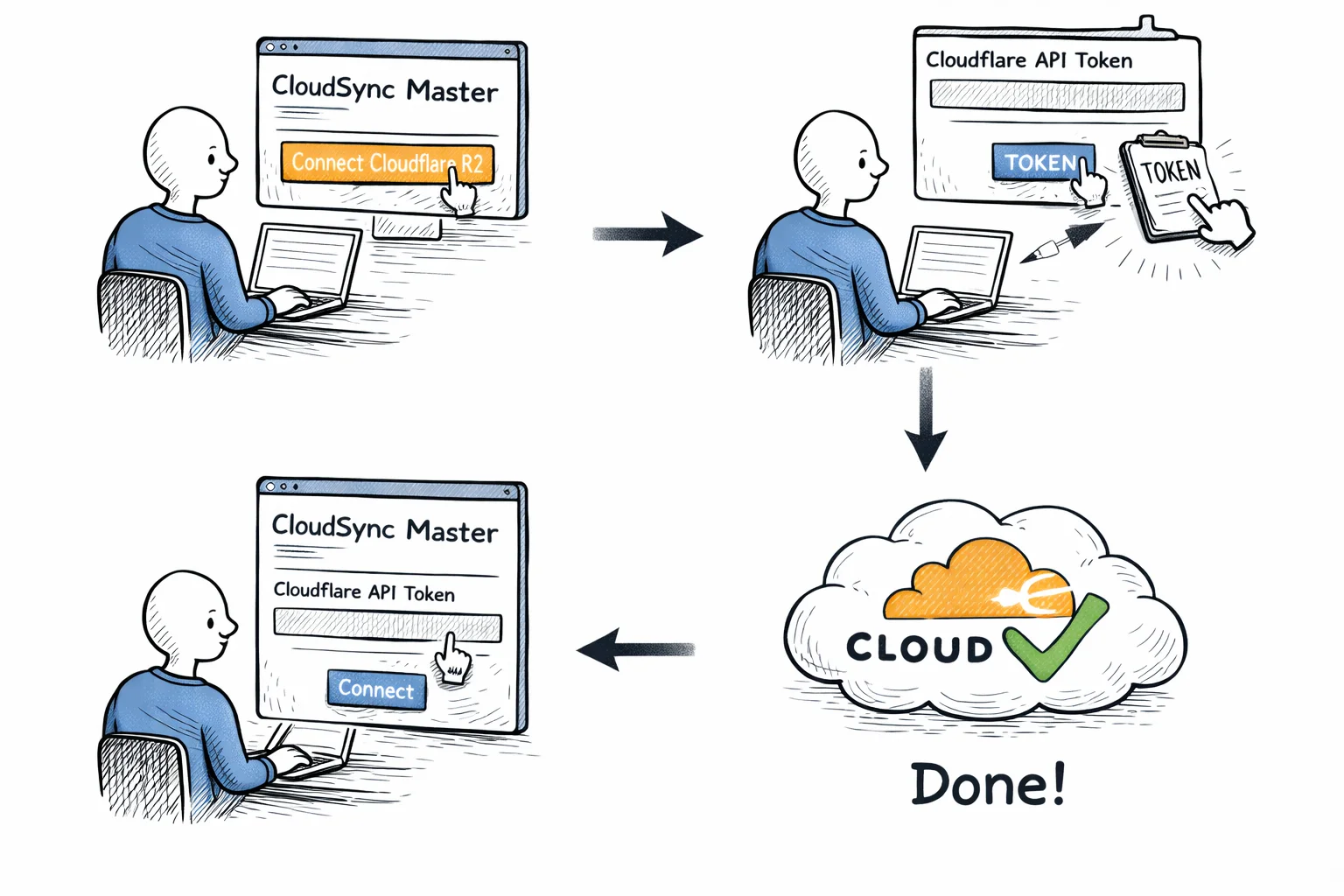
Step-by-step setup tutorial
Why Cloudflare R2 is different
Most cloud storage providers follow Amazon’s pricing model: cheap storage, expensive egress. You pay a few cents per GB to store files, then $0.05–$0.09 per GB every time those files are downloaded. For a WordPress site, “downloaded” means every time a visitor loads a page and their browser fetches your images.
Cloudflare built R2 specifically to kill egress fees. The storage is S3-compatible at the API level, so any tool that works with S3 can talk to R2 with minor configuration changes. But the billing model is fundamentally different:
R2 charges for storage and operations only. There is no per-GB fee for data leaving R2. None. Whether you serve 1 GB or 1 TB of images per month, the egress cost is $0.00.
This matters because egress typically accounts for 70–90% of your total cloud storage bill on S3. Remove that, and your monthly cost drops dramatically.
R2 also sits on Cloudflare’s global network, not tied to a single AWS region. When you pair R2 with a custom domain through Cloudflare, your media gets served through Cloudflare’s CDN automatically. No separate CloudFront distribution to set up, no additional CDN subscription.
And R2 uses S3-compatible APIs. You don’t need a new SDK or a different authentication system. R2 speaks the same protocol as S3, which means CloudSync Master Pro connects to it using the same Signature V4 authentication it uses for Amazon. The only differences are the endpoint URL and how you generate credentials (API tokens instead of IAM users).
Scaling WordPress with Cloudflare R2
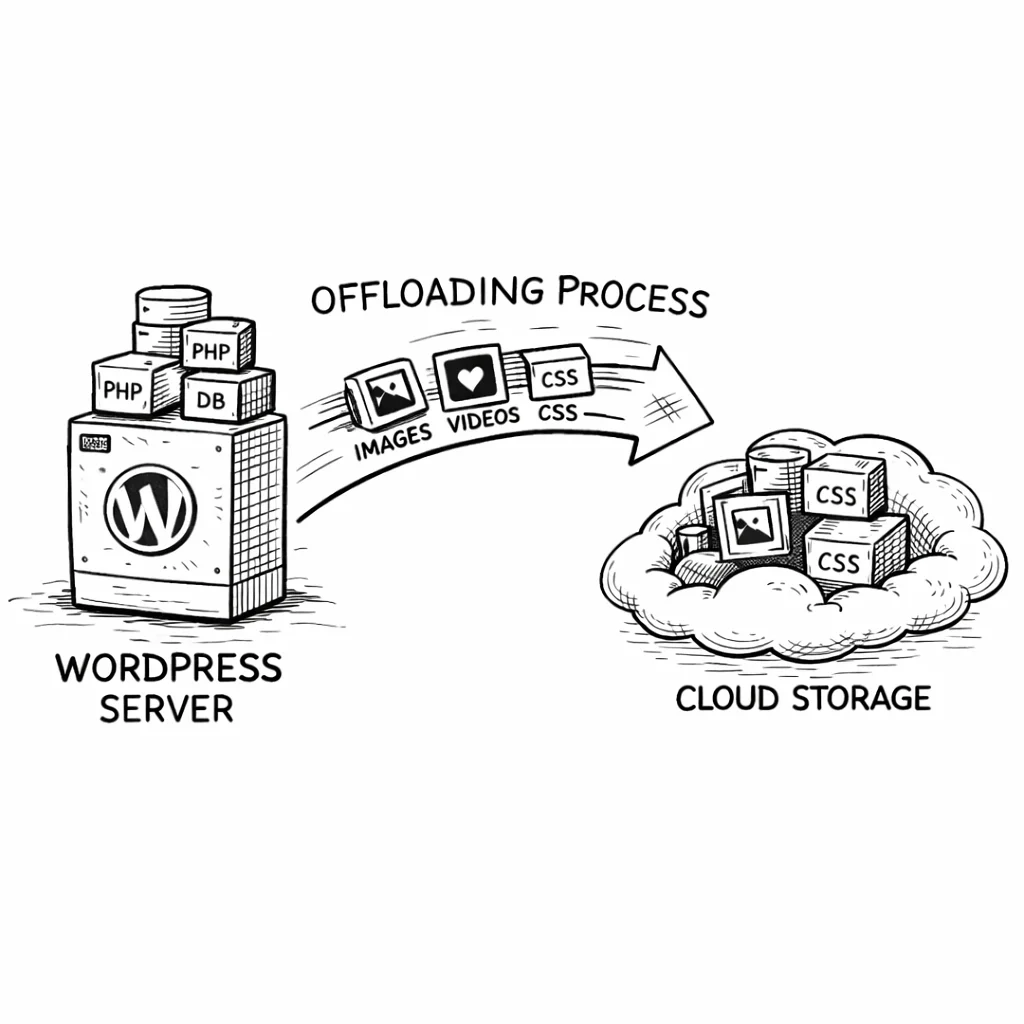
For agencies and multi-site setups, R2 offloading has the same architectural benefit as S3: it separates storage from compute.
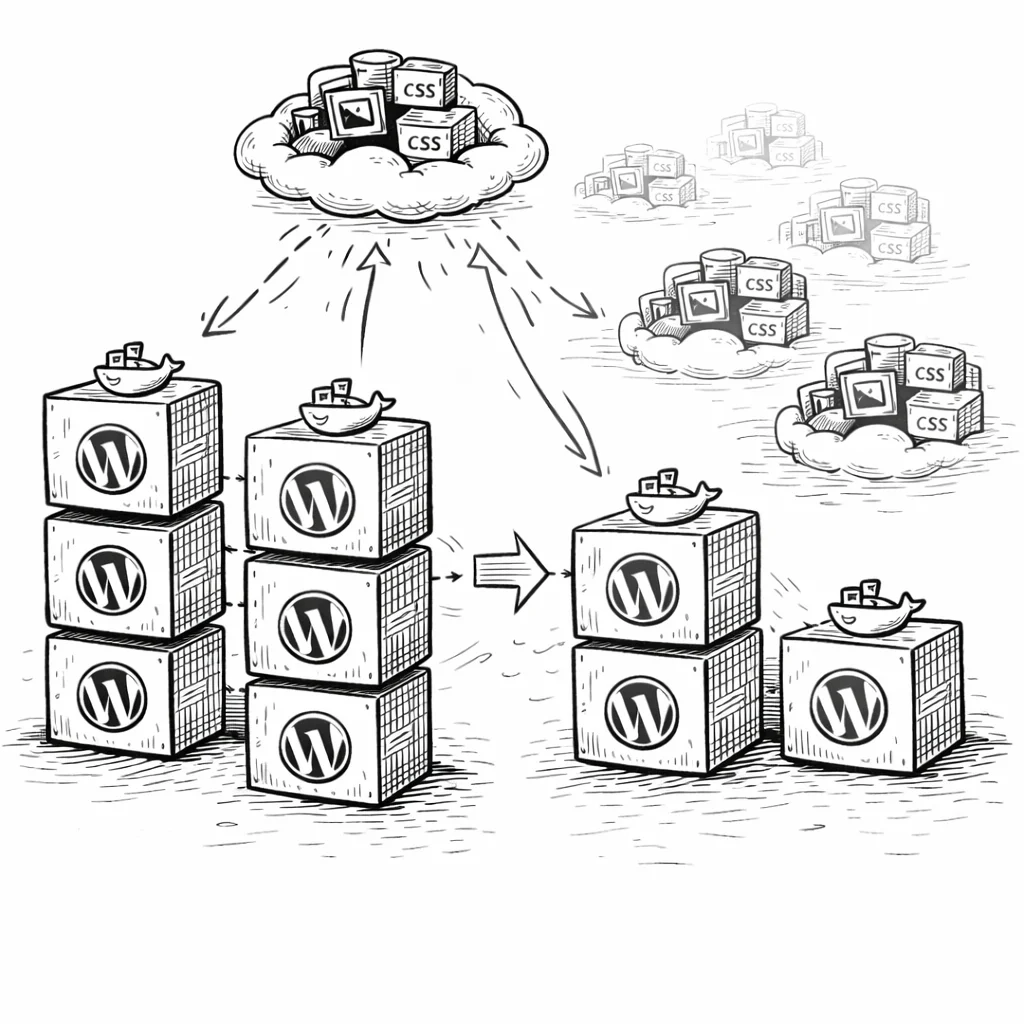
Load-balanced environments
If you run WordPress behind a load balancer with multiple app servers, local media storage creates sync headaches. An image uploaded on Server A isn’t available on Server B. You end up building rsync scripts or NFS mounts.
With R2 as your media backend, every server reads from and writes to the same bucket. No file sync needed. Spin up a new server, install the plugin, and it works immediately because media state lives in the database (shared) and R2 (shared), not on local disk.
Cost predictability at scale
The zero-egress model makes R2 especially attractive for scaling. With S3, your costs grow with both storage and traffic. A viral blog post that drives 10× normal traffic creates a surprise egress bill. With R2, traffic spikes don’t affect your storage costs at all. You pay the same whether you serve 10 GB or 10 TB. That predictability is useful for budgeting.
Why store owners trust CloudSync Master
Built by 1TeamSoftware, developers of enterprise WordPress and WooCommerce solutions with over a decade of experience building plugins for store owners. CloudSync Master is listed on WordPress.org with 1,000+ active installations and has passed the official WordPress plugin review process. Tested up to WordPress 6.7.
Every paid license includes a 30-day money-back guarantee, priority support, and ongoing updates. The plugin works with WooCommerce, Multisite, and all major hosting providers including Cloudways, SiteGround, and WP Engine.
If it doesn’t work for your setup, you get your money back. No questions.
Simple, transparent pricing
No per-item limits. No hidden fees. Start free, upgrade when you’re ready. Cloudflare’s zero-egress pricing is generous now, but cloud pricing changes over time. An annual license locks in your setup to take full advantage of R2 regardless of what happens next.
Free
$0
Available on WordPress.org
- ✅ All 10 cloud providers (1 account)
- ✅ Auto-upload new media
- ✅ URL rewriting to cloud/CDN
- ✅ Delete local after upload
- ✅ Competitor import (4 plugins)
- ✅ Cross-provider migration
- ❌ Bulk upload existing media
- ❌ WooCommerce & EDD signed URLs
- ❌ Auto WebP/AVIF
- ❌ CSS/JS offloading
Pro Monthly
$19/month
Cancel anytime
- ✅ Everything in Free
- ✅ Bulk upload existing media
- ✅ WooCommerce & EDD signed URLs
- ✅ Auto WebP/AVIF serving
- ✅ CSS/JS offloading
- ✅ Priority support
Pro — 1 Site
$89/year
Unlimited media items
- ✅ Everything in Free
- ✅ Bulk upload existing media
- ✅ WooCommerce & EDD signed URLs
- ✅ 4 image optimizer integrations
- ✅ Auto WebP/AVIF serving
- ✅ 6 cache plugin integrations
- ✅ CSS/JS offloading
- ✅ Cross-provider migration
- ✅ Priority support
MOST POPULAR
Pro — 3 Sites
$199/year
$66/site/year — save 25%
- ✅ Everything in Pro
- ✅ 3 WordPress sites
- ✅ Centralized license
- ✅ Ideal for freelancers
Frequently asked questions
Common questions about Cloudflare R2 and WordPress media offloading.
Yes. R2 charges $0.00 for data transfer out. This includes downloads via the S3-compatible API and requests through custom domains on Cloudflare’s network. You pay for storage ($0.015/GB/month) and operations (writes at $4.50/million, reads at $0.36/million), but outbound data transfer is free. This has been R2’s pricing since launch and is the core reason Cloudflare built it.
S3 + CloudFront eliminates S3-to-CloudFront egress (that transfer is free), but you still pay CloudFront’s data transfer rate ($0.085/GB for the first 10 TB). With R2 + a custom domain on Cloudflare, both the storage egress and the CDN delivery are free. R2 also avoids the operational overhead of setting up a separate CloudFront distribution, origin access controls, and cache invalidation rules.
Yes. R2 is available on all Cloudflare plans, including the free plan. You need a Cloudflare account and your domain’s DNS needs to go through Cloudflare if you want custom domain support. The R2 service itself has its own pricing (storage + operations) that’s separate from your Cloudflare plan tier.
R2 provides 99.999999999% (eleven 9s) annual durability for stored objects, the same figure Amazon quotes for S3. Availability SLAs differ slightly, but for WordPress media serving, R2’s uptime has been consistent since its general availability launch. Cloudflare’s network handles billions of requests daily across all its products, and R2 runs on the same infrastructure.
Class A operations are writes: PutObject, CreateMultipartUpload, ListParts, and similar calls. These cost $4.50 per million. Class B operations are reads: GetObject, HeadObject, ListObjects. These cost $0.36 per million. In WordPress media offloading, the vast majority of operations are Class B (serving images to visitors). With 50,000 pageviews and 6 images per page, you’d see roughly 300,000 Class B operations per month, which costs about $0.11.
Yes. R2’s free tier includes 10 GB storage, 1 million Class A operations, and 10 million Class B operations per month. A small WordPress site with under 10 GB of media and moderate traffic will stay within those limits. CloudSync Master doesn’t add any additional API calls beyond what’s needed for uploading and serving your files.
Yes. Add your R2 account in CloudSync Master and switch to it as the active account. The plugin migrates files in the background automatically and falls back to S3 for anything not yet transferred, so your site never goes down. Once migration completes, everything serves from R2 automatically. Available in both Free and Pro.
R2 currently has a single storage class. There’s no equivalent to S3’s Glacier, Infrequent Access, or Intelligent-Tiering. For WordPress media, this is a non-issue since your images need to be instantly accessible. If you need archival storage for old backups or rarely accessed files, S3’s lifecycle rules are still an advantage. But for active media libraries, R2’s single tier with its lower base price and zero egress wins on total cost.
As of early 2026, WP Offload Media (now maintained by WP Engine) supports Amazon S3, DigitalOcean Spaces, and Google Cloud Storage. R2 support has not been announced. If you want R2, CloudSync Master and Media Cloud are your current options. CloudSync Master has the advantage of being 58× smaller (1.5 MB vs 87 MB) and offering cross-provider migration.
Yes. CloudSync Master’s free version on WordPress.org includes full Cloudflare R2 support: auto-upload new media, URL rewriting, delete local copies, competitor import, and cross-provider migration. The Pro version ($89/year) adds bulk upload for existing libraries (Media Library Scanner), signed URLs for WooCommerce and EDD, image optimizer integrations, and more. Download the free plugin here.
Every GB of traffic costs you money on S3. On R2, it costs nothing.
The longer you wait, the more you pay in egress fees you didn’t need to. Every pageview, every crawler, every social preview — they’re all pulling images from your server and racking up data transfer charges. On R2, that entire line item disappears.
You have the cost comparison, the migration path, the plugin comparison, and the performance data. The setup takes about 5 minutes. For WordPress sites where egress is the primary expense, R2 offers the lowest total cost of any major provider.
30-day money-back guarantee included. All paid plans include plugin updates and priority support. Tested up to WordPress 6.7.
See how CloudSync Master works with Amazon S3 | Backblaze B2 | Google Cloud Storage | DigitalOcean Spaces