
WordPress Media Offload
Best WordPress Media Offload Plugins Compared (2026): CloudSync Master vs WP Offload vs Media Cloud

If your WordPress media library is getting large, your server usually starts doing work it should not be doing. Uploads eat disk, backups get bloated, and every traffic spike turns media delivery into an infrastructure problem instead of a content problem.
Offloading media to object storage fixes that. Choosing the wrong plugin does not.
This comparison is for people who are trying to choose a WordPress media offload plugin without wasting time on vague feature lists. If you are evaluating these tools seriously, the real questions usually look more like this:
- Which plugin stays affordable as the media library grows?
- Which one supports the cloud providers buyers actually want in 2026?
- Which option is easiest to live with after setup?
- Which plugin makes migration harder than it needs to be?
The plugins covered here are CloudSync Master, WP Offload Media, Media Cloud, WP-Stateless, and Next3 Offload. If you are specifically looking for a WP Offload Media alternative or a better WordPress cloud storage plugin for WooCommerce, this page should help you narrow that down quickly.
Quick answer: which WordPress media offload plugin is best?
If you want the short version before reading the full comparison:
- Best overall for most WordPress and WooCommerce sites: CloudSync Master
- Best if you want the oldest, most established option: WP Offload Media
- Best if you only use Google Cloud Storage: WP-Stateless
- Best if you want maximum customization and can handle complexity: Media Cloud
- Best if you want a newer alternative with a modern UI: Next3 Offload
If you already know you want flat pricing, broader provider support, and a cleaner migration path, start here:
Try CloudSync Master Free | See CloudSync Master Pro Pricing | Cloudflare R2 Guide
That quick answer only helps if your use case is simple. In practice, most buying decisions in this category come down to five things:
- pricing under growth
- cloud provider flexibility
- setup effort
- migration risk
- WooCommerce/private media support
What matters most when choosing a WordPress media offload plugin
Most buyers start with brand familiarity. A better place to start is with the problems that tend to show up later, once the site is no longer small and the media workflow is no longer new.
1. Pricing under growth
A cheap entry plan is not always a cheap long-term choice. Some plugins look affordable on a small site and become much more expensive once the library gets large.
2. Cloud provider support
Provider support is not just a checklist item. It controls whether you can switch to cheaper or more suitable storage later. If the plugin only supports a narrow set of providers, you lose pricing leverage.
3. Setup and day-two maintenance
A WordPress media offload plugin should reduce operational burden, not create a second one. Setup speed matters, but so do bulk upload behavior, admin responsiveness, and support overhead.
4. Migration risk
This matters the day you want to switch plugins or change providers. If migration means re-uploading everything or risking broken URLs, that cost should count now, not later.
5. WooCommerce and private-media fit
If you sell digital products, signed URLs and private object access are not optional. A plugin that works for public images may still be the wrong choice for a store.
Choose Based on Your Use Case
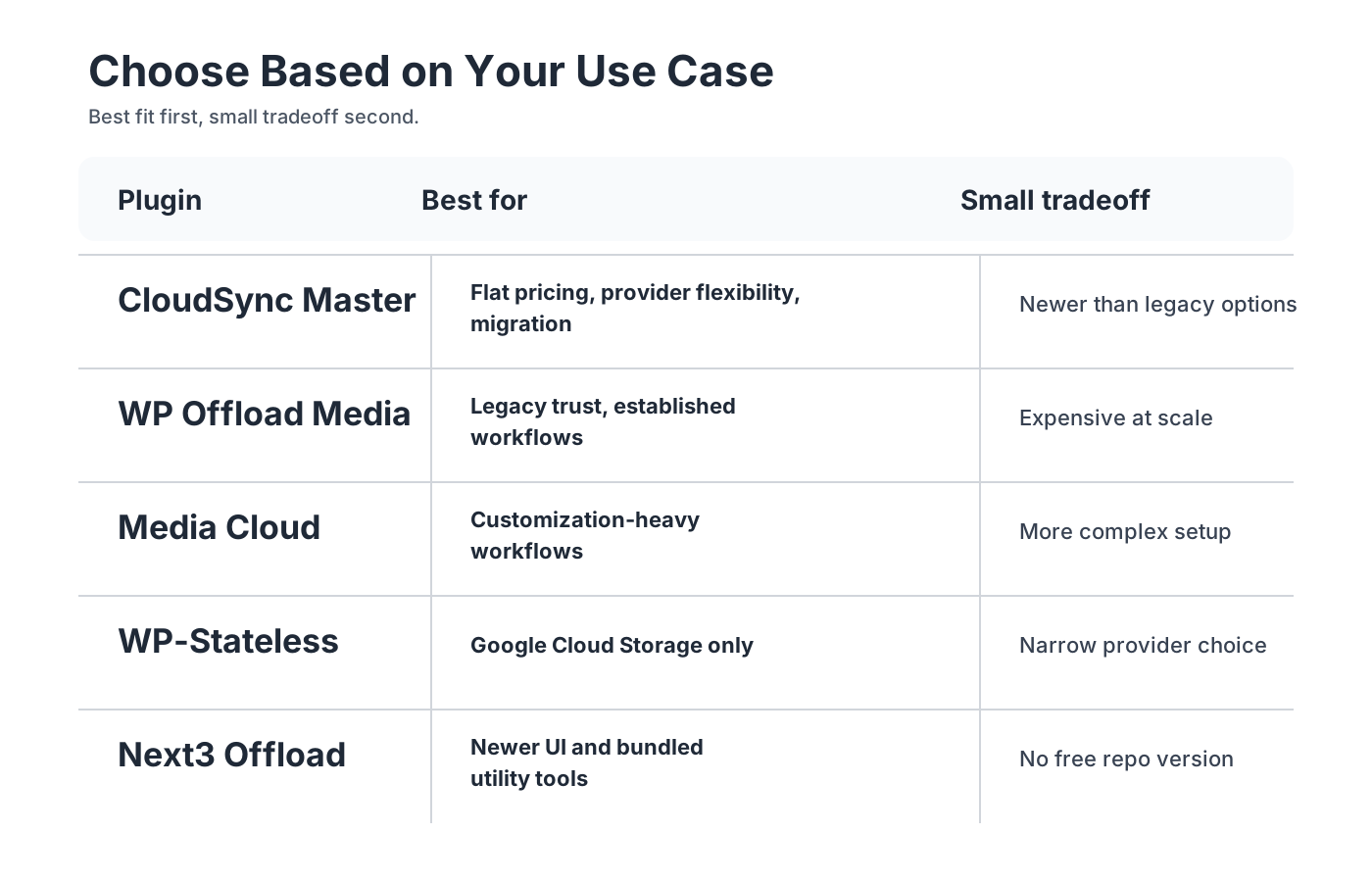
If you want the fastest way to narrow the field, use this:
| If you care most about… | Best fit |
|---|---|
| predictable flat pricing and broad provider support | CloudSync Master |
| longest track record and agency familiarity | WP Offload Media |
| Google Cloud Storage only | WP-Stateless |
| deep customization and Imgix-heavy workflows | Media Cloud |
| a newer interface with bundled optimization-style tools | Next3 Offload |
1. Quick Comparison Table
Below is a high-level overview of the top 5 contenders in the WordPress media offloading space.
| Feature | CloudSync Master | WP Offload Media | Media Cloud | WP-Stateless | Next3 Offload |
|---|---|---|---|---|---|
| Best For | Best Value & Flexibility | Enterprise / Legacy | Heavy Customization | Google Cloud Only | Next-Gen Integrations |
| Pricing Model | Flat Yearly ($89) | Per-Item Limits ($39-$349) | Flat Yearly ($60-$200) | Free (GCS only) | Tiered ($68+) |
| Providers Supported | 10 (S3, R2, GCS, B2, etc.) | 3 (S3, GCS, DO) | 8 (S3, GCS, R2, etc.) | 1 (Google Cloud) | 11+ built-in plus S3-compatible options |
| Plugin Size (Bloat) | < 1.5MB (No SDK bloat) | ~23-50MB | ~87MB | ~20MB | ~30MB |
| Unlimited Items | Yes | No (Up to 100K limits) | Yes | Yes | Yes (in higher tiers) |
| Cloudflare R2? | Yes | No | Yes | No | Yes |
| Free Version? | Yes (10 providers) | Lite Version (Limited) | Yes | Yes | No |
2. Individual Plugin Reviews
CloudSync Master Pro
The Verdict: A strong fit for teams that care about provider flexibility, operational simplicity, and predictable pricing.
Overview: CloudSync Master takes a different architectural approach from the competition. While many plugins bundle large provider SDKs, CloudSync Master uses direct REST API calls. The result is a smaller plugin footprint, broader provider support, and flatter pricing that is easier to budget for as a media library grows.
Pros:
- Ultra-lightweight design with a much smaller footprint than SDK-heavy alternatives.
- Supports 10 cloud providers including Cloudflare R2, Wasabi, Backblaze B2, and MinIO.
- Flat-rate pricing with no per-media-item upgrades.
- Includes 6 cache integrations, 4 image optimizer integrations, and dedicated PRO integrations for WooCommerce, EDD, ACF, Elementor, and WPML.
- One-click competitor migration tools for WP Offload Media, Media Cloud, and WP-Stateless.
Cons:
- Newer to the market compared to decade-old legacy plugins.
WP Offload Media
The Verdict: The legacy heavyweight. Powerful but expensive at scale.
Overview: Developed by Delicious Brains and now sold by WP Engine, WP Offload Media is still one of the best-known plugins in this category. It is reliable and familiar to many agencies. Its main tradeoff is pricing: the cost rises with the number of offloaded media items in your library, so growing sites can age into a much more expensive tier than they expected.
Pros:
- Industry-standard reliability and massive trust.
- Excellent documentation and community support.
- Private media features for WooCommerce and Easy Digital Downloads.
Cons:
- Restrictive per-item pricing model (costs $349/year if you have 100K media files).
- Public support is limited to Amazon S3, DigitalOcean Spaces, and Google Cloud Storage.
- Very large plugin size (23MB+).
Media Cloud
The Verdict: The “kitchen sink” option with deep power but steep complexity.
Overview: Media Cloud is a large, ambitious plugin. It aims to do everything: cloud offloading, image processing with Imgix, CSS/JS minification, video encoding, AI-powered image tagging with Amazon Rekognition, and more. If you need extreme programmatic control over your media processing, Media Cloud provides the tools. It also supports direct uploads that bypass the WordPress server entirely, sending files straight to your storage provider.
Pros:
- Integrates with Imgix for dynamic, on-the-fly image resizing.
- Extremely feature-rich with countless customization hooks.
- Supports multiple providers including Cloudflare R2.
- Direct upload feature can boost upload speeds by skipping the WordPress server.
Cons:
- Massive plugin size (nearly 87MB) that can slow down WordPress admin.
- High complexity; configuring the plugin requires deep technical knowledge.
- Historically buggy user interface due to the large feature surface area.
WP-Stateless
The Verdict: The best free option if you exclusively use Google Cloud Storage.
Overview: Created by Usability Dynamics, WP-Stateless is built specifically for Google Cloud Storage. It targets one niche and handles it well, keeping your WordPress site fully “stateless” (all media is on Google’s servers). Since it’s free and open-source, it’s popular among Google-centric agencies. The plugin offers four operating modes (Backup, CDN, Ephemeral, and Stateless), each controlling how aggressively files are removed from the local server.
Pros:
- Completely free and open-source.
- Deep, reliable integration with Google Cloud Storage.
- True “stateless” methodology with multiple operating modes.
- Setup assistant handles service account and bucket creation automatically.
Cons:
- Locked into Google Cloud Storage (no S3, R2, or DigitalOcean support).
- Google Cloud egress fees can be very expensive compared to Cloudflare R2.
- Some third-party compatibility features now require separate paid add-ons (WooCommerce, Gravity Forms, Divi).
Next3 Offload
The Verdict: A solid mid-tier option with good S3 compatibility.
Overview: Next3 Offload is a newer plugin that attempts to provide a comprehensive, modern approach to offloading. It has a clean interface and supports major providers, along with useful additions like auto-removing local files, database optimization tools, and built-in image compression with WebP conversion. The plugin also lets users pause and resume offloading processes.
Pros:
- Clean, modern administrative UI.
- Unlimited media offloading on higher tiers.
- Includes database optimization and image compression tools.
Cons:
- No free version on the WordPress repository to try before you buy.
- Lacks the deep cache-plugin integrations found in CloudSync Master.
- More expensive base-tier entry point.
- Mixed user reviews on reliability, with some reports of timeouts during bulk offloading.
3. Price Comparison Matrix
Cost scalability is the most critical factor when choosing an offload plugin. While storage on S3 or R2 is cheap, the plugins that connect to them have very different monetization strategies.
The table below compares the pricing models that are easiest to evaluate side by side.
| Media Library Size | CloudSync Master Pro | WP Offload Media | Media Cloud Pro | WP-Stateless | Next3 Offload |
|---|---|---|---|---|---|
| < 2,000 items | $89/year | $39/year | $60/year | Free (GCS) | From $68/year |
| < 20,000 items | $89/year | $149/year | $60/year | Free (GCS) | From $68/year |
| < 100,000 items | $89/year | $349/year | $60-$200/year | Free (GCS) | From $68/year |
| Unlimited items | $89/year | Not Available | $200/year | Free (GCS) | From $68/year |
The Takeaway: If you have a small, static blog, WP Offload Media’s $39 entry tier might seem attractive. But the moment your WooCommerce store or digital publication grows beyond 20,000 images, their aggressive pricing bumps you to $149 or $349 annually. CloudSync Master Pro stays at $89/year regardless of library size. Next3’s current public pricing is license-tiered rather than media-count-tiered, so it avoids item caps but shifts the comparison toward site count and feature bundle rather than library size alone.

If pricing predictability is your main concern, the next step is straightforward:
See CloudSync Master Pro for $89/year | Amazon S3 setup guide | Cloudflare R2 setup guide
4. Feature Comparison Matrix
What features do you get across the Free and Pro versions of the main WordPress media offload plugins? The table below breaks it down.
| Feature | CloudSync Master | WP Offload Media | Media Cloud | WP-Stateless | Next3 Offload |
|---|---|---|---|---|---|
| Auto-Upload New Media | Yes | Yes | Yes | Yes | Yes |
| URL Rewriting | Yes | Yes | Yes | Yes | Yes |
| Delete Local After Upload | Yes | Yes | Yes | Yes | Yes |
| Bulk Upload Existing | Yes (Pro) | Yes (Pro) | Yes (Pro) | Yes | Yes |
| Signed URLs / Private Download Protection | Yes (Pro) | Yes (Pro) | Yes (Configuration-dependent) | No | No clear public docs |
| Google OAuth Integration | Yes (Pro) | No | No | Yes | No public Google OAuth flow |
| Auto WebP/AVIF Serving | Yes (Pro) | No | No | No | WebP-focused tools included |
| Image Optimizer Integrations | 4 Plugins | 0 Plugins | 0 Plugins | 0 Plugins | Built-in optimization tools |
| Cache Plugin Integrations | 6 Plugins | Paid Addon | No | Paid Addon | No clear public integration list |
| Competitor Migration Tool | Yes | No | No | No | Cloud-to-cloud tools, no clear competitor import flow |
5. Provider Support Matrix
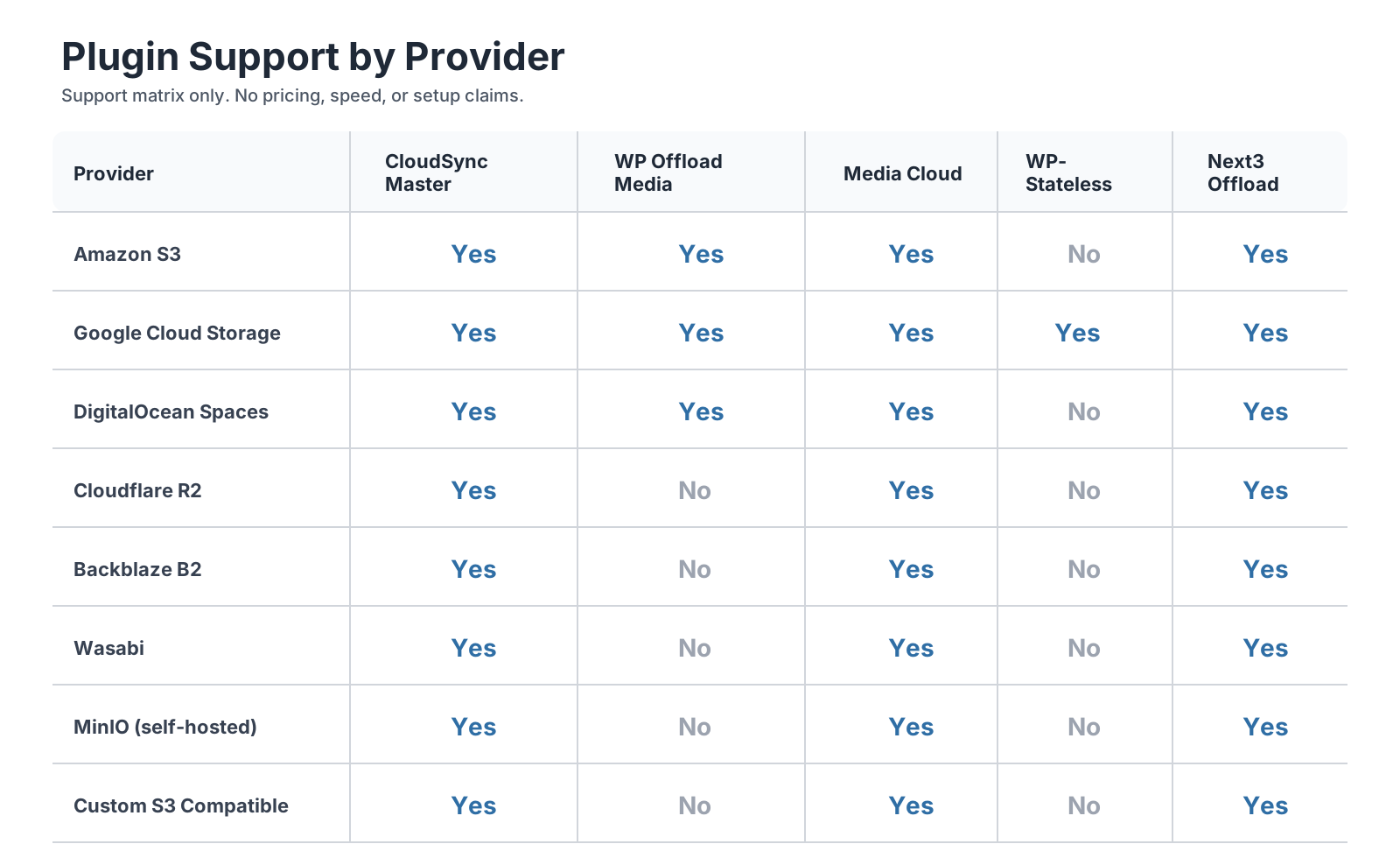
Not all cloud providers are equal. While Amazon S3 was the gold standard for a decade, providers like Cloudflare R2 and Backblaze B2 have changed the market by completely eliminating or drastically reducing data egress fees (the fees charged when users download your images).
If your plugin only supports a narrow provider set, you lose pricing leverage. For a detailed look at the Cloudflare R2 WordPress integration, see the dedicated guide.
| Cloud Provider | CloudSync Master | WP Offload Media | Media Cloud | WP-Stateless | Next3 Offload |
|---|---|---|---|---|---|
| Amazon S3 | Yes | Yes | Yes | No | Yes |
| Google Cloud Storage | Yes | Yes | Yes | Yes | Yes |
| DigitalOcean Spaces | Yes | Yes | Yes | No | Yes |
| Cloudflare R2 (Zero Egress) | Yes | No | Yes | No | Yes |
| Backblaze B2 | Yes | No | Yes | No | Yes |
| Wasabi | Yes | No | Yes | No | Yes |
| MinIO (Self-Hosted) | Yes | No | Yes | No | Yes |
| Custom S3 Compatible | Yes | No | Yes | No | Yes |
| Total Out-of-the-Box | 10 | 3 | 8 | 1 | 11+ built-in |
6. Setup Complexity Comparison
One factor that gets overlooked in most WordPress media offload plugin reviews is how long it actually takes to get from “plugin installed” to “media successfully offloading.” The number of steps varies significantly.

Steps to Connect to Amazon S3
Connecting to S3 requires creating IAM credentials in the AWS Console, which involves multiple screens and security configurations regardless of your plugin choice.
| Step | CloudSync Master | WP Offload Media | Media Cloud | WP-Stateless | Next3 Offload |
|---|---|---|---|---|---|
| Install plugin | 1 | 1 | 1 | N/A (GCS only) | |
| Create IAM policy in AWS | 2 | 2 | 2 | N/A | |
| Create IAM user + access key | 3 | 3 | 3 | N/A | |
| Enter credentials in plugin | 4 | 4 (or wp-config.php) | 4 | N/A | 4 (or wp-config.php) |
| Create / select bucket | 5 | 5 | 5 | N/A | 5 |
| Configure URL rewriting | Usually automatic | Usually automatic | Usually manual / more configurable | N/A | Usually automatic |
| Typical Total Steps | 5 | 5-6 | 5-6 | N/A | 5-6 |
Steps to Connect to Cloudflare R2
This is where the differences become clear. WP Offload Media does not publicly list R2 support, and WP-Stateless remains GCS-only.
| Step | CloudSync Master | WP Offload Media | Media Cloud | Next3 Offload |
|---|---|---|---|---|
| Install plugin | 1 | N/A | 1 | 1 |
| Create R2 bucket in Cloudflare | 2 | N/A | 2 | 2 |
| Generate R2 API token | 3 | N/A | 3 | 3 |
| Enter credentials in plugin | 4 | N/A | 4 | 4 |
| Configure URL / custom domain | Usually automatic | N/A | Usually manual / more configurable | Usually manual / provider-based |
| Typical Total Steps | 4 | Not Supported | 4-5 | 4-5 |
R2 setup is generally simpler than S3 because Cloudflare does not require complex IAM policies. When you attach a custom domain to an R2 bucket, Cloudflare’s CDN activates automatically, so you do not need to configure a separate CDN like CloudFront.
Steps to Connect to Google Cloud Storage
| Step | CloudSync Master | WP Offload Media | Media Cloud | WP-Stateless | Next3 Offload |
|---|---|---|---|---|---|
| Install plugin | 1 | 1 | 1 | 1 | 1 |
| Create GCS bucket | 2 | 2 | 2 | Auto | 2 |
| Create service account | 3 | 3 | 3 | Auto | 3 |
| Download / enter JSON key | 4 | 4 | 4 | Auto (OAuth) | 4 |
| Configure URL rewriting | Usually automatic | Usually automatic | Usually manual / more configurable | Usually automatic | Usually automatic |
| Typical Total Steps | 4-5 | 4-5 | 4-5 | 2 (with wizard) | 4-5 |
WP-Stateless wins on GCS setup because its wizard automates bucket and service account creation through Google OAuth. CloudSync Master Pro also supports Google OAuth for a more streamlined GCS setup.
7. WooCommerce Compatibility Deep Dive
For store owners, the interaction between your media offload plugin and WooCommerce matters more than raw feature lists. Product images, digital download files, and gallery thumbnails all need to work reliably from cloud storage. The table below compares the key WooCommerce integration points across all five plugins.
| WooCommerce Feature | CloudSync Master | WP Offload Media | Media Cloud | WP-Stateless | Next3 Offload |
|---|---|---|---|---|---|
| Product Image Offloading | Yes | Yes | Yes | Yes (addon) | Yes |
| Product Gallery Support | Yes | Yes | Yes | Yes (addon) | Yes |
| Digital Download Signed URLs | Yes (Pro) | Yes (Pro) | Yes | No | No |
| EDD Signed URLs | Yes (Pro) | Yes (Pro) | Yes | No | No |
| Auto-Private ACL for Downloads | Yes (Pro) | Yes (Pro) | Manual | No | No |
| Variable Product Images | Yes | Yes | Yes | Yes (addon) | Yes |
| Expiring Download Links | Yes (Pro) | Yes (Pro, 5s expiry) | Configurable | No | No |
Why Signed URLs Matter for WooCommerce
When you sell digital downloads through WooCommerce, the actual files (PDFs, ZIPs, audio tracks) get offloaded to cloud storage along with your images. Without signed URLs, anyone with the direct cloud storage URL could download your paid products for free. Signed URLs generate temporary, expiring links that only authorized buyers can access.

WP Offload Media generates download URLs that expire in 5 seconds. Once the download begins, it continues past the expiry window, but new attempts to use the expired link get rejected. CloudSync Master Pro provides similar functionality with configurable expiry windows.
WP-Stateless does not support signed URLs at all, which makes it unsuitable for WooCommerce stores selling digital products from Google Cloud Storage. Next3 Offload also lacks this feature, limiting its use for digital commerce.
WP-Stateless WooCommerce Add-on Change
It is worth noting that WP-Stateless moved its WooCommerce compatibility into a separate paid add-on in recent updates. Previously, WooCommerce support was built into the free plugin. If you rely on WP-Stateless for a WooCommerce store, verify that the add-on covers your specific product configuration.
8. Developer Hooks and Extensibility
Developers building custom themes or writing client-specific integrations need to know how much control each plugin gives them. The number and quality of available WordPress filters and actions determine whether a plugin can be adapted to unusual requirements or whether you are stuck with the defaults.
| Extensibility Feature | CloudSync Master | WP Offload Media | Media Cloud | WP-Stateless | Next3 Offload |
|---|---|---|---|---|---|
| Custom Filters for URL Rewriting | Yes | Yes | Yes | Yes | No clear public docs |
| Hooks for Upload/Delete Events | Yes | Yes | Yes | Limited | No clear public docs |
| SDK Client Configuration Filters | N/A (no SDK) | Yes | Yes | Yes | No clear public docs |
| Custom Provider Endpoint Filters | Yes | No | Yes | No | No clear public docs |
| WP-CLI Support | Yes | Yes | Yes | Yes | No public WP-CLI docs |
| wp-config.php Constants | Yes | Yes | Yes | Yes | Yes |
| Documented Developer Guide | Yes | Yes (extensive) | Limited | Limited | Limited public docs |
| Open-Source Tweaks Plugin | No | Yes (GitHub) | No | No | No public tweaks repo |
WP Offload Media
WP Offload Media has the most mature developer ecosystem in this category. Delicious Brains maintains a dedicated developer guide and a tweaks plugin on GitHub that documents all available hooks with working examples. Filters exist for adjusting SDK client arguments, modifying CloudFront paths, controlling which files get removed from the local server, and overriding multisite subsite prefixes. If a third-party plugin (such as Enable Media Replace) updates a filename, WP Offload Media fires a filter and cleans up the old file in the bucket.
CloudSync Master
Because CloudSync Master does not bundle SDKs, its extensibility model is different. Rather than exposing SDK configuration filters, it provides hooks around its REST API calls and URL rewriting logic. Developers can filter custom provider endpoints, making it straightforward to add S3-compatible providers that the plugin does not ship with out of the box. Its wp-config.php constant support allows server-level configuration that persists across plugin updates.
Media Cloud
Media Cloud provides extensive hooks for image processing, especially around its Imgix integration. Custom filters allow developers to modify image parameters, crop coordinates, and CDN paths programmatically. The plugin’s large feature surface means there are many internal hooks, but formal documentation of these hooks is sparse compared to WP Offload Media’s developer guide.
WP-Stateless
WP-Stateless supports wp-config.php constants and network setting overrides for multisite. Its CLI includes the wp stateless migrate command with an auto parameter for running data optimizations. Developer hook documentation is limited, and the plugin’s extensibility has been somewhat constrained by the move of compatibility features into separate add-ons.
9. Migration Path Matrix
Switching from one offload plugin to another can be nerve-wracking. If your media URLs break during the transition, your entire site’s images disappear. The table below shows which plugins can import data from which others, so you know your migration options before you commit.
| Migrate From | Migrate To CloudSync Master | Migrate To WP Offload | Migrate To Media Cloud | Migrate To WP-Stateless | Migrate To Next3 Offload |
|---|---|---|---|---|---|
| WP Offload Media | One-click import | N/A | No built-in tool | No built-in tool | No clear competitor import docs |
| Media Cloud | One-click import | No built-in tool | N/A | No built-in tool | No clear competitor import docs |
| WP-Stateless | One-click import | No built-in tool | No built-in tool | N/A | No clear competitor import docs |
| Next3 Offload | Manual (metadata) | No built-in tool | No built-in tool | No built-in tool | N/A |
| No Previous Plugin | Bulk upload (Pro) | Bulk upload (Pro) | Bulk upload (Pro) | Bulk upload (Free) | Bulk upload / sync tools |
CloudSync Master is the only plugin in this comparison that ships with built-in migration tools for competing plugins. Its importer reads the database records and settings created by WP Offload Media, Media Cloud, or WP-Stateless and adopts them directly, so migration is much more straightforward than starting over with a full re-sync.

If you are migrating between any other combination (for example, from WP Offload Media to Media Cloud), you typically need to deactivate the old plugin, install the new one, and re-run a bulk sync. Depending on library size, this can take hours and may cause temporary broken images on the front end.
10. Performance Impact: Plugin Size and Admin Load
Every plugin you install in WordPress gets loaded on every admin page request. A 1.5MB plugin and an 87MB plugin do not create the same operational profile, even when neither is actively offloading anything.
Plugin Size Breakdown
| Plugin | Installed Size | SDK Bundled | Autoloaded PHP Classes |
|---|---|---|---|
| CloudSync Master | 1.5 MB | None (direct REST API) | Minimal |
| WP-Stateless | ~20 MB | Google Cloud SDK | Moderate |
| Next3 Offload | ~30 MB | AWS SDK + others | Moderate |
| WP Offload Media | ~23-50 MB | AWS SDK, Google SDK, DO SDK | Heavy |
| Media Cloud | ~87 MB | AWS SDK, Google SDK, DO SDK + Imgix + more | Very Heavy |
Why Size Matters for WordPress Admin
The WordPress admin dashboard loads all active plugin code on every page view. When a plugin bundles the full AWS SDK (approximately 20MB of PHP files), your server has more code to parse and autoload even when the admin user is editing a blog post or reviewing comments. On shared hosting or memory-constrained VPS instances, that can increase PHP memory consumption and page generation time.
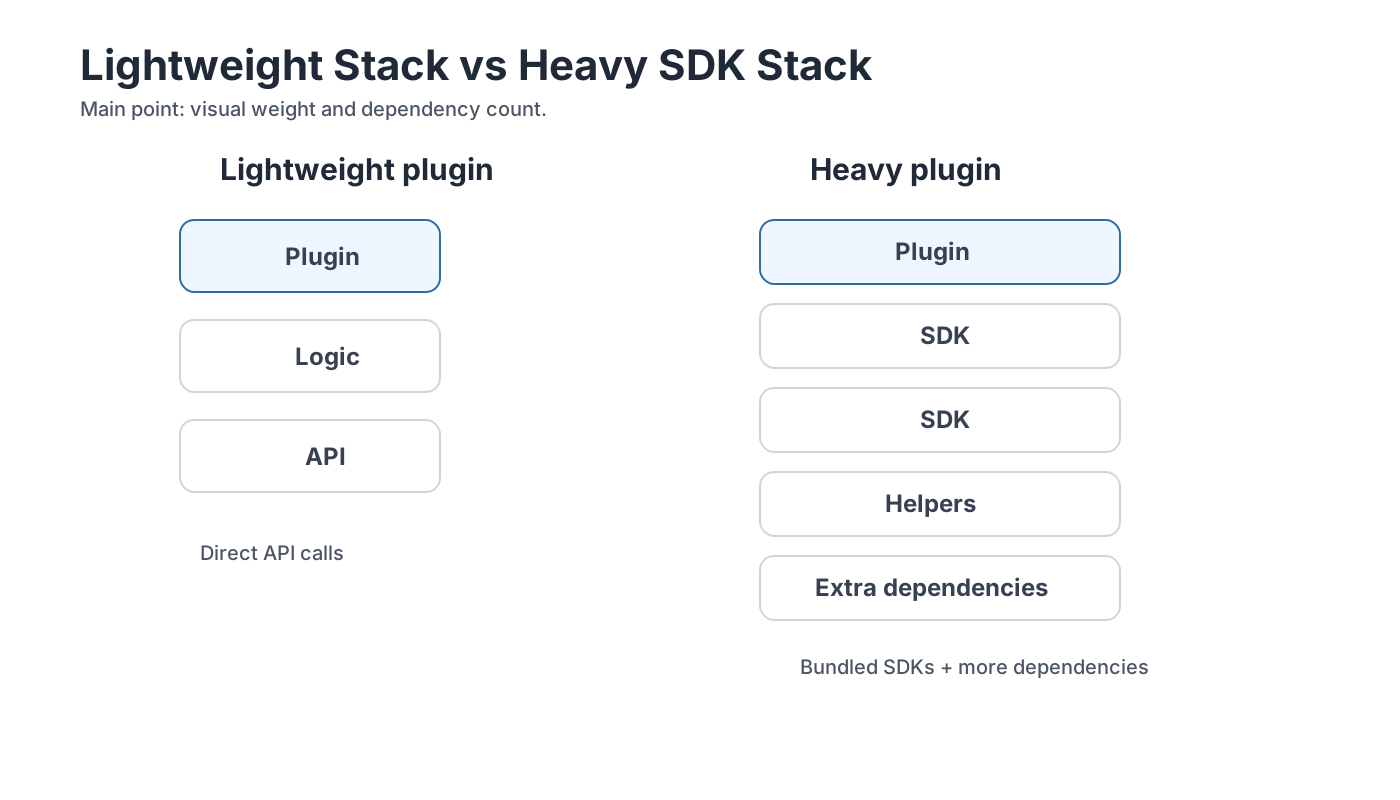
CloudSync Master avoids this by implementing S3-compatible API calls using its own lightweight Signature V4 signing code instead of bundling vendor SDKs. The practical result is a smaller memory footprint per admin request.
For sites running multiple heavy plugins (page builders, WooCommerce, SEO tools), a much larger media offload plugin adds more pressure to already tight PHP memory limits. On lower-resource hosting, that increases the odds of slow dashboard response, failed media actions, or memory-related admin issues.
11. Recommendations by Use Case
Choose WP-Stateless if: You are an agency tied to the Google Cloud ecosystem and you only plan on using Google Cloud Storage, regardless of bandwidth costs.
Choose Media Cloud if: You are a highly technical developer who needs to dynamically crop and filter images on the fly via Imgix, and you do not mind an 87MB plugin in your WordPress admin.
Choose WP Offload Media if: You have a large budget, a small media library (under 5,000 items), and prefer the safety of the oldest, most recognized name in the space. Note that it only supports S3, DO Spaces, and GCS.
Choose Next3 Offload if: You want a modern UI and are willing to pay without testing a free version first. The bundled database optimization and image compression features may save you from installing separate plugins for those tasks.
Choose CloudSync Master if: You want strong value, a lighter plugin footprint, and freedom from vendor lock-in. It is usually the best fit if:
- You want to use Cloudflare R2 to pay $0 in data egress fees.
- You have over 10,000 media items and refuse to pay per-item limits.
- You care about your backend performance (a 1.5MB plugin architecture).
- You want seamless integration with image optimizers, cache plugins, and common WordPress builder or commerce workflows.
- You run a WooCommerce store and need signed URLs for digital downloads.
- You are migrating from another offload plugin and want a one-click import.
If that sounds like your setup, go straight to:
CloudSync Master Pro | Free Version on WordPress.org | WordPress + R2 landing page
12. Which plugin should you choose if you care about business outcomes, not just features?
If your main goal is to protect optionality and keep the operating model simple, the choice becomes clearer:
Choose WP Offload Media if trust and familiarity matter most
WP Offload Media is still credible. It has been around for years, it is well known, and plenty of agencies are already comfortable with it. If you have a small media library and you are fine with the current provider list, that familiarity may be worth paying for.
Choose WP-Stateless if you are fully committed to Google Cloud
WP-Stateless is a niche tool, but it is a useful niche tool. If your organization has already standardized on Google Cloud Storage and does not care about multi-provider flexibility, it remains a reasonable choice.
Choose Media Cloud if you genuinely need the larger feature surface
Most buyers do not need it. The ones who do usually know quickly. If you want deeper customization and Imgix-heavy workflows, Media Cloud still has a place. You just need to accept the complexity that comes with it.
Choose CloudSync Master if you want the best balance of cost, flexibility, and operational simplicity
For many commercial buyers, this is where the comparison becomes strongest.
While WP Offload Media helped define the category, its limited provider list and per-item pricing model make it harder to recommend for growing businesses now. For a full side-by-side breakdown, see our CloudSync Master vs WP Offload Media comparison.
CloudSync Master works best when these are your priorities:
- flat pricing instead of item-count penalties
- support for modern low-egress or zero-egress providers like Cloudflare R2
- a lighter plugin footprint inside WordPress
- a practical migration path away from competing plugins
That combination makes it a strong overall choice for many WooCommerce stores, digital publishers, and agencies that need a WordPress cloud storage plugin they can still live with a year from now.
Try CloudSync Master Free on WordPress.org | Upgrade to Pro for $89/year
13. Frequently Asked Questions (FAQ)
Q: Can I migrate from WP Offload Media to CloudSync Master without starting from scratch? A: Yes. CloudSync Master includes a one-click migration tool that imports WP Offload Media settings and media metadata, so moving over is much cleaner than doing a full manual re-sync. It also supports imports from Media Cloud and WP-Stateless.
Q: Does WP Offload Media support Cloudflare R2? A: WP Offload Media’s public product and plugin pages list Amazon S3, Google Cloud Storage, and DigitalOcean Spaces. They do not list Cloudflare R2 support. If R2 is a requirement, you need a plugin that supports it directly.
Q: What is “Plugin Bloat” and why does 1.5MB vs 87MB matter? A: Plugins that bundle official cloud SDKs add far more code to your WordPress install. That can mean more memory use and more admin overhead, especially on smaller hosting plans. CloudSync Master takes a lighter approach by using direct REST APIs instead of bundling large vendor SDKs.
Q: Does CloudSync Master work with WooCommerce? A: Yes, both the Free and Pro versions work with WooCommerce. The Free version covers normal media workflows, while the Pro version adds signed URLs for secure digital downloads. The same PRO download-protection pattern also exists for Easy Digital Downloads.
Q: Which cloud storage provider is the cheapest for WordPress? A: Cloudflare R2 and Backblaze B2 are consistently the cheapest. While Amazon S3 storage is inexpensive, Amazon charges high “Egress” fees (bandwidth charges when users download images). Cloudflare R2 charges $0.00 for egress, making it the most economical choice for high-traffic websites.
Q: How many steps does it take to set up Cloudflare R2 with a WordPress offload plugin? A: With CloudSync Master or Media Cloud, connecting to R2 takes about four steps: install the plugin, create an R2 bucket in Cloudflare, generate an R2 API token, and enter the credentials in the plugin settings. R2 setup is generally simpler than S3 because Cloudflare does not require complex IAM policies. WP Offload Media does not support R2 at all.
Q: Can I use a media offload plugin with WooCommerce digital downloads? A: Yes, but not all plugins support it equally. CloudSync Master Pro and WP Offload Media Pro both generate signed (expiring) URLs for digital download files, preventing unauthorized access. WP-Stateless does not support signed URLs, making it unsuitable for protecting paid downloads on Google Cloud Storage.
Q: What happens to my images if I switch from one offload plugin to another? A: If you switch to CloudSync Master, its built-in migration tool imports your existing cloud metadata from WP Offload Media, Media Cloud, or WP-Stateless. That usually makes the move much cleaner than switching to a plugin that requires a full re-sync. Between other plugin combinations, a full re-sync is more common and can create extra migration work.
Q: Do media offload plugins work with page builders like Elementor and Divi? A: Most offload plugins rewrite media URLs at the WordPress core level, so page builders that use standard WordPress media functions will work. WP-Stateless has a separate Divi compatibility add-on. CloudSync Master also ships dedicated PRO integrations for Elementor and ACF, which makes its builder support story stronger than generic URL rewriting alone.
Q: Which plugin has the best developer API for custom integrations? A: WP Offload Media has the most documented developer ecosystem, with an open-source tweaks plugin on GitHub and a formal developer guide covering all available filters and actions. CloudSync Master provides hooks around its REST API calls and URL rewriting logic. Media Cloud offers extensive internal hooks for image processing but has limited formal documentation for them.