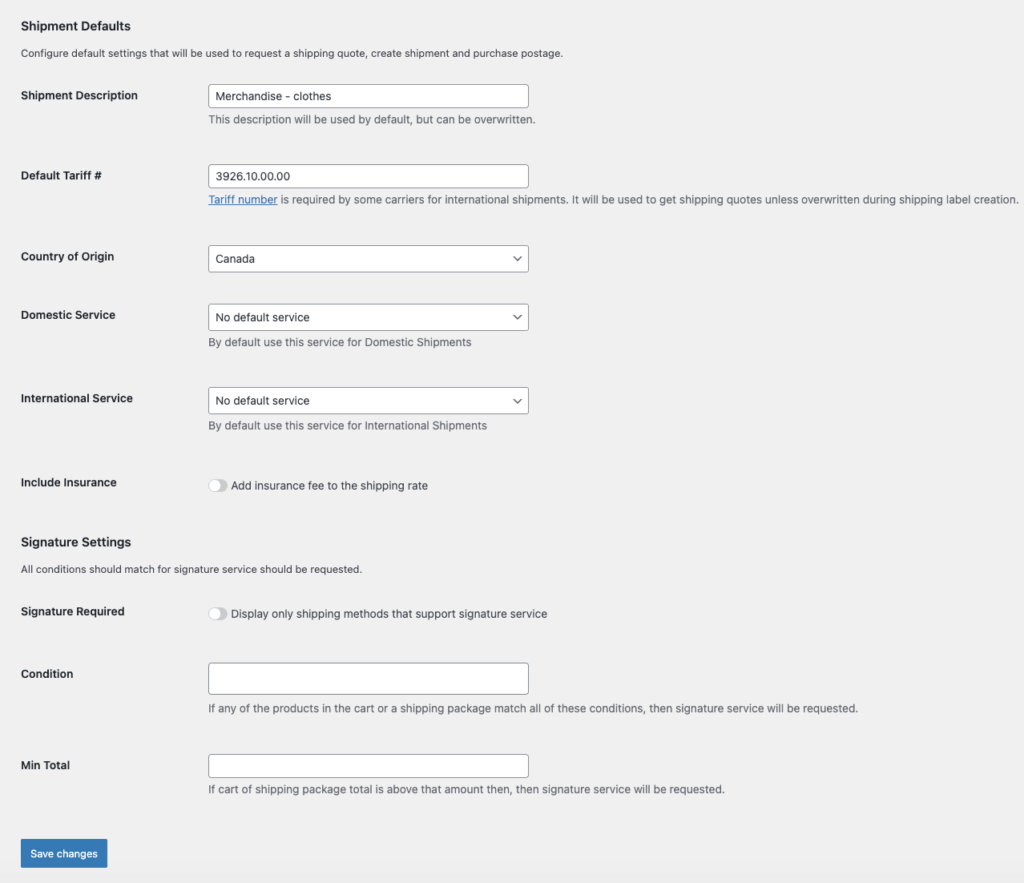
How to setup Shipment Defaults settings for Stallion Express Shipping PRO plugin?
In this guide, we’ll walk through the Shipment Defaults settings of the Stallion Express Shipping PRO plugin and explain what each setting controls and how it affects your shipments.
Shipment Description
This description will be used as the default for your products, but it can be modified or overridden as needed.
Default Tariff
If you ship internationally, inputting a tariff number is required by carriers for international shipments. It is used by the Stallion API to retrieve shipping rates. If no tariff number is entered, the Stallion API will not return any shipping rates.
Country of Origin
Since you are using Stallion Express to ship your products and your store is based in Canada, enter Canada in this field.
Domestic Services and International Services
You can configure preferred shipping services for both domestic and international shipments. However, during the testing period, we recommend leaving these fields empty to avoid restricting the display of available shipping rates.
Signature Settings
Not all shipping services support signature on delivery. Please note that if you enable signature service, only shipping services that offer signature on delivery will return shipping rates.
Shipping services that do not support signature will be filtered out, which may result in no rates being displayed in the cart. Therefore, we recommend making sure the shipping services you have enabled in the shipping services settings support signature on delivery before enabling this option.