
How to setup tracking of the shipments?
Plugin can automatically track a progress of the shipments and update order details for the shipping labels that were purchased and printed through it.
In this document we will go over Auto Tracking Settings of WooCommerce shipping plugin and talk about what they control and when you might want to change them.
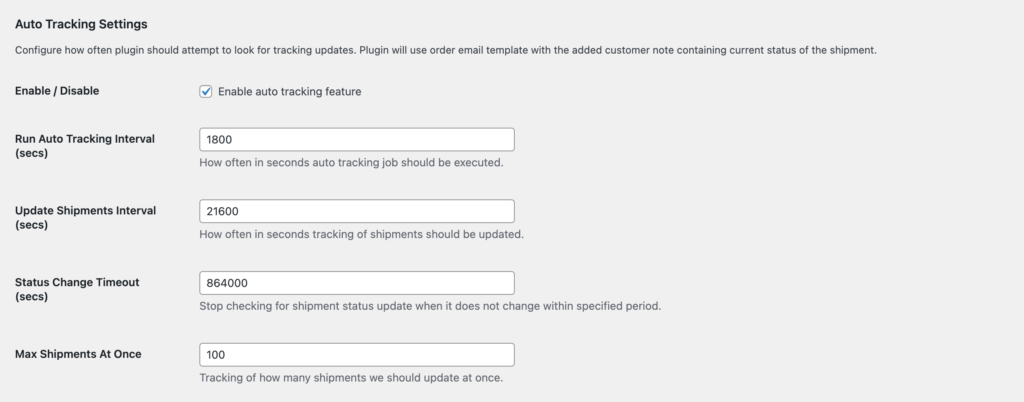
How does auto tracking work? #
Shipping plugin is using WordPress CRON to regularly execute a task that will periodically check a status and location of the shipments that are registered in the plugin and were not yet delivered or returned. Once plugin will detect a change in a status of a shipment, it will automatically update an order that is associated with it with the latest tracking details.
Enable / Disable #
Check Enable / Disable checkbox for the plugin to start tracking shipments for the shipping labels that were purchased and printed via the plugin.
Run Auto Tracking Interval #
It defines how often WordPress CRON job that checks for the latest tracking information should be executed. By default, it is set to 1800 sec (30 min), which means that the plugin will execute the tracking job once every 30 mins.
Depending on the volume of the shipments (orders) you might want to decrease this value.
Update Shipments Interval #
It defines how often the plugin should check for the tracking updates of each individual shipment.
By default, it is set to 21600 sec (6 hours), which means that the plugin will wait for 6 hours before it attempts to check if shipment tracking has any new information.
Status Change Timeout #
In some cases, such as when a package has been inducted, handed off to an intermediate carrier, or not scanned at delivery, carriers may stop updating the tracking information.
The Status Change Timeout setting defines how long the plugin will continue checking for shipment updates if no new tracking information is received during that interval period.
By default, this value is set to 864,000 seconds (10 days). This means that if the plugin does not detect any tracking updates within 10 days of the last update, it will assume the shipment is no longer actively updating (for example, delivered or lost) and will stop tracking it.
Max Shipments At Once #
It defines how many shipments will be picked and then updated on every execution of the Shipping Plugin WordPress CRON job.
By default, this value is set to 100 shipments. Depending on your shipment volume, you can increase or decrease this number as needed.


