
E-Commerce Shipping
No UK Rates from ChitChats? Configure “Duties Paid” the Right Way (Step-by-Step Guide)

If your WooCommerce store was previously returning live shipping rates for UK addresses through ChitChats Shipping PRO but has recently stopped returning rates for UK shipments, this is not a bug in the plugin. Chit Chats updated their API in July 2026, and UK rate requests now require a specific configuration before rates will be returned.
The key change comes down to a single setting: Duties Paid.
Following the latest confirmation from the Chit Chats Support team, the Duties Paid option must now be disabled (unchecked) for UK shipments in order for the ChitChats API to return rates.
This article is a step-by-step guide on how to configure your Shippo Shipping PRO plugin settings to comply with the updated ChitChats API and restore UK shipping rate, including how to keep Duties Paid enabled for other destinations, such as the United States.
Why “Duties Paid” must be disabled for the UK
For UK shipments, the Duties Paid option must be disabled (unchecked).
Although the option is disabled, if valid VAT Reference information is provided in the plugin’s settings and included in the rate request, the postage fee covers the brokerage fee, and the UK recipient will not be charged VAT or duties upon delivery. This is the configuration recommended by Chit Chats support.
Which setup do you need?
Before you begin, decide which of these two scenarios applies to your store:
- Scenario A — Duties unpaid for all countries (simplest). If you are happy to keep duties unpaid for every destination, you don’t need per-zone configuration at all. Simply leave the Duties Paid option unchecked in the main (global) plugin settings, and it will apply to all countries, including the UK. You can skip the rest of this guide.
- Scenario B — Duties Paid enabled for other regions (e.g. the US), but unchecked for the UK. If you want to keep Duties Paid enabled for other regions, for example, the United States. While disabling it only for the UK, you need to configure settings per shipping zone. The steps below walk you through that setup.
Part 1: Set your global default settings
Step 1: Configure the API Settings tab
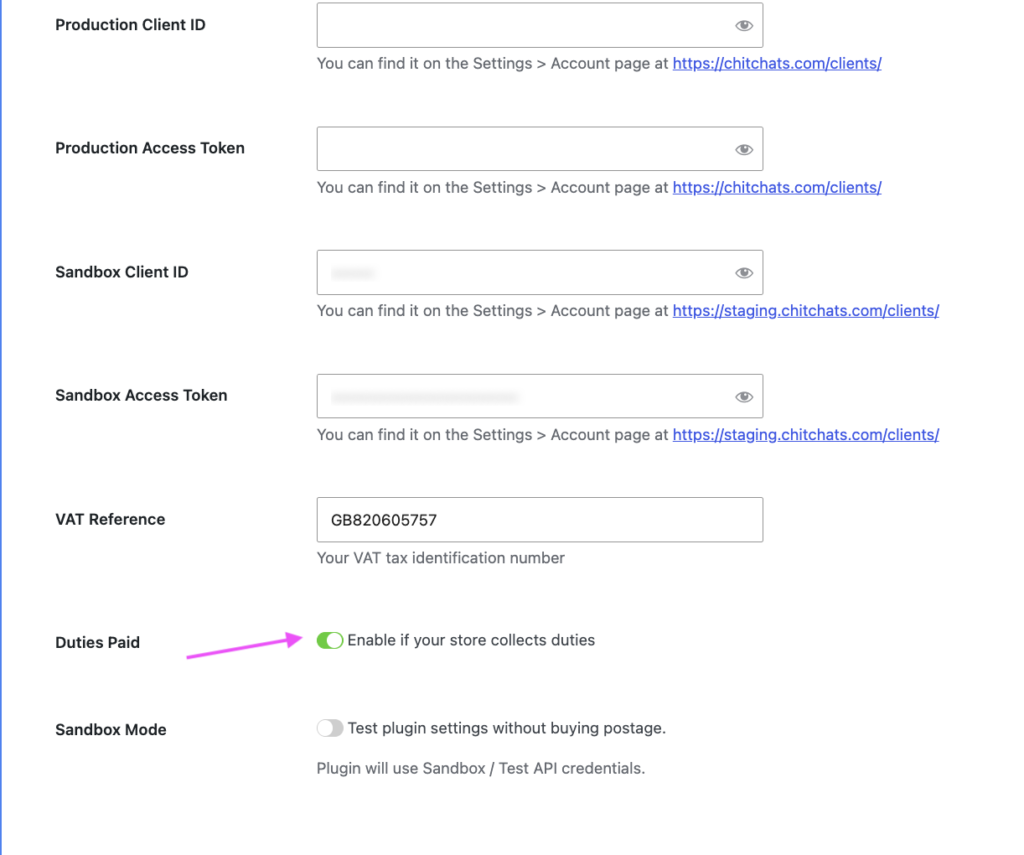
Go to the API Settings tab and enable the Duties Paid option. This will be your global default setting, as shown below. Enter your VAT Reference number.
Step 2: Configure the Cart Rates tab
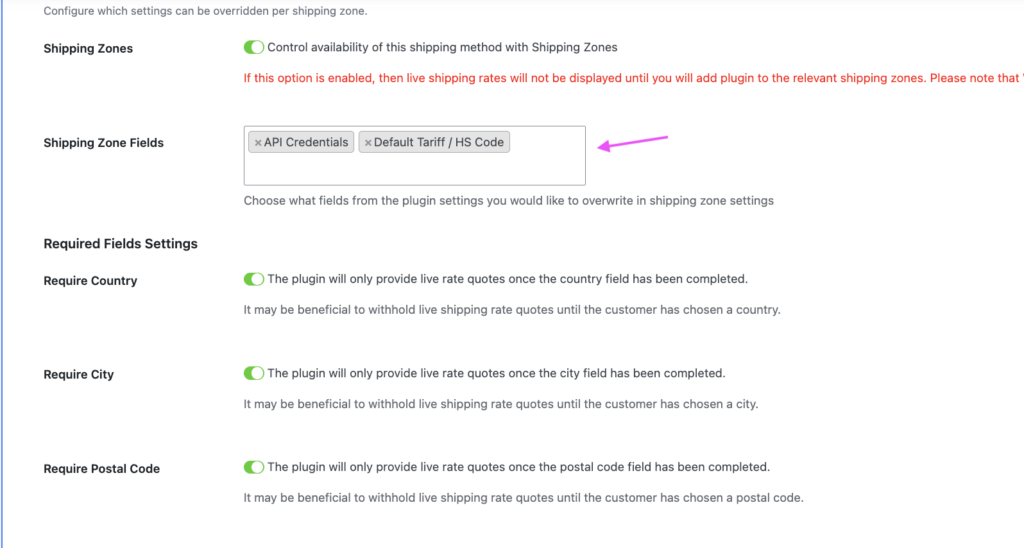
Go to the Cart Rates tab and enable Shipping Zones, then select the API Credential, Default Tariff/HTS Code, and enable Shipping Zone options. Save the plugin settings. It will allow you to configure the API, tariffs and related settings per shipping zone.
Part 2 — Configure your UK shipping zone
Step 3: Add ChitChats Shipping to your shipping zones
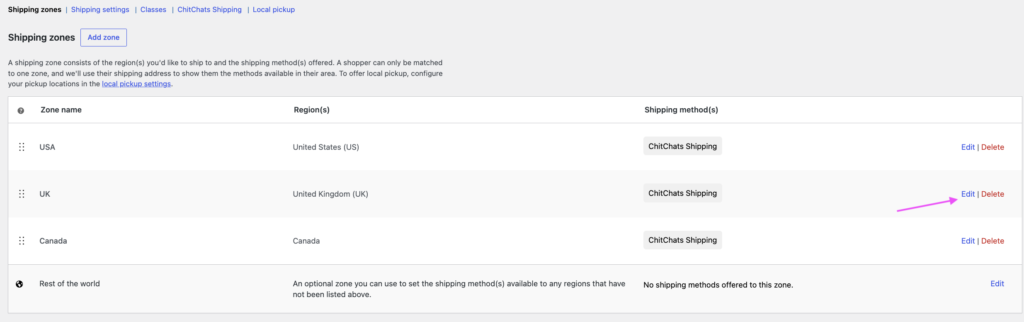
Go to WooCommerce → Settings → Shipping → Shipping Zones, and ensure the ChitChats Shipping method has been added to each shipping zone for which you want to display live shipping rates.
Step 4: Edit your UK shipping zone
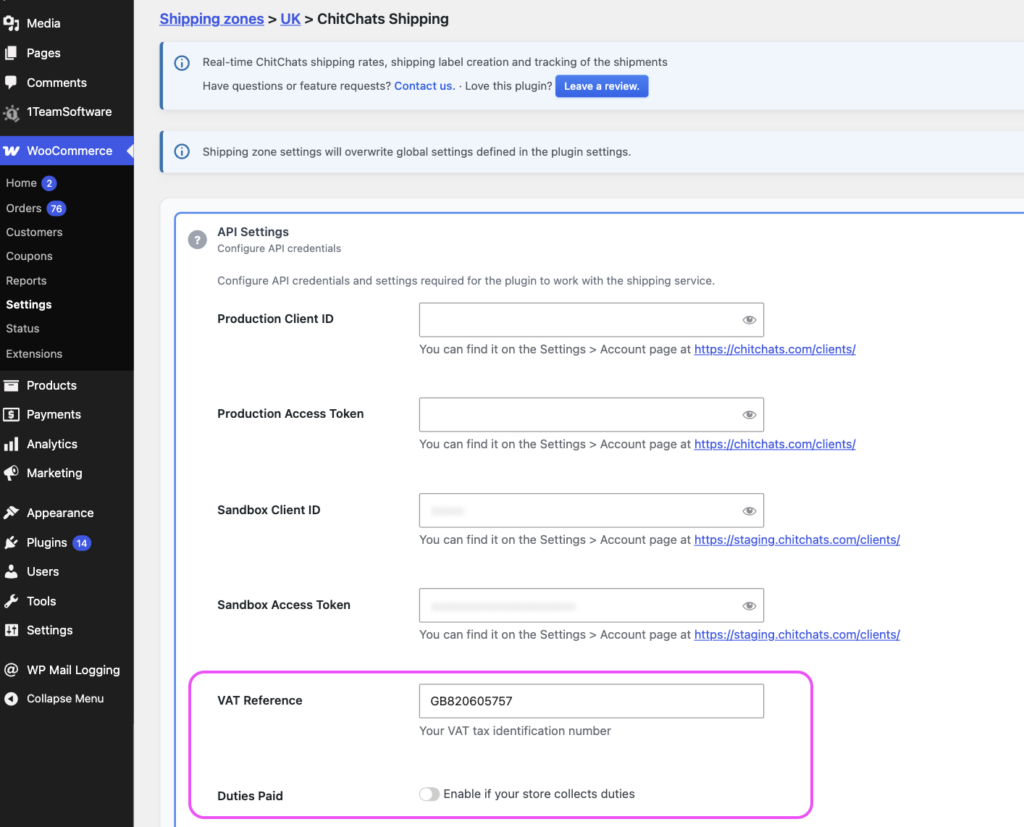
Click “Edit” on the UK shipping zone. Under the API Settings and Shipment Defaults sections, enter your VAT Reference number and leave the Duties Paid option unchecked, then save the settings as shown below.
This configuration allows the Chit Chats API to return shipping rates for UK addresses.
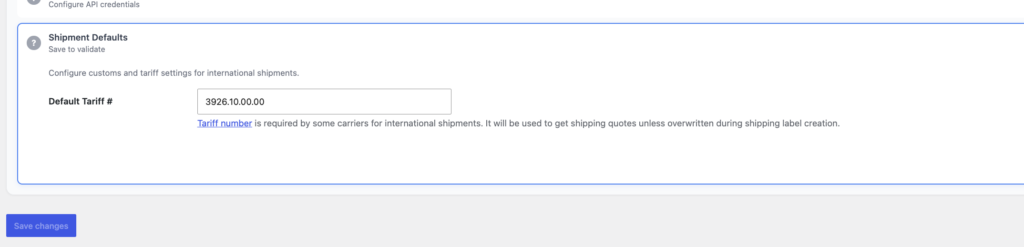
Step 5: Enter your default HS Tariff Code
Under the Shipment Defaults tab, enter your default HS Tariff Code.
Step 6: Save and test
Save the settings and test again using a new UK shipping address at the Cart or Checkout page. (Using a new shipping address helps avoid cached shipping rates.) The shipping zone settings will override the global plugin settings.
Summary
The ChitChats Shipping PRO plugin supports per-zone configuration; you can keep Duties Paid enabled globally, for example, for US shipments. While disabling the duties paid only for the UK shipping zone. As long as a valid VAT Reference is included, this matches the configuration recommended by Chit Chats support and allows UK shipping rates to be returned successfully, with no VAT or duties charged to the UK recipient upon delivery.
📍Related plugin: ChitChats Shipping PRO
📍Related article:
Chit Chats vs Stallion Express: Which One Is Better for Canadian WooCommerce Stores in 2026?