
AI Gateway PRO – WordPress MCP Server Plugin
From: $0.00 / year
Connect Claude to WordPress. You Set the Limits.
AI Gateway turns your site into an MCP server that Claude, ChatGPT, Gemini and Cursor connect to directly – with a per-role read/write/delete permission matrix, OAuth 2.1 consent, and an audit log that names the permission behind every change.
160 free tools. 47 Pro tools. Zero tools exposed until you switch them on.
- Permissions live with the WordPress role, not the token – set once, holds for every AI app
- Posts, pages, products, orders, coupons and SEO meta, on your own site over HTTPS
- Audit log names the user, the app and the exact permission that allowed each change
- Bulk edits that preview first, plus Undo on the audit row (Pro)
- Subscriptions churn reports and AutomateWoo control by chat (Pro)
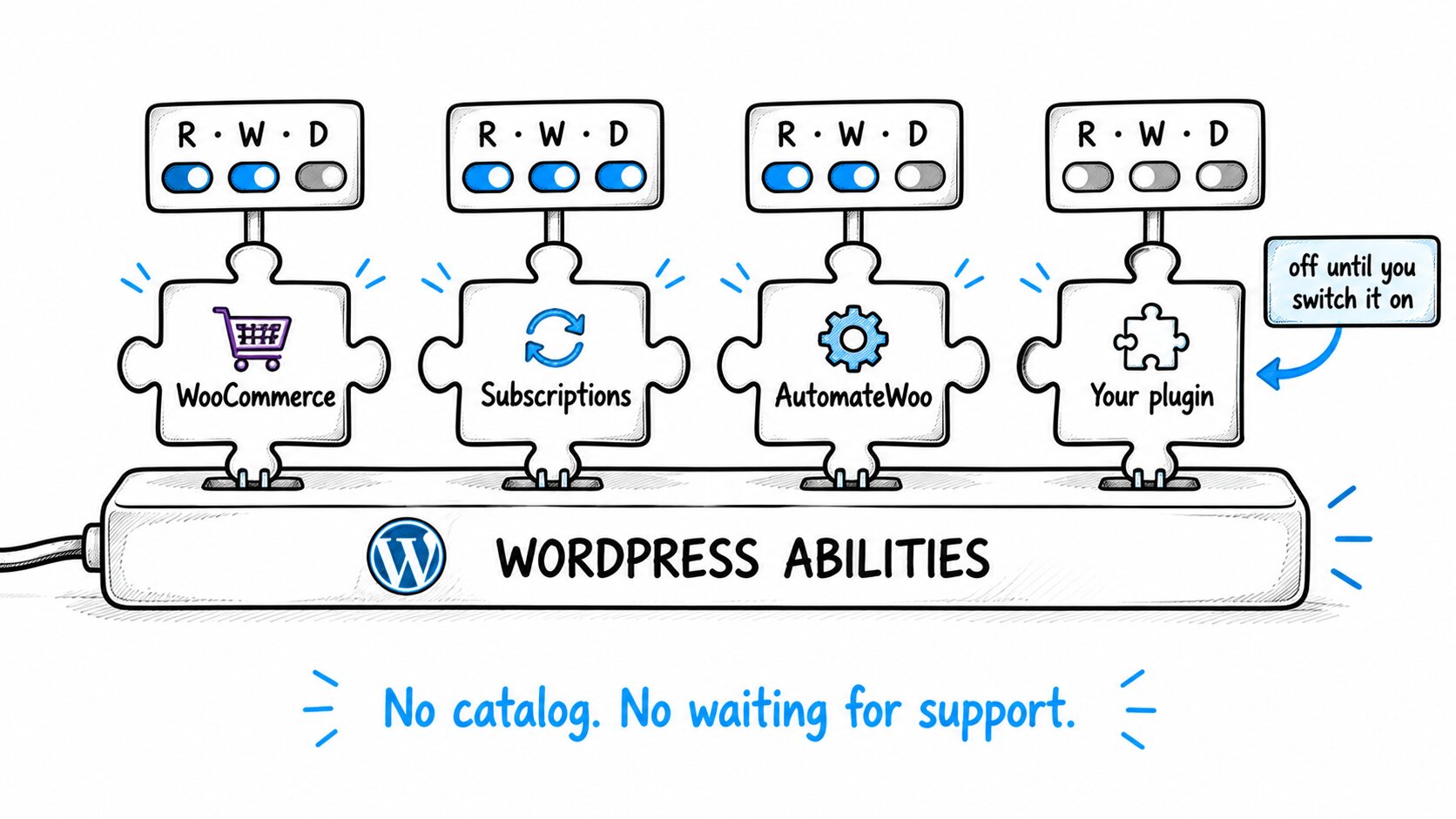
- Any plugin that registers WordPress Abilities is governed automatically
Free version right here – PRO adds bulk edits with preview, undo, a self-verifying audit chain and the store reports.
Connect Claude to WordPress. You Set the Limits.
Your site becomes an MCP server that Claude, ChatGPT, Gemini and Cursor connect to directly. You decide, per WordPress role, what the AI may read, write or delete, and every change is logged. Free lets you do the work. PRO shows you where the money is.
Start free. Nothing is exposed until you switch it on, so you can try the role matrix on your own store before you pay a cent.
Built on the official WordPress MCP Adapter, by the team behind our CloudSync, FedEx, ShipStation and ShipEngine plugins. Nothing routes through our servers.
Works With The AI Apps You Already Pay For
Free version with all 160 tools and the full permission matrix. No account, no card. PRO adds bulk edits, undo and the Subscriptions and AutomateWoo reports.
Why Store Owners Trust It
See It Work Before You Pay
Install the free version right here and all 160 tools are there, behind switches that start off. Connect one AI, grant it read on one area, and watch it work on your real store. Nothing is exposed until you switch it on, and the free tier never expires.
One Proven Engine
The same plugin architecture already powers our CloudSync, FedEx, ShipStation and ShipEngine products. AI Gateway is not an experiment – it is the team’s production code, pointed at the official WordPress MCP Adapter instead of a carrier API.
Native WordPress Abilities
Built directly on the official WordPress MCP Adapter and the Abilities API that ships in WordPress 6.9, not a private tool catalogue. Any plugin that registers abilities is detected and governed automatically, so the tool list grows with your site.
Honest Pricing, Real Support
$129 a year, everything included. No per-request fees, no metering, no hosted relay to subscribe to. Both PRO tiers include every PRO feature, and monthly billing is there if you just want a one-month trial.
The Copy-Paste Tax, and the Fear That Keeps You Paying It
Your AI can already write the product descriptions. It just cannot reach your site. It drafts faster than you type and it never gets bored of the 340th product description – and then it stops at the edge of the chat window, because it cannot touch your store. So you keep paying the tax:
- “Update the plan names on every pricing post” – 20 minutes of prompting, then an hour of pasting
- “Set every out-of-stock item in Summer to backorder” – the AI writes the list; you click through 60 product screens
- “Give me every page with no meta description and write one” – it writes all of them; you paste each one into Yoast by hand
- “Which subscribers are about to churn?” – export, upload, ask, hope the CSV was right
At a WooCommerce manager’s median rate of about $30 an hour, two to three hours a week of this transfer work is $3,000 to $4,700 a year before the first mistake. And the reason most store owners keep paying it is not that connecting an AI is hard. It is that connecting an AI is scary: give a chatbot a token with full access to a live store and one confident wrong answer can reprice a catalogue, publish a draft, or zero the stock on 500 SKUs.
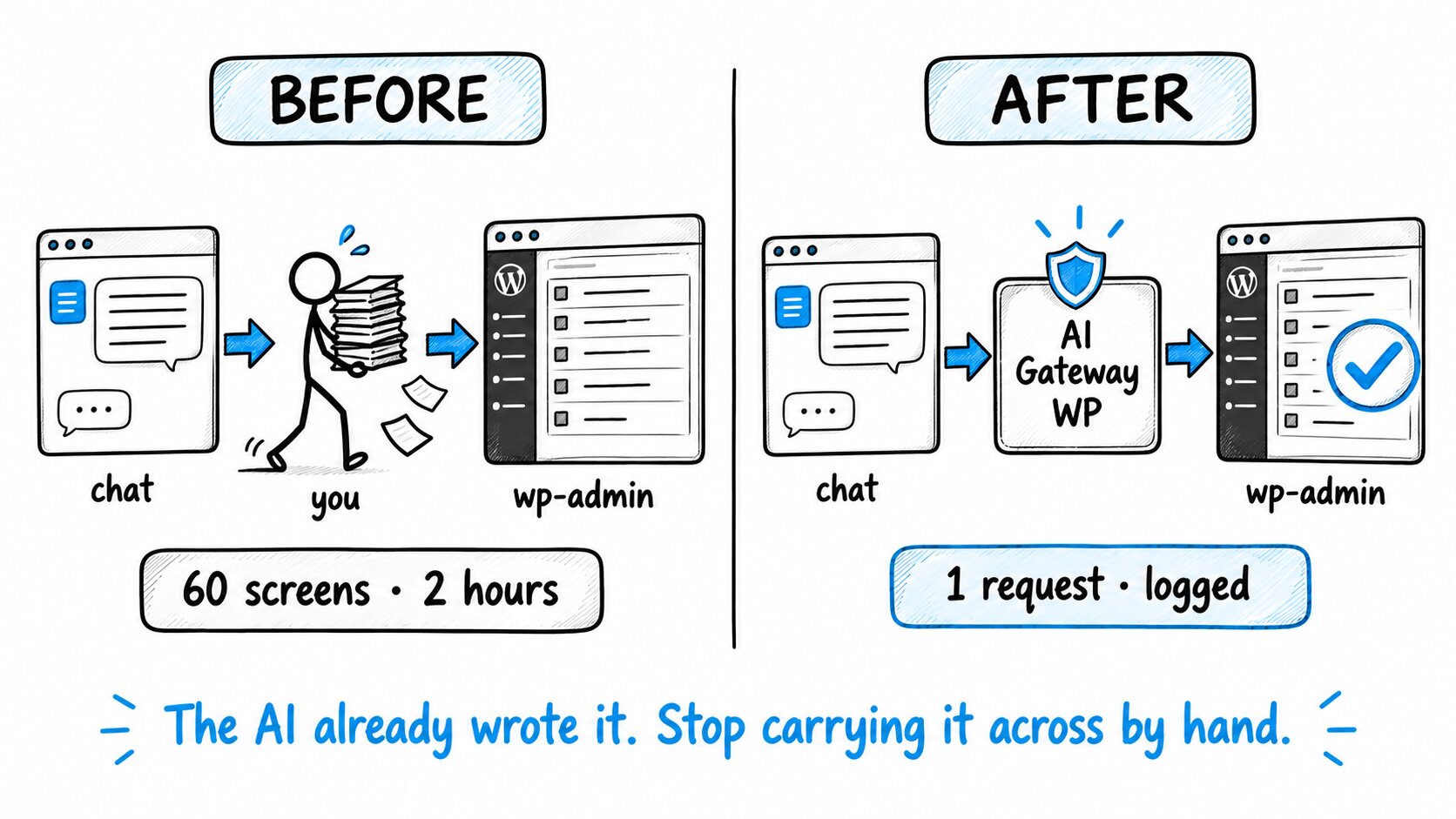
AI Gateway removes both halves of the problem at once: the pasting, because the AI can act inside the areas you allow, and the fear, because it can only act inside the areas you allow. Every change it makes is written down, with the permission that allowed it.
What You Get
One WordPress-native plugin that turns your site into an MCP server, governed by a role matrix you set once and an audit log that names the permission behind every change.
A Per-Role Permission Matrix
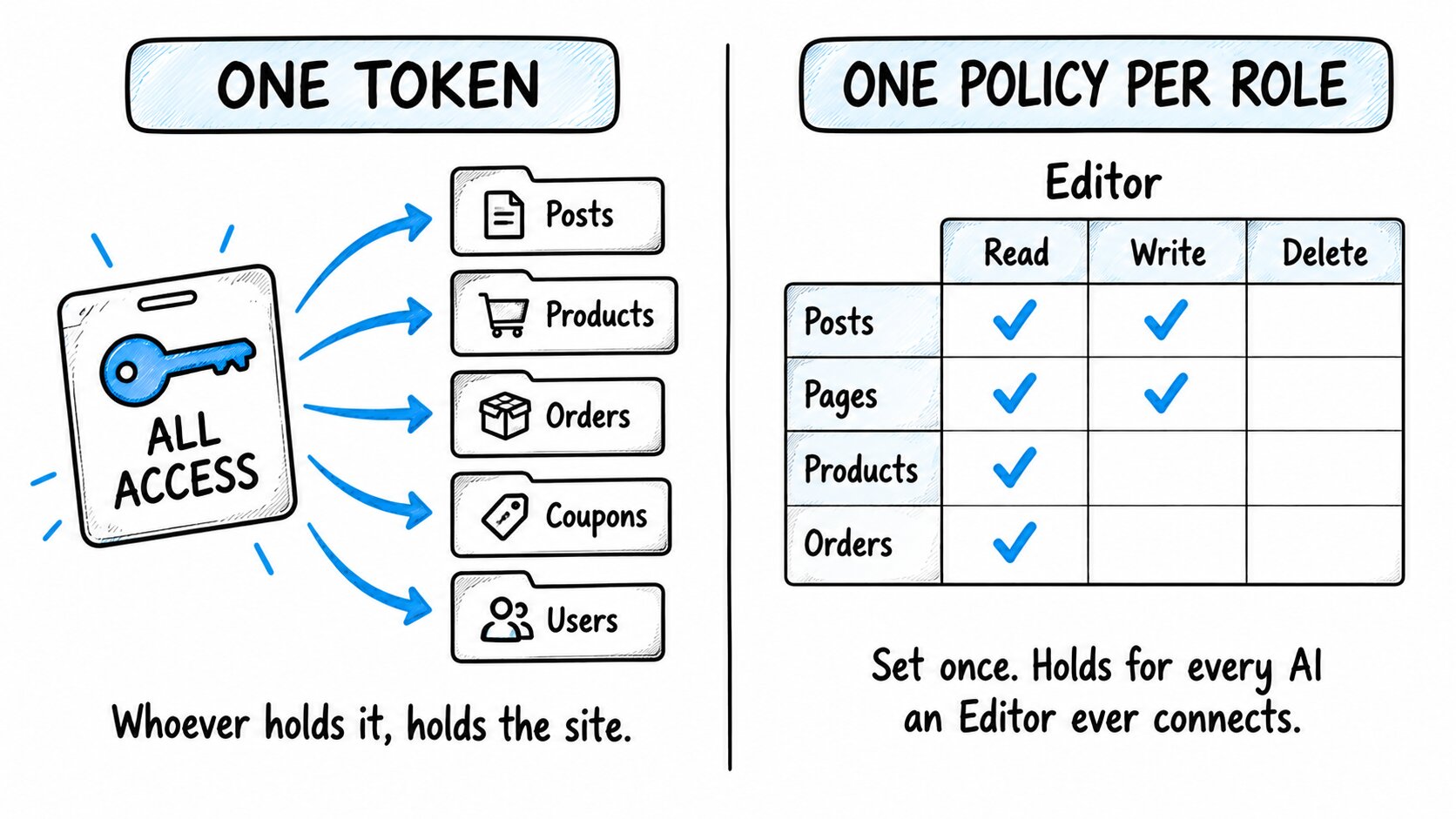
Read, write and delete as separate switches for each of 43 areas of the site, bound to the WordPress role. Deny-all by default: a new role starts with zero access, and the AI cannot see a tool until you switch it on. Set it once and it holds for every AI app anyone in that role ever connects.
OAuth 2.1 With a Consent Screen
No Application Password, no API key pasted into a third-party tool. Clients connect with OAuth 2.1 and PKCE (S256 only), the redirect address must match exactly, and access tokens expire after one hour. You approve every app before it connects and can cut it off in one click.
An Audit Log That Names the Permission
Every row names the user, the AI app, the object touched and the exact matrix cell (products.write) that allowed the call. Argument names are recorded, never their values, so customer data stays out of the log. Refused calls are logged too, marked denied.
160 Tools in the Free Version
Posts, pages, products, stock, orders, coupons, SEO meta for Yoast, Rank Math, AIOSEO and SEOPress, GA4 and Search Console reports through Site Kit. Works with or without WooCommerce; without it the store tools simply do not appear.
Grows With Every Plugin You Install
Any plugin that registers WordPress Abilities appears on the Integrations tab the same day, switched off, with its tool count. Turn it on and its tools are governed by the same role matrix. You never wait for us to “add support”.
No Middleman, No Metering
Your site is the server, on your domain, over HTTPS. There is no Node.js process to keep alive, no hosted relay, and nothing routes through our servers. A busy day costs the same as a quiet one.
What Changes the Day You Install It
| Before | After |
|---|---|
| The AI writes; you paste | The AI writes and saves, inside the areas you allowed |
| One token = the whole site | One policy per role: read, write or delete, per area |
| “Who changed that price?” | The audit row names the user, the AI app and the permission that allowed it |
| A bad bulk edit is a restore-from-backup job | Bulk edits preview first; single changes carry an Undo button (PRO) |
| Subscription churn lives in a spreadsheet | Ask “who is about to churn” and get a list with the amount at risk (PRO) |
Ask It Like This
You never have to find the right screen in wp-admin again. Say what you want and the AI finds the screen, makes the change inside the limits you set, and writes down what it did.
Set up the site
“Create the About, Contact and Shipping Policy pages, put them in the footer menu, and set the permalinks to post name.”
“Add a tax rate of 8.25% for Texas, a flat-rate zone for the US at $6.95, and free shipping over $75.”
Run the store
“How did we do this week compared with last week, and which products are carrying it?”
“Create an order for [email protected]: two Linen Summer Shirts, ship to her saved address, mark it paid.”
“Refund order #4512 in full and add a note that the parcel was returned damaged.”
Publish and maintain content
“Write a 900-word article on choosing linen weights, add it as a draft in the Guides category with the product images from the media library.”
“Go through every post from 2024, fix the meta descriptions that are missing, and flag the ones that mention a discontinued product.”
Keep it healthy
“Which plugins and theme are active, and what does the site status say?”
“What is the site’s PageSpeed score this month, and which pages lost search clicks?” (through Site Kit)
“Which subscribers are about to churn, and why are renewals failing?” (PRO)
Every one of those is a tool the AI already has, behind a switch you control. What it cannot do, on purpose: install or activate plugins and themes. Those stay a human decision.
Set the Rules Once. Every AI Your Team Ever Connects Obeys Them.
The permission lives with the role, not the token. The usual answer is to scope a token: then the safety of your store depends on whoever set that token up getting it right, and on getting it right again every time someone adds a new AI app. AI Gateway binds the policy to the WordPress role instead, and it holds for everyone in that role:
Deny-All by Default
A new role starts with zero access. The AI cannot see a tool until you switch it on.
Draft All Day, Delete Nothing
Write on posts with delete off is one click. That is the whole “safe assistant” setup.
The AI Never Outranks the Human
It acts with the capabilities of the user who authorized it, and not one more. Change your mind and every token stops working the moment you say so.
Start Read-Only
Grant one area to one role with write and delete off. Read the audit log for a week, then widen.
Do Not Connect as an Administrator
Administrators are never restricted by the matrix, on purpose. If you are the only user, create a Shop Manager or Editor account for the AI and set that role’s switches. For read-only assistants, the plugin creates an “MCP Bot” role on activation that can only read. And every built-in tool is labelled read, write or delete by hand; tools from other plugins are classed by the strictest of what the plugin declares, so a tool that writes cannot be labelled “read” to slip through a read grant.
“Who Did That, and What Let Them?”
The other audit logs we found answer “who” and “what” at best. Ours also answers “under which permission”. Each row names the user, the AI app, the object touched and the exact matrix cell (products.write) that allowed the call. It records which arguments were passed, never their values, so customer data stays out of the log. Calls the matrix refused are logged too, marked denied, so an AI probing past its grant leaves a trail.
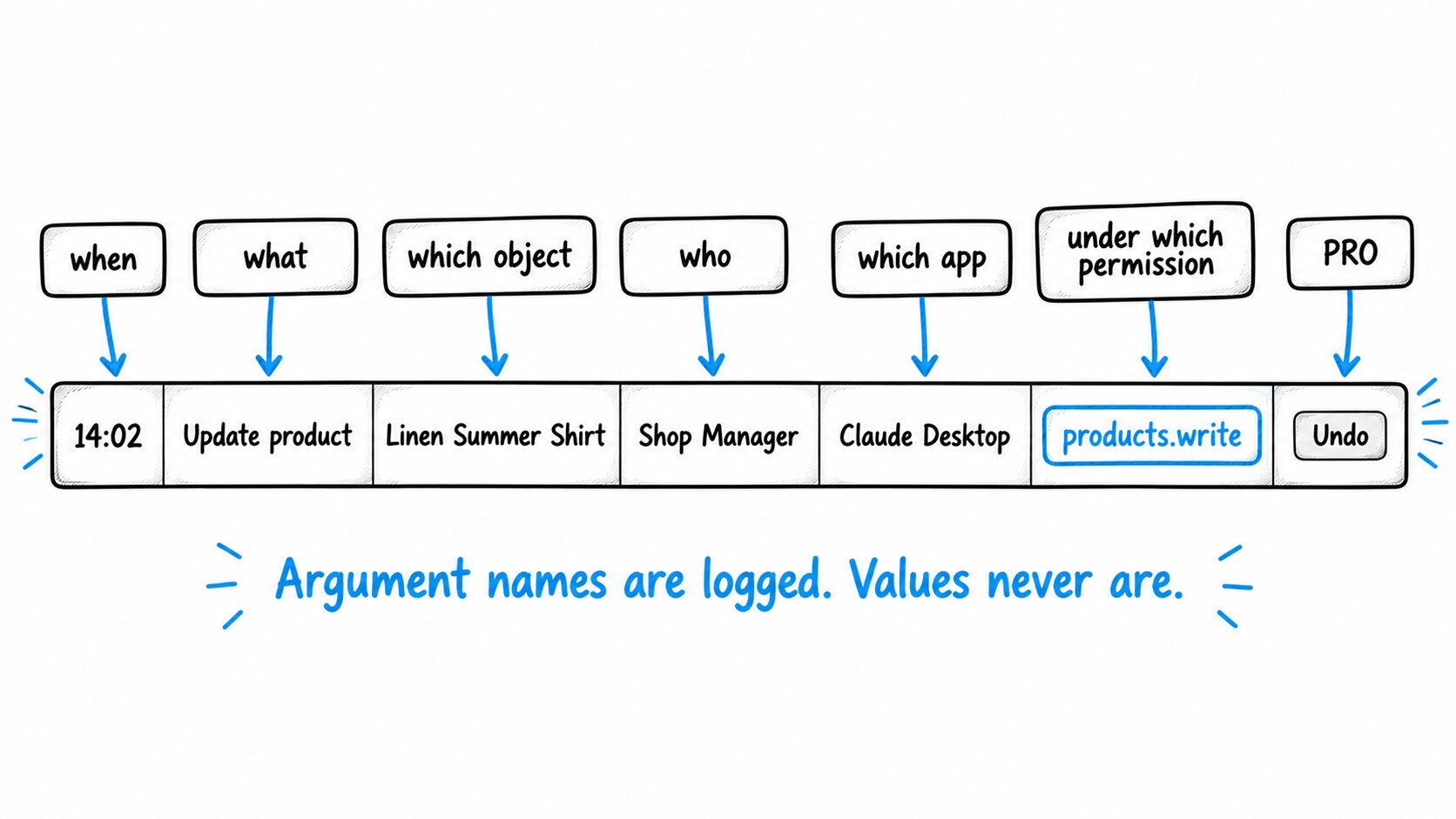
Rows are kept for the number of days you set, 7 to 30 on the free plugin and up to a year on PRO, and they never leave your database. When something goes wrong: revoke the AI app on the OAuth Clients tab and every token it holds stops working. On PRO, most single changes have Undo right on the audit row, and the row says when they do not, and why.
Built So a Bad Actor Cannot Turn Your AI Into an Admin
Connecting an AI to a site is a new door into it. Most WordPress MCP plugins open that door with an Application Password or a long-lived API key: one string that, if it leaks from a laptop, a chat log or a browser extension, is the whole account. We built the door the way banks and SaaS platforms build theirs, and then put the role matrix behind it.
No Keys Ever Leave Your Site
Apps connect with OAuth 2.1 and PKCE. Nothing to paste into a third-party tool, nothing for a leak to expose.
A Stolen Token Dies Within an Hour
Access tokens expire after one hour, and secrets are stored only as SHA-256 hashes. A database dump yields nothing usable.
Nothing Is On by Default
No role connects until you tick it, no area is readable until you tick it. Consent fails closed: only an explicit Approve gets in.
Registration Is Capped
Apps can register themselves, rate-limited from the start. One filter closes the door entirely once your clients are connected.
Every Attempt Is on the Record
An app probing past its grant leaves a trail you can read, and one click revokes it.
OWASP-Audited Every Release
An automated sweep probes a running site and verifies that no tool can do more than its declared permission says.
None of this needs a hardening add-on, a companion security plugin, or a settings page you have to know to visit. It is the default install.
Grows With Every Plugin You Install
Install a plugin that speaks the WordPress Abilities API and it shows up on the Integrations tab the same day, switched off, with its tool count. Turn it on and its tools are governed by the same role matrix as everything else. WordPress 6.9 gave every plugin a standard way to describe what it can do; we read that registry rather than shipping a fixed list, so there is no catalog and no waiting for support.
How an AI Request Reaches Your WordPress Site
Ask
You type the request. The AI sees only the tools your matrix exposes.
Connect
OAuth 2.1 with PKCE, directly over HTTPS. No relay, no keys.
Check
Every call is checked twice: user capabilities, then the role matrix. Outside the grant is refused and logged.
Act
The tool runs only where that role’s switches allow.
Record
The audit row: who, what, which object, which app, which permission.
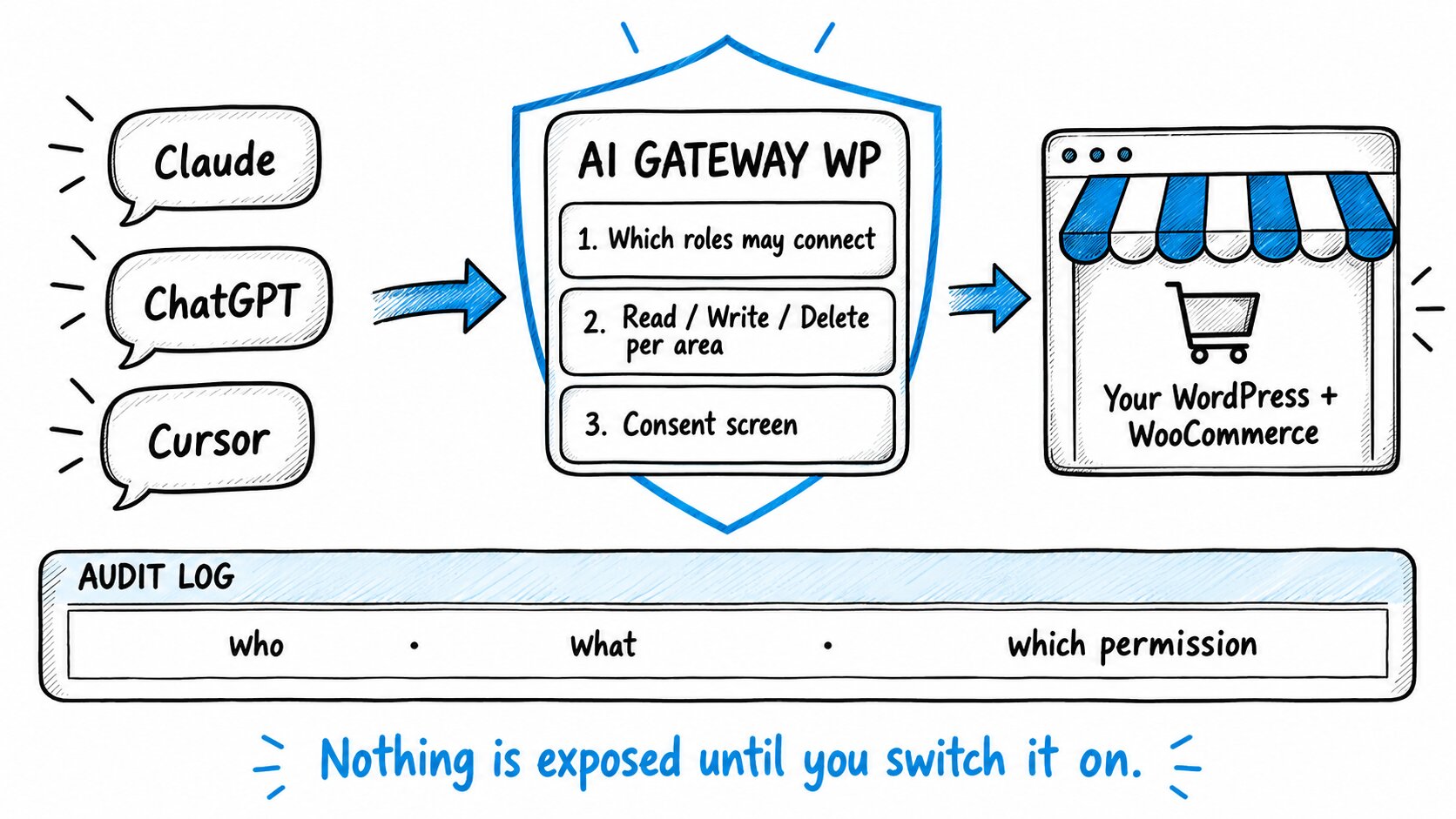
Nothing is exposed until you switch it on. The endpoint answers from the first minute, but offers no tools until you tick a role and an area.
How It Works
Four steps from install to your first audited AI change.
Allow a Role
On Access & Roles, tick the WordPress roles that may use MCP. Everyone else is refused before a single tool is listed.
Set the Switches
On Permissions, grant read, write or delete per area. The Default row is deny-all. Most stores start an Editor on read and write, delete off.
Paste One URL
The Connection tab gives you the MCP Server URL and copy-paste setup for Claude, ChatGPT, Gemini, Cursor and Claude Code. You approve one consent screen.
Read It Back
Ask for something, then open the Audit Log: the tool, the object, the user, the app, and the permission that allowed it.
How We Compare
Royal MCP Pro has more tools, Elementor and Divi. Easy MCP AI is free with the widest tool count. WPVibe adds a human approval prompt on every destructive action. AI Gateway is the one whose permissions live with the WordPress role, whose audit log names the permission that allowed each change, and whose PRO adds Subscriptions and AutomateWoo reports nobody else has. Where they are ahead, the table says so.
| Capability | AI Gateway PRO | Royal MCP Pro | Easy MCP AI | WPVibe |
|---|---|---|---|---|
| Price (single site/yr) | $129 all-in | $99 | Free | $99-899 |
| Permission model | Per role, read/write/delete per area, deny-all | Per-tool checks + paid per-profile filtering | Per token | Per-action approval prompt |
| Audit log names the permission used | Yes | No | No | No |
| Audit log names the user (free tier) | Yes | Not stated | Yes | Not stated |
| Hash-chained audit log, verified on a schedule | Weekly, automatic | Chain yes, manual WP-CLI verify | No | No |
| Undo | Per row, from the audit log | Per tool, 72-168 h token | Diff view only | No |
| Bulk WooCommerce edits | Yes, preview by default | Preview optional | No | Generic |
| WooCommerce Subscriptions reports | Health, at-risk, cohorts, retries | Plan management | No | No |
| AutomateWoo | Yes | No | No | No |
| Third-party plugin abilities | Detected automatically, governed | Fixed catalog | Fixed catalog | Listed, governance not documented |
| Page-builder tools (Elementor, Divi) | No | Yes | No | Yes |
| Human approval per action | No | No | No | Yes |
| Runs without a hosted relay | Yes | Yes | Yes | No |
| Metered by call volume | No | No | No | Yes |
Honest, code-verified comparison from public pages and docs; verify competitor figures before relying on them. Royal MCP Pro is the closest thing to us and a good product: if you need Elementor tools or a six-plugin bundle, buy it. If you need to say who was allowed to do what, and prove it, buy this.
Bulk Edit WooCommerce Products in One Sentence, and Know Before Anything Moves (PRO)
“Raise every price in Winter by 10%” is one call to the gateway, and PRO puts a preview in front of it:
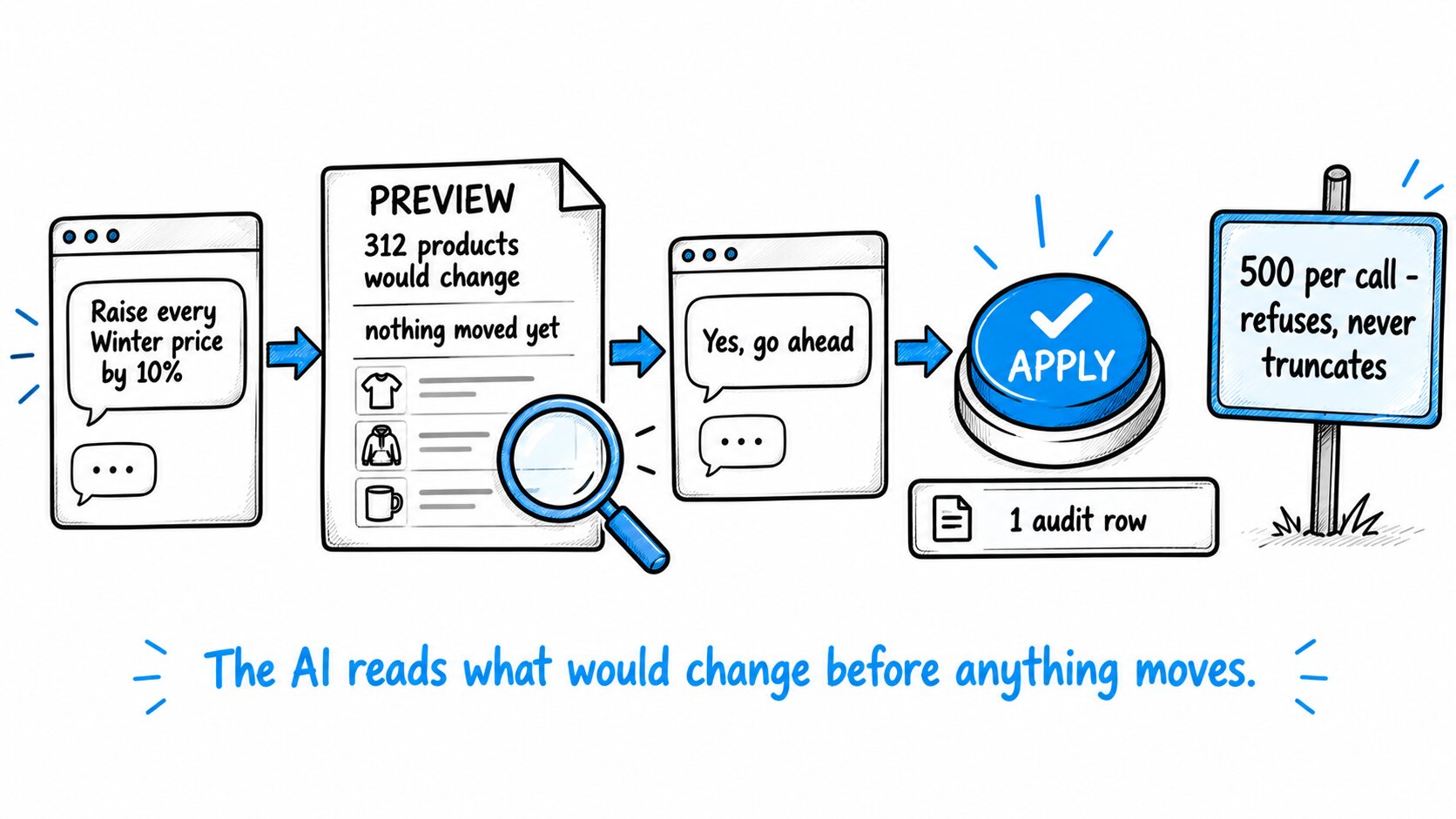
- You read what would change before anything does. A bulk call runs as a preview unless the AI passes an explicit confirmation flag. Ask for the preview, read it, then tell the AI to go ahead.
- Ask for too many and it refuses, rather than doing half. 500 products per call. Ask for 800 and you get the count back, not a guess about which 500 moved.
- One line in the log tells the whole story. What moved and who asked. Prices, stock, status and category, up to 500 products per call.
Undo for WooCommerce Products, Coupons and Settings, and a Log That Checks Itself (PRO)
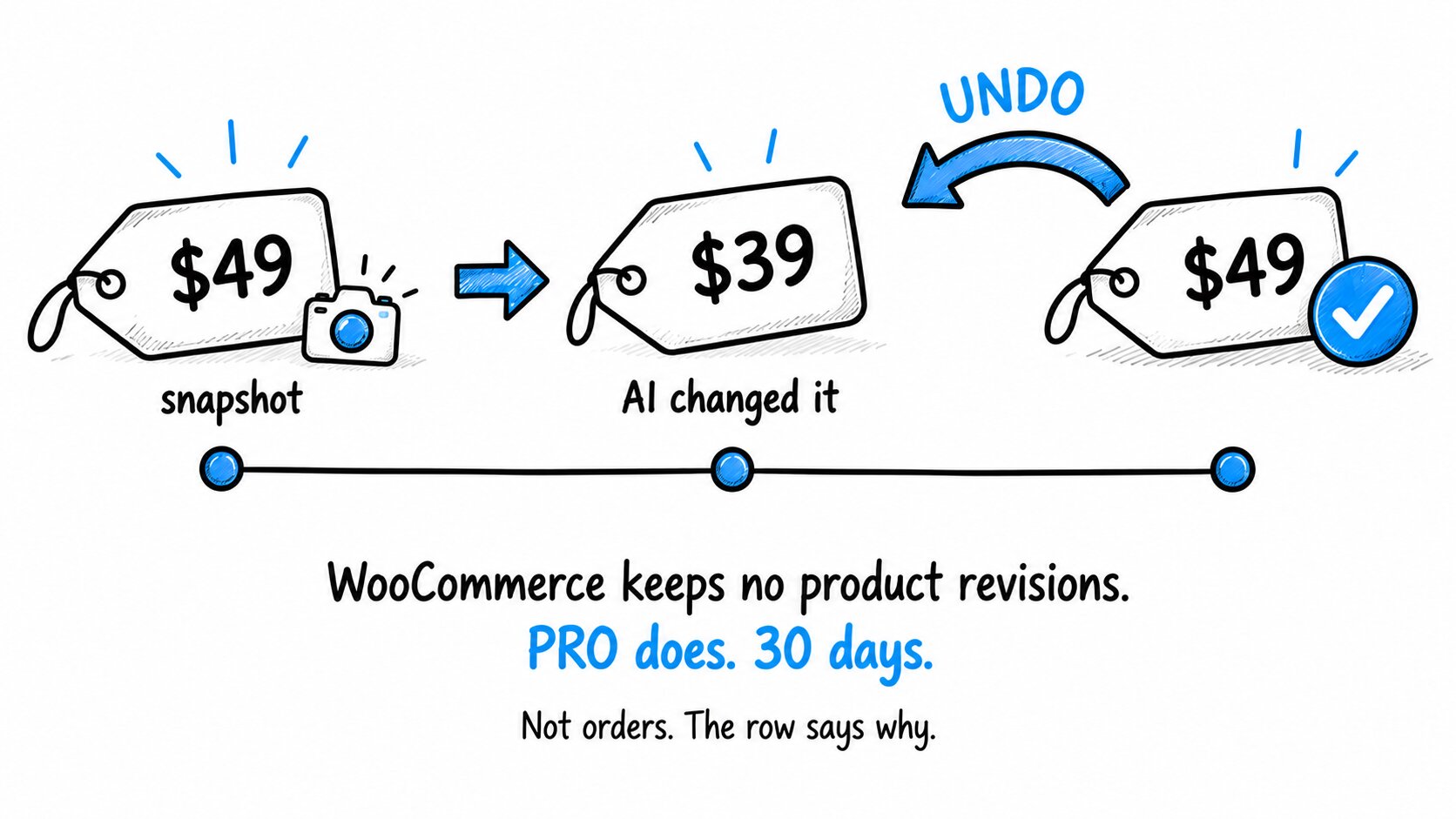
WooCommerce keeps no revisions for products, variations or coupons. Change a price and the old one is gone. PRO saves the fields it is about to touch before every change, and the audit row for that change carries an Undo control that writes them back through WooCommerce’s own APIs.
Covered Where It Matters
Products, variations, coupons, posts, pages, media, site options and custom CSS – the fields are snapshotted before every change.
Orders Are Deliberately Excluded
Reversing one moves stock, re-sends customer email and can leave a captured payment untouched. The row says so.
Up to 30 Days
Never longer than the audit row that records it, and the row says why when it cannot be reversed: already reversed, expired, not covered, or no permission.
The Log Checks Itself
Each row carries a hash of the row before it, so an edited or deleted row breaks the chain. A weekly job verifies the whole log.
WooCommerce Subscriptions Reports: Ask Your Store Who Is About to Churn (PRO)
If you run WooCommerce Subscriptions, the questions that decide your month are buried in the Subscriptions screen. PRO adds the reports a subscription business runs on, as tools your AI can call:
Subscription Health
How much recurring revenue you have, how much of it is stuck on hold, and for how long – so you know what is recoverable this month.
At-Risk Subscriptions
Renewals due soon, failing now, or parked on hold by a failed payment – each with the customer, the amount at risk and the failure history.
Retention Cohorts
How each signup month has held on, month by month, so you can see whether churn is improving.
Payment Retries
Why renewals fail: decline codes, retry recovery rate, gateway mix, and how much revenue is stuck.
One recovered failed-renewal subscriber at $30 a month is $360 a year. The report that finds them is $129 a year.
Find the AutomateWoo Workflows You Never Built (PRO)
Ask “which automations am I missing” and get an answer from your actual AutomateWoo install: no abandoned-cart workflow, no win-back, no review request. Then create the workflow, switch it on, and read back its email performance, all through the gateway and all in the audit log. PRO also adds a revenue breakdown, a review funnel and an email deliverability report, and can change tax rates, payment gateways and shipping classes from chat.
Seen enough? Install the free version, connect one AI on one area read-only, and read the audit log for a week before you widen anything.
Who It’s For
If you already pay for Claude, ChatGPT or Cursor, this plugin is the governed connection between that assistant and your store. If you will only ever want one person’s ChatGPT to read a few posts, a simpler token-based plugin will do.
WooCommerce Stores
Let an AI manage products, stock, orders and coupons without handing it the whole store. Bulk edits preview first, and every change names the permission that allowed it.
Content Sites
An assistant that drafts, edits and fixes SEO meta but never deletes. No WooCommerce needed; the free tier is the whole product for you.
Agencies
Say in writing, per client site, exactly what the AI was allowed to do – and hand over a hash-chained log you can prove nobody edited. One key covers three domains.
Subscription Businesses
Churn and failed-renewal answers from your own data: health, at-risk renewals, cohorts and payment retries, without exporting a single CSV.
Requirements: WordPress 6.0 or newer (on versions below 6.9, also install the free Abilities API plugin), PHP 7.4 or newer, HTTPS on the site.
A Gateway Developers and Plugin Authors Can Extend
AI Gateway is built on the official WordPress MCP Adapter and the Abilities API, not a private tool catalogue. The adapter turns registered abilities into MCP tools and checks each call against the WordPress capability of the user; this plugin adds the role matrix, OAuth 2.1 consent, the audit log, and a direct HTTPS endpoint at /wp-json/ai-gateway-wp/mcp.
Register Once, Governed Everywhere
Plugin developers: there is nothing to integrate against. Register your abilities with wp_register_ability() and you are on every site running AI Gateway, on the Integrations tab, governed by the same switches.
OAuth 2.1 With PKCE
Any standards-compliant MCP client can connect. Self-registration is rate-limited and can be capped or closed with one filter once your intended clients are connected.
Tools Labelled by Hand
Every built-in tool declares its verb – read, write or delete – as part of its definition. Third-party tools are classed by the strictest of what the plugin declares, so nothing writes its way through a read grant.
Audited Live, Not on Paper
An automated, OWASP-aligned conformance sweep runs on every release, probing a live site to measure that every registered tool declares a capability, a verb and a domain, and that no mutating tool is labelled as a read.
Read-Only MCP Bot Role
A dedicated read-only role is created on activation, for assistants that should never write anything. Administrators are never restricted by the matrix, so connect as a Shop Manager or Editor instead.
Site Kit Integration
GA4 and Search Console reports reach the AI through your own Site Kit login – no second Google OAuth app to manage, and the audit log records those calls like any other.
Pricing
Plans from $25 a month or $129 a year. Nothing is metered; both PRO tiers include every PRO feature.
Free
$0
All 160 tools, the full role matrix, consent screen, OAuth 2.1 and the audit log, on one store. See it work before you pay.
Download FreeMonthly
$25/mo
Single site, every PRO feature. For trials and short projects. Cancel any time and keep your settings.
Choose MonthlyAnnual · Most Popular
$129/yr
Single site. Save 57% vs monthly. Best value for most stores.
Get Annual, $129/yr3 Domains
$239/yr
Annual, $80 per site. Agencies and multi-store operators. One key for three domains.
Get 3 DomainsThe free version includes the whole governance layer: role matrix, consent, OAuth and the audit log. PRO adds bulk edits with preview, undo, a self-verifying audit chain, a year of retention, and the Subscriptions and AutomateWoo reports.
Running more than three sites?
Does $129 a Year Pay for Itself?
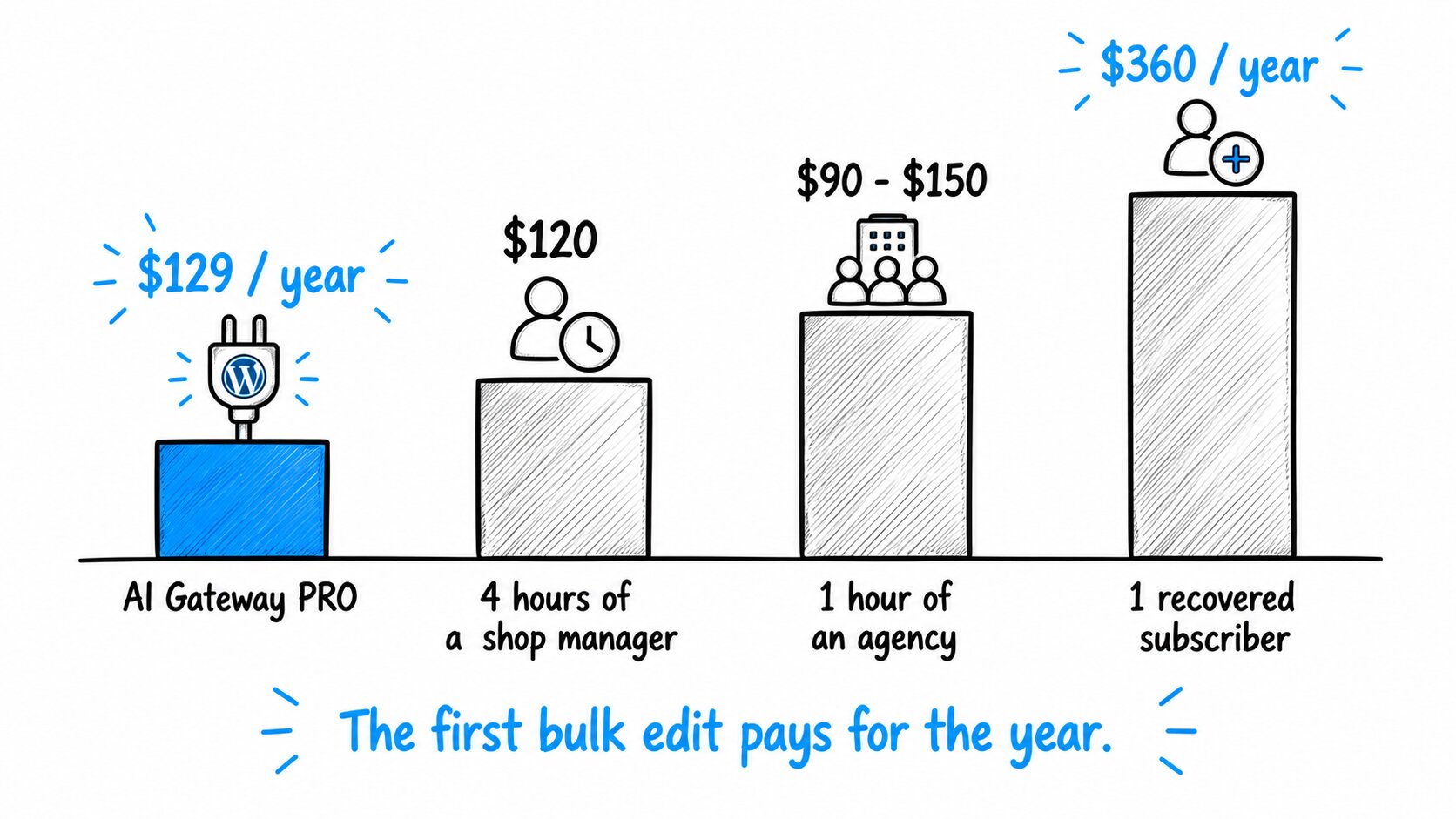
About $11 a month. $129 a year is roughly four hours of a shop manager’s time, or one hour of an agency’s. One recovered failed-renewal subscriber at $30 a month is $360 a year, and the at-risk report that finds them is in PRO. The first bulk edit pays for the year.
Frequently Asked Questions
Common questions about connecting Claude, ChatGPT and Cursor to WordPress.
Is there an MCP server for WordPress?
Yes. AI Gateway is one. Install it and your site answers the Model Context Protocol on its own domain, so Claude, ChatGPT, Gemini, Cursor and any other MCP client can read and manage it. It is built on the official WordPress MCP Adapter and the Abilities API that ships in WordPress 6.9, and adds the role matrix, OAuth 2.1 consent and the audit log the adapter does not have.
How do I connect Claude to my WordPress site?
Install and activate the plugin, open the Connection tab, and add the MCP Server URL in Claude Desktop, Claude.ai or Claude Code. Claude opens a consent screen that lists the areas it is asking for; you click Authorize. For Claude Code it is one line: claude mcp add --transport http my-site https://example.com/wp-json/ai-gateway-wp/mcp, then /mcp inside the session. Adding a custom connector needs a Claude plan that allows it; check Anthropic’s current plan page.
Does it work with ChatGPT?
Yes. Add the MCP Server URL in ChatGPT, approve the consent screen, and it is live. There are no keys or secrets to copy; ChatGPT connects the same way Claude does. It sees only the tools the authorizing user’s role grants, and every change it makes is in the audit log. Adding a custom connector needs a ChatGPT plan that allows it; check OpenAI’s current plan page.
Is the WordPress MCP plugin free?
Yes. The role matrix, the consent screen, OAuth 2.1, all 160 tools and the audit log are in the free plugin, and there is no per-request fee. It works without WooCommerce; the store tools simply do not appear. PRO adds 47 tools: bulk WooCommerce edits, undo, a self-verifying audit chain, a year of retention, and the Subscriptions and AutomateWoo reports.
Is it safe to give an AI access to my site?
Nothing is exposed to a non-administrator role until you configure its matrix, no AI app connects until you approve it on the consent screen, an AI can only act with the WordPress capabilities of the user who authorized it, and every write and delete is recorded with the permission that allowed it. Revoke any AI app in one click. Do not connect it as an Administrator; use a Shop Manager, Editor or MCP Bot account so the matrix applies.
What is the difference between MCP and the REST API?
The REST API is a set of URLs a developer calls. MCP is how an AI assistant discovers what it may do on your site and asks permission to do it. AI Gateway sits between the two: it describes your site’s abilities to the assistant in the MCP format, checks each call against your role permissions, and records the outcome.
Can you run MCP servers locally?
You can, but you do not need to. AI Gateway runs inside WordPress, so there is no local Node.js process, proxy or hosted relay to keep alive. Your AI app talks to your site directly over HTTPS, and the same URL works from Claude Desktop on your laptop and from claude.ai in a browser.
Can Claude or ChatGPT build a WordPress website?
They can create and edit pages, posts, menus, templates, global styles and products through AI Gateway, so yes for the content and structure of a site. They cannot install themes or plugins through it; that is deliberately out of reach.
Can I let an AI write but never delete anything?
Yes. That is what the read / write / delete matrix is for. Grant write on posts or products and leave delete off. The AI can draft and edit all day and cannot remove a single thing, and if it tries, the attempt is in the audit log marked denied.
Why not just use WooCommerce’s built-in MCP?
WooCommerce itself ships a handful of basic MCP abilities of its own – product and order operations. They authenticate with a REST API key that is either read-only or read-write for everything, with no per-role matrix, no audit log, no bulk operations, no preview, no undo and nothing for Subscriptions or AutomateWoo. AI Gateway keeps them off its surface so a single permission decision governs each product and order operation, and PRO adds what they leave out.
Does undo cover everything?
No, and the row tells you. Products, variations, attributes, coupons, posts, pages, blocks, templates, media, site options, permalinks, theme settings and custom CSS are covered. Orders are not, because reversing one has side effects on stock, email and payment. Bulk operations are not, because the preview is the safety net there and it runs before anything moves. WooCommerce settings, menus, users and anything that sends email are excluded, and the reason appears on the row.
How do I enable MCP on WordPress?
Install AI Gateway, open Access & Roles and allow at least one role, then tick the areas that role may read or write on Permissions. The MCP endpoint is live at that point; the Connection tab shows the address to paste into your AI app. Until you tick something, the endpoint answers but offers no tools, which is the point.
Is there an AI agent for WordPress?
An AI agent is any assistant that can act, not just answer. With AI Gateway installed, Claude, ChatGPT, Gemini or Cursor becomes one for your site: it can list, create and edit content and products within the permissions you set, and everything it does is in the audit log with the permission that allowed it.
When should I not use an MCP server?
If you cannot say which role should be allowed to do what. AI Gateway starts with everything off for that reason: grant one area to one role, watch the audit log for a week, and widen from there. If you want a human to approve every single AI action instead, WPVibe and miniOrange do that and we do not.
Does it work with plugins you have not built integrations for?
Yes, if the plugin registers abilities through the WordPress Abilities API. It appears on the Integrations tab automatically, switched off. Turn it on and its abilities are governed by the same role permissions as everything else. Plugin developers: there is nothing to integrate against. Register your abilities with wp_register_ability() and you are on every site running AI Gateway.
Does any of my data leave the site?
The plugin sends nothing anywhere. It makes your site reachable as an MCP server. The AI app you chose connects to your site. Once you authorize it, whatever your matrix lets it read goes to that AI vendor and is handled under their terms. Audit rows, OAuth clients and tokens live in your own database. Tokens are stored as hashes only.
Every Week You Wait Is Another Afternoon of Pasting
The AI is ready. The only thing between it and your site is the fear of what it might do there, and that is exactly the thing this plugin removes. Five minutes to install, nothing exposed until you say so, and every change written down. The only thing waiting costs you is the afternoon you spend pasting.
Connect the AI. Set the Limits. Read Every Change Back.
Turn your WordPress site into a governed MCP server today. Start free with all 160 tools and the full role matrix, and upgrade to PRO for bulk edits, undo and the Subscriptions and AutomateWoo reports when the store needs them.
Free version right here, no card needed. Cancel PRO any time; the gateway drops back to the free feature set and keeps your settings.
| License Type | Free Version, Single Domain / Site – Monthly Subscription, Single Domain / Site, Three Domains / Sites |
|---|
Be the first to review “AI Gateway PRO – WordPress MCP Server Plugin”
You must be logged in to post a review.
Reviews
There are no reviews yet.