
E-Commerce Shipping, WordPress Media Offload
Shippo Address Validation Pricing Update (2026)

If you’re using our Shippo Shipping PRO for WooCommerce plugin, there’s a small but important change that could affect your operation costs, especially if you have a busy WooCommerce store.
This update comes from Shippo, and it changes how the address validation fee is billed.
What Actually Changed?
Previously, the process was fairly straightforward: we used the Shippo API to retrieve live shipping rates and relied on its address validation functionality.
- U.S. address validation → free
- International address validation → paid
Now it’s different.
Every address validation request costs money:
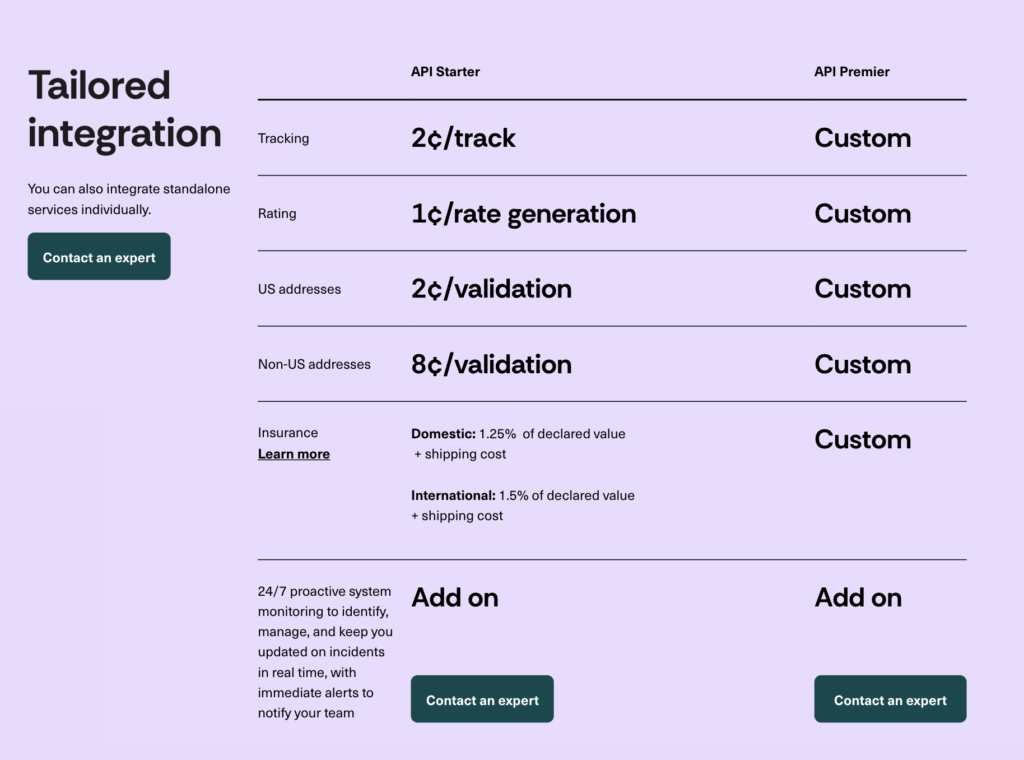
- $0.02 (2¢) for U.S. addresses
- $0.08 (8¢) for non-U.S. addresses
Below is the information screenshot from the Shippo website about how much they charge for using the Shippo API to execute the address validation functionality.
While the cost may appear minimal, it can become significant for stores with high visitor volume, as these small fees accumulate over time.
Here’s something many WooCommerce store owners may not realize
Most WooCommerce store owners assume address validation only happens when creating a label for the orders. That’s not the case.
In WooCommerce stores, address validation can happen when:
- Customers enter their shipping address in the cart and checkout page
- Shipping rates are calculated
- Someone is just testing checkout
So yes, even testing the cart to see the shipping cost can trigger it.
If your WooCommerce store has high traffic, those tiny charges can quietly stack up.
Quick Reality Check
Let’s say your WooCommerce store gets around:
- 1,000 visitors per day
- Half of them check the shipping cost
That’s 500 validations.
- U.S. traffic → about $10/day
- Mixed or international → can go much higher
Not a big deal… until you look at it monthly.
Should You Turn On the Address Validation Feature?
Honestly, it depends on your store.
It makes sense if:
- You’ve had issues with incorrect shipping addresses
- You ship expensive products
- Failed deliveries cost you real money
You may want to rethink it if:
- You get a lot of window shoppers
- You show live shipping rates early (cart page, not just checkout)
- You’re still testing or optimizing your setup
Where to Find This Setting in the Plugin
If you’re using our Shippo Shipping PRO plugin, you can find the address validation setting in the following locations:
Original Shippo Shipping PRO Plugin
Go to “Shipment Defaults,” tab, where you’ll find the address validation option.
Updated Shippo Shipping PRO (new UI)
First, enable Advanced Settings. Then, expand the “Shipment Defaults” tab to find the “Address Validation” option.

One Important Note
- These charges come from Shippo, not from our shipping plugin
- We don’t add a fee on top
- The plugin simply sends the live shipping rate request and displays the result
If pricing changes again in the future, it will always follow Shippo’s official API pricing.
Final Thoughts
This isn’t a “good or bad” change, just something to be aware of.
Address validation is still useful. But now it’s something you’ll want to use intentionally, not just leave on by default.
Frequently Asked Questions
Does Shippo charge for address validation?
Yes. Shippo now charges for all address validation requests:
- $0.02 for U.S. addresses
- $0.08 for international addresses
When is address validation triggered in WooCommerce?
Address validation can be triggered when:
- A customer enters or updates their shipping address
- Shipping rates are calculated in the cart or checkout page
- The checkout page refreshes
This means even browsing or testing the shipping rate can generate validation requests.
Does your WooCommerce plugin charge for address validation?
No. Our Shippo Shipping PRO plugin does not charge anything for address validation.
All fees come directly from Shippo based on their API usage.
Should I enable address validation in my store?
It depends on your store setup. Enable it if you want to reduce failed deliveries or shipping errors.
Disable or limit it if you have high traffic and want to control API costs.
Where can I find the address validation setting in the plugin?
You can find it under:
- Shipment Defaults (original plugin)
- Advanced Settings → Shipment Defaults