
How to Disconnect an AI App From Your Store
2 min read
You will have: An AI app cut off from your store right away.
Time: About 2 minutes
You need: An AI app you connected before, with your role turned on under Access & Roles, and at least one permission turned on for it on the Permissions tab. Not set up? Follow How to Turn On Your Role and Choose What the AI Can See. No AI app connected yet? Follow Connect your AI app.
Step 1: Revoke the app’s access #
Go to 1TeamSoftware → AI Gateway → OAuth Clients. Under Registered clients, find the app by its Client Name (for example Claude) and click Revoke. There is no confirm box: the app is cut off as soon as you click.
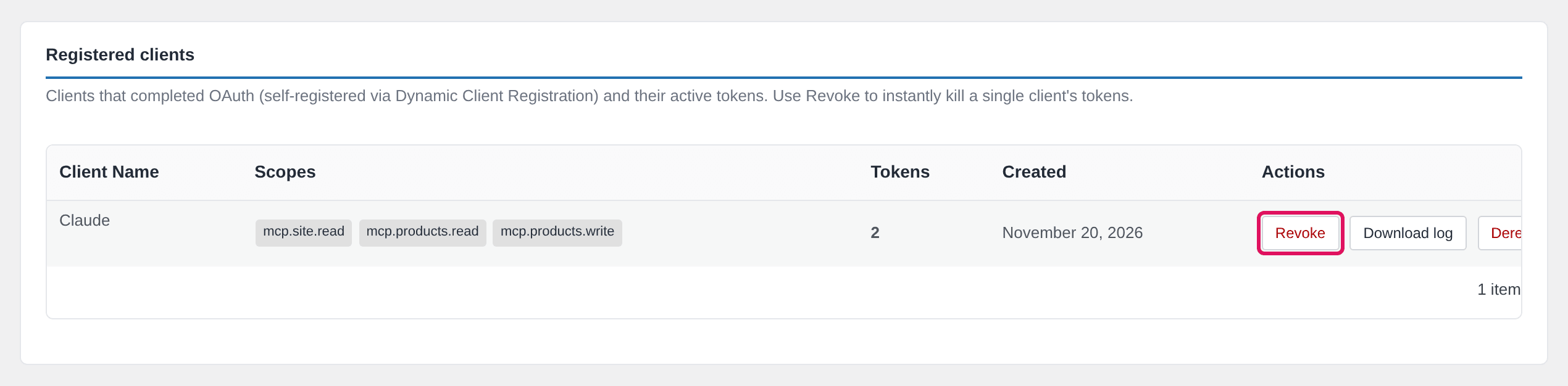
The app’s Tokens count drops to 0. A token is the app’s pass into your store. Without one, the app cannot do anything.
Please note: The Revoke button only shows while the app has a token. If you do not see it, the app is already cut off. After Revoke, the app can ask to connect again, and it only gets back in if you approve it.
Please note: Do not click Deregister unless you want the app gone for good. It deletes the app’s registration and all its tokens, and it cannot be undone. The app has to register again from the start to reconnect. It asks you to confirm first.
If it did not work #
- The app still works after Revoke: reload the page and check the Tokens count is 0. If it is not, click Revoke again.
- You want to cut off every app at once: click Revoke All on the same tab. It asks you to confirm first.
Next step #
How to See What the AI Changed in Your Store
Get AI Gateway: the free version is on the AI Gateway product page. Choose Free Version under License Type.


