
How to See What the AI Changed in Your Store
2 min read
You will have: A list of everything an AI app did in your store, who it did it for and what it changed.
Time: About 2 minutes
You need: An AI app connected to your store. Your role turned on under Access & Roles, and at least one permission turned on for it on the Permissions tab. Not set up? Follow How to Turn On Your Role and Choose What the AI Can See. No AI app connected yet? Follow Connect your AI app.
Step 1: Open the Audit Log #
Go to 1TeamSoftware → AI Gateway → Audit Log.
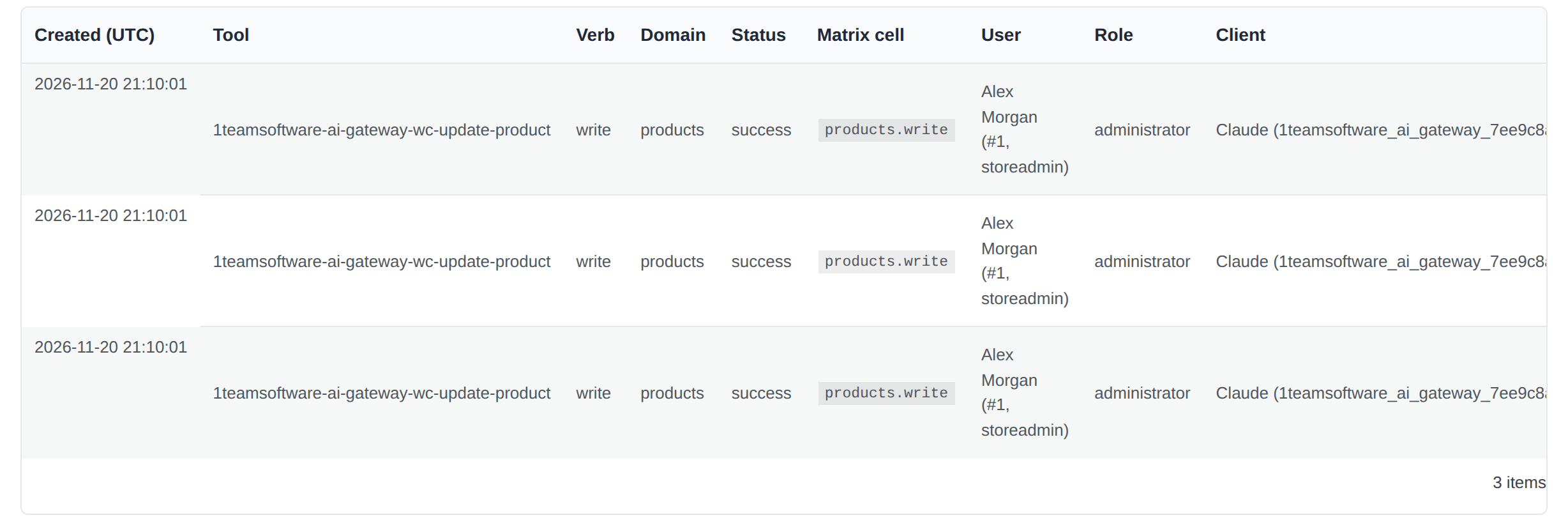
Each row is one thing the AI did, with the newest at the top. Here is what the main columns mean:
- Created (UTC): when it happened, in UTC time.
- Tool: the action the AI used, for example updating a product.
- Verb: whether it read, wrote or deleted.
- Domain: the part of your store it touched, for example products (the same names as the rows on the Permissions tab).
- Status: whether it worked.
- Matrix cell: the permission that allowed it, for example products.write.
- User and Role: the person the AI acted for.
- Client: which AI app did it, for example Claude.
Please note: Scroll the table sideways for more columns. IP shows where the request came from. Operation shows the item that changed (for example products #10).
If it did not work #
- The log is empty: the AI has not done anything in your store yet. Ask it a question about your store, then reload the page.
Next step #
How to Undo a Change the AI Made
With PRO you can also ask the AI to change many products at once. How to Ask the AI to Change Many Products at Once
Get AI Gateway: the free version is on the AI Gateway product page. Choose Free Version under License Type.


