
E-Commerce Shipping
Shippo vs ShipStation in 2026: Which Is Better for Your WooCommerce Store?
If you run a WooCommerce store, you already know the frustrating drill. You spend weeks dialing in your product pages, marketing, and design, only to watch customers add items to their cart and abandon checkout. In many cases, shipping costs are the main reason customers abandon their carts. Specifically, not using a modern multi-carrier shipping service like Shippo or ShipStation to offer your customers the best, most competitive shipping rates.
Without the real-time, discounted carrier rates provided by these industry-leading platforms, shipping cost surprises at checkout drive buyers away. Getting your shipping setup right isn’t just about printing labels; it’s about using the right integration to keep your checkout smooth, transparent, and high-converting.
But if you’ve looked at the shipping landscape lately, things look very different than they did a year or two ago. Finding the right mult-carrier path for your WooCommerce store in 2026 can feel like trying to hit a moving target because of constant pricing changes and plan updates.
Whether you’re setting up a new WooCommerce store or looking for a way out of escalating subscription costs, we’re here to break down the honest truth about Shippo vs. ShipStation in 2026 and how to get the most out of them.
This article focuses on the Shippo vs ShipStation head-to-head. For the full three-way comparison including EasyPost, see our complete ShipStation vs Shippo vs EasyPost guide.
What Has Actually Changed in ShipStation and Shippo in 2026? (The Pricing Confusion)
In 2026, ShipStation replaced its old Gold and Scale tiers, replacing them with Starter, Standard, and Premium plans. Standard ($29.99/mo) now includes API access, but subscription rates scale up based on shipment volume (e.g., $149.99/mo for 1,000 shipments). Shippo keeps its API free, charging 1¢ per rate calculation plus pay-as-you-go label fees.
Let’s address the elephant in the room. If you’ve been trying to keep track of ShipStation’s pricing, you are probably confused, and you aren’t alone.
Here is the catch:
* ShipStation API Access is now included in the Standard plan.
* The Standard plan starts at $29.99/month, which sounds like a relief compared to the previous $99/month requirement in 2025.
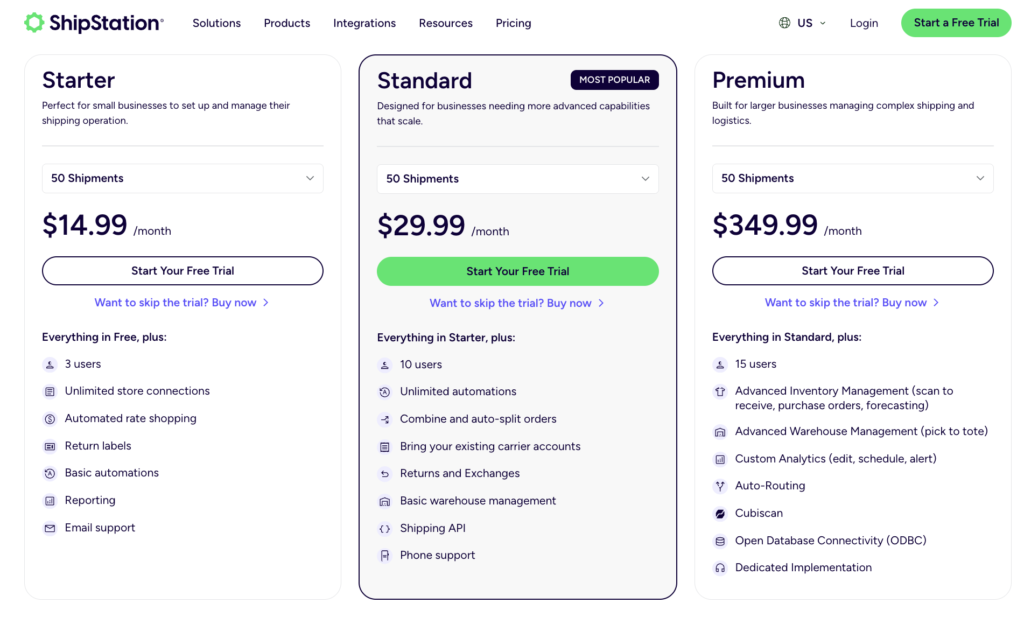
* However, the price scales up based on your shipping volume. If you ship more than 50 orders a month, your subscription price jumps. For example, 100 shipments cost $59.99/month, 500 shipments cost $89.99/month, and 1,000 shipments cost $149.99/month.
This means that as your WooCommerce store grows, you still end up paying a heavy monthly premium just to keep live shipping rates active at checkout.
Meanwhile, Shippo has kept things simple, transparent, and predictable. Under their API Starter plan, there is no monthly subscription fee. You get:
* 30 free shipping labels per month (and just 7¢ per label after that).
* 1¢ per rate generation for live rates request through API at checkout.
* 2¢ per U.S. domestic address validation (and 8¢ for international).
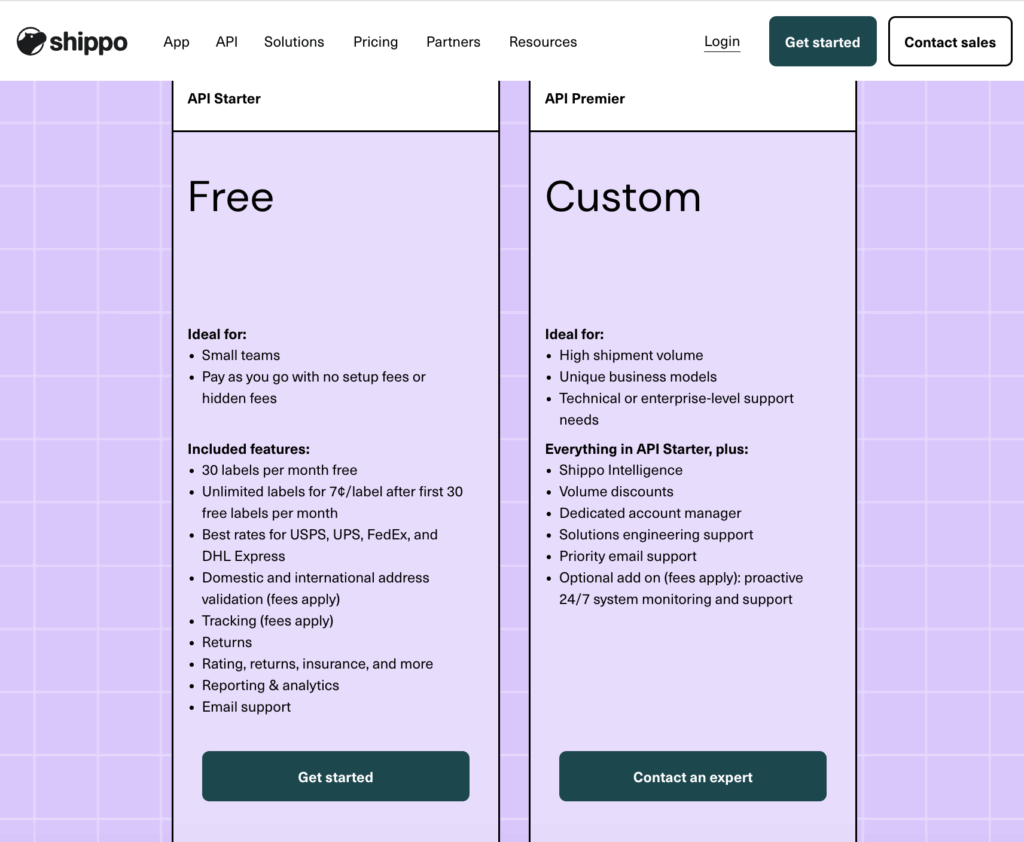
This pay-as-you-go Shippo API model is a game changer. Even with thousands of customers calculating shipping rates at checkout, your API costs remain minimal (e.g., 1,000 rate calculations is just $10), without forcing you into a scaling monthly subscription plan like ShipStation.
Address Validation: How Do They Compare?
ShipStation includes unlimited address validation for free on all paid plans. Shippo charges pay-as-you-go rates: 2¢ for US domestic and 8¢ for international address checks. While Shippo is cheaper for domestic shipments, international storefronts face high per-transaction costs if address validation is triggered repeatedly by checkout rate calculations.
Having clean, validated addresses is essential for preventing returned packages and delivery delays. But the way Shippo and ShipStation bill for this feature is very different:
* ShipStation API (Included): ShipStation includes address validation for free within its monthly subscription plans. Once you are on the Standard plan ($29.99/mo), you can validate U.S. domestic and international addresses without any per-transaction validation fees.
* Shippo API (Pay-As-You-Go): Under Shippo’s API Starter plan, you pay a small fee per validation: 2¢ for U.S. domestic addresses and 8¢ for international addresses.
If your store receives a lot of international traffic, you need to be very careful.
When address validation is active on your Shippo account and the shipping plugin’s settings, it is triggered as international users type, edit, and check shipping rates. At 8¢ per international validation, these checks can add up incredibly fast. If you have 5,000 international visitors checking rates in a month, you could face a surprise bill of $400 just for address validation, even if they don’t buy anything!
Which makes sense for your store?
* If you ship mostly U.S. domestic: Shippo is highly cost-effective (validating 100 US addresses is only $2.00), making it the clear winner for saving on ShipStation’s starting subscription.
* If you ship globally (International): You should be careful about enabling automatic address validation at checkout when using Shippo’s API. Our Shippo Shipping PRO plugin allows you to easily toggle address validation on or off to help you prevent surprise bills. If address validation is a absolute must-have for every global customer checkout check, ShipStation’s flat-rate inclusion might be the safer financial option.
If address validation is an absolute must-have for every global customer checkout check, ShipStation’s flat-rate inclusion might be the safer financial option.
Shippo vs. ShipStation in 2026: The Honest Breakdown
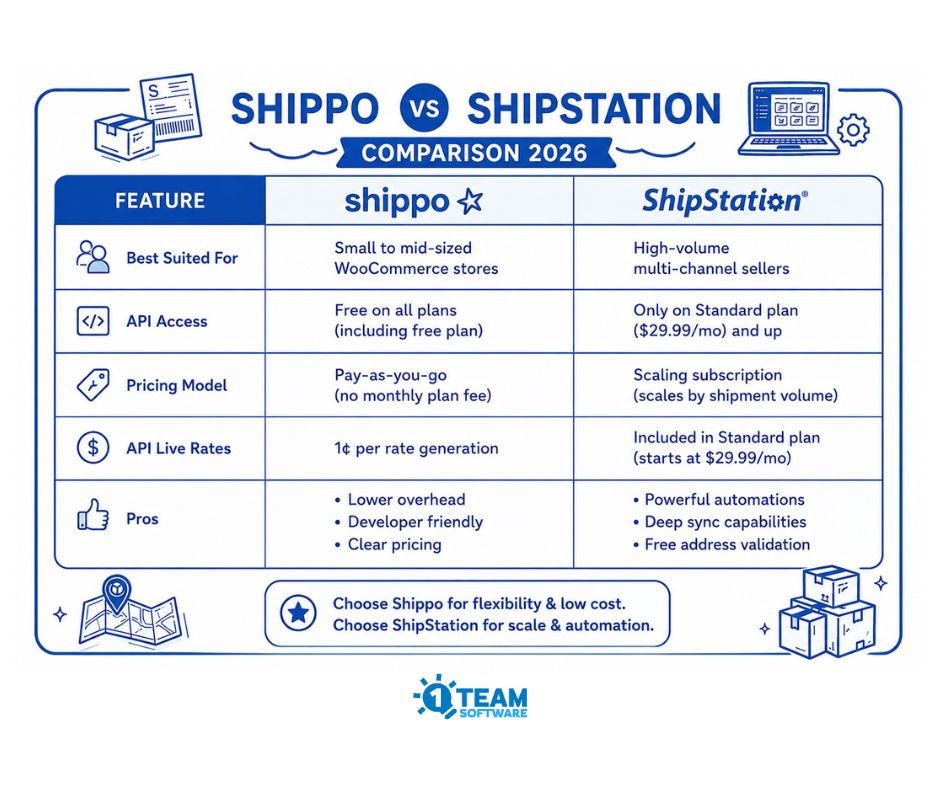
To help you decide, let’s look at how they compare side by side:
| Features | SHIPPO | SHIPSTATION |
| Best Suited for | Small to mid-sized WooCommerce stores | High volume multi-channel WooCommerce stores |
| API Access | Free on all plans (including free plan) | Only on Standard Plan ($29.99/mont) and up |
| Pricing Model | Pay as you go (no monthly plan fee) | Scaling subscription (scale by shipment volume) |
| API Live Rates | 1¢ per rate generation | Included in Standard plan |
| Address Validation | * US domestic: 2¢/each * International: 8¢/each | Free/Included in all paid subscription |
| Postage Rates | Up to 89% off USPS, UPS, FedEx, DHL | Up to 89% off USPS, UPS, FedEx, DHL |
| Cost Escalation | No monthly contract (flat 7¢/label after 30 free labels) | Up to $1,849/month as shipping volume grows |
| PROS | *Lower overhead *Developer friendly *Clear pricing | *Powerful automation *Deep sync capabilites *Free address validation |
| CONS | * Pre-validation fees *Less native automation *Basic inventory tools | *High subscription cost *Steeps learning curve *Complex configuration |
Shippo:
– The Vibe: Quick, budget-friendly, and very developer-friendly.
– API Access: Open to everyone (free plan included).
– Pricing Model: Pay-as-you-go (no monthly fee; 1¢/rate generation, 7¢/label after first 30 shipping label for free per month).
– Address Validation: 2¢ per US address; 8¢ per international address (Caution advised for checkout integration).
– Best Suited For: Small to mid-sized stores looking for low monthly overhead and predictable costs.
– Setup Speed: Up and running in minutes.
🚚 Shippo: Built for Speed and Flexibility
Shippo is fast, modern, and keeps things simple. Because their API is open to everyone, you can get discounted carrier rates (USPS, UPS, FedEx, DHL) right in your cart without a high monthly bill. While it doesn’t have the same level of complex multi-channel syncing as ShipStation, it does the core job of WooCommerce shipping incredibly well.
ShipStation:
– The Vibe: Feature-rich, heavy-duty, and built for multi-channel scaling.
– API Access: Restricted to Standard plan ($29.99+/month) and Premium plans.
– Pricing Model: Volume-based monthly subscription fees.
– Address Validation: Included for free in all paid subscription plans.
– Best Suited For: High-volume merchants selling on Amazon, eBay, and WooCommerce simultaneously.
– Setup Speed: Takes a bit of time to configure automation rules.
🚚 ShipStation: Built for the Multi-Channel Giant
If you are shipping hundreds of orders a day from WooCommerce, Amazon, and Etsy all at once, ShipStation is a powerhouse. Its automation rules, batch label printing, and branded tracking portals are top-tier. But if you only need it to show live rates to WooCommerce customers, the subscription cost is a steep price to pay as your volume grows.
How 1TeamSoftware Shipping Plugins Bridge the Gap
Standard WooCommerce integrations often display inaccurate rates or fail to handle complex packaging. 1TeamSoftware’s Multi-Carrier Shippo shipping PRO plugin and Multi-Carrier ShipStation Shipping PRO plugins bridge this gap by pulling live carrier rates into cart and checkout, using advanced dimensional box-packing and warehouse-splitting algorithms to eliminate overcharging and reduce cart abandonment.
We actually built Multi-Carrier Shippo shipping PRO plugin and Multi-Carrier ShipStation Shipping PRO because we were tired of seeing WooCommerce store owners struggle with clunky, slow, or outright broken integrations. Here is what we focused on fixing:
No More Overcharging (or Undercharging): Our live shipping rates plugins pull real-time, live carrier rates from Shippo API and ShipStation API straight into checkout. Your customers see exactly what it costs to ship their orders, boosting trust and reducing cart abandonment.
Smart Dimensional Packing: Instead of just guessing based on weight, our smart shipping box packing algorithm from shipping plugins calculates which shipping box size fits the items in the cart and fetches the exact shipping rate from API for that package.
Multi-Warehouse & Warehouse Splits: If you ship some items from New York and others from Los Angeles, the plugins automatically calculate the rates from both locations and combine them at checkout without issues.
For a step-by-step guide on how to set this up, please refer to the article below:
How to Split WooCommerce Orders by Warehouse or Vendor Automatically
* Custom Adjustments: Want to add a $2 handling fee, offer a 10% discount on shipping cost? You can do it all directly from the shipping plugins settings.
Frequently Asked Question (F&Q) & Making the Switch
Q: My ShipStation rates stopped showing in the cart. What do I do?
Because of ShipStation’s API changes, you must be on a Standard plan or higher (which starts at $29.99/mo for up to 50 shipments and scales up based on volume). You will also need to retrieve your API key and update to our latest ShipStation Shipping PRO plugin. If you don’t want to pay these scaling subscription fees, we recommend switching to Shippo.
Q: I want to switch to Shippo Shipping PRO plugin. Do I have to pay twice?
If you decide to switch from our ShipStation Shipping PRO plugin to Shippo Shipping PRO, please contact our support team for further assistance.
Q: Can I test the shipping plugins first?
Yes! We offer free versions of both shipping plugins so you can verify that if shipping rates of your preferred shipping services are dipslayed in the cart/checkout page on your staging site before buying the PRO version.
👉 Download the Free version of the Shippo Shipping Plugin
👉 Download the Free version of the ShipStation Shipping Plugin
To help you get started, along with a short video tutorial that walks you through the configuration of the free version of our WooCommerce shipping plugin, making it easy to test on your WooCommerce store:
👉 How to display live shipping rate in the WooCommerce cart (free version) watch the video tutorial