
E-Commerce Shipping
WooCommerce Shipping Plugin UI Update – Faster Setup & Smarter Configuration
We’ve just rolled out a major UI update across our WooCommerce shipping plugins, designed to make setup simpler, navigation faster, and day-to-day configuration much easier.
Over time, we’ve added a lot of powerful features to give you full control over your shipping. But we also know that with more flexibility can come more complexity, especially since every WooCommerce store has its own unique setup.
That’s exactly why we decided to redesign the interface.
The goal is simple:
Making everything easier to use without taking away any of the power.
What’s New in the Updated UI
⚙️ Guided Setup Wizard (Perfect for New Users)
Getting started is now much more straightforward, especially if you’re setting things up for the first time.
The new setup wizard walks you through the essential steps and highlights exactly what needs to be completed, so you don’t miss anything important.
- Great for first-time users
- Helps avoid common setup mistakes
- Gets your WooCommerce store up and running faster
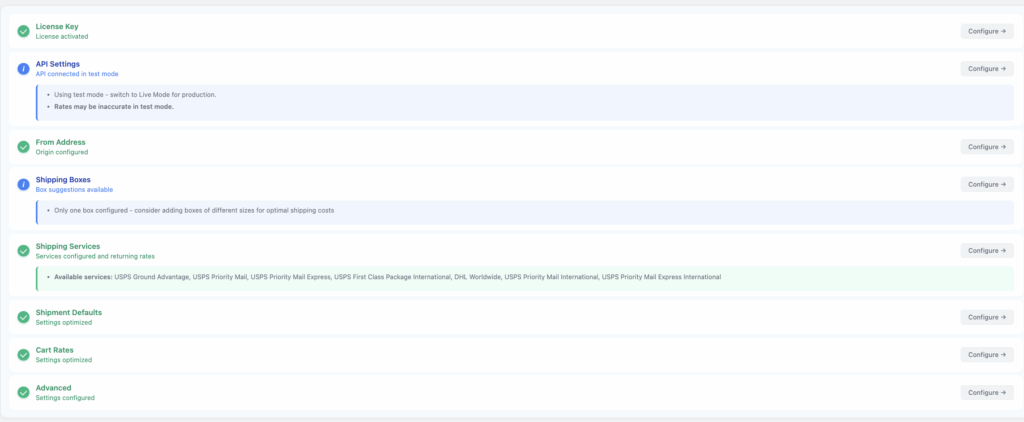
📂 Expandable Settings Tabs (Faster Navigation)
Instead of jumping between multiple tabs, you can now work within expandable tabs.
You can now expand sections and view related settings all in one place, making it easier to:
- Review your configuration quickly
- Make changes without losing context
- Save time during setup and adjustments
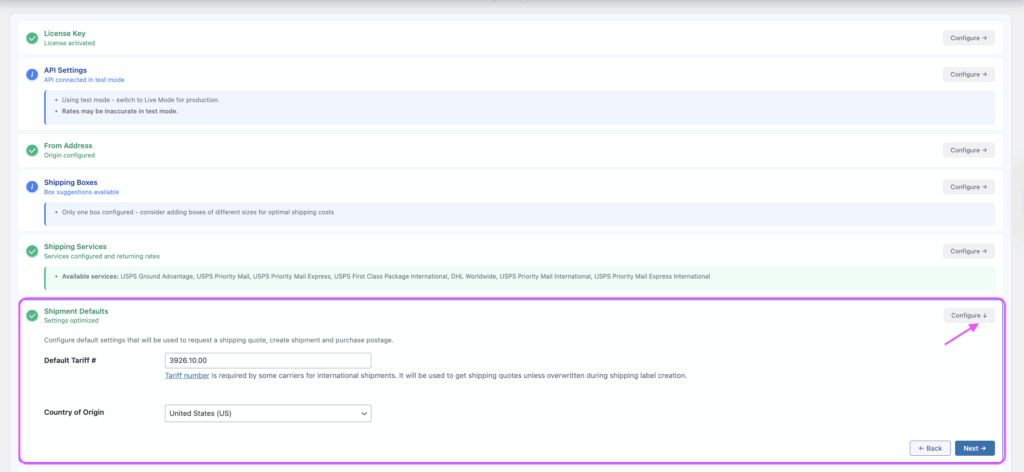
📍Smart Notifications for Missing Settings
One of the most common issues we see is incomplete configuration.
Now, each section shows:
- What’s missing
- Where attention is needed
- What might be preventing shipping rates from being displayed in the cart
👉 This makes troubleshooting much faster, no more digging through settings trying to figure out what’s wrong.
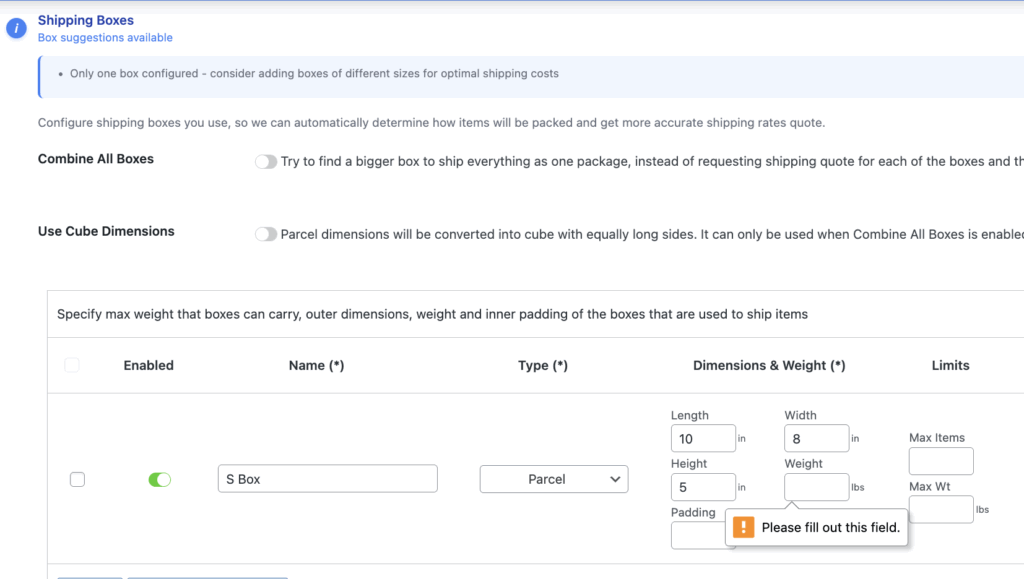
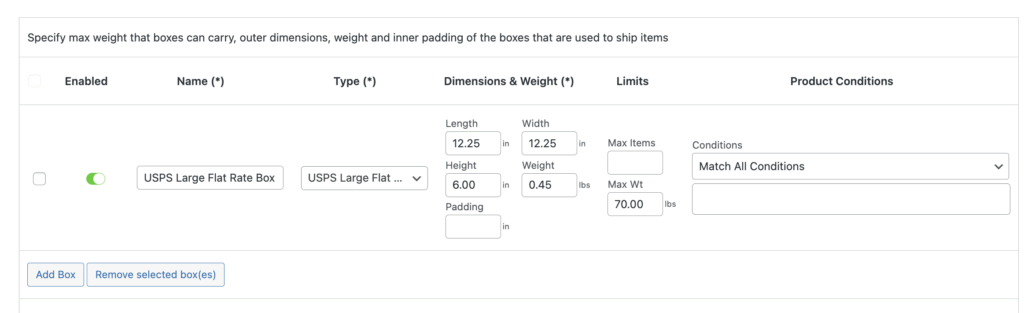
📦 Smart Packaging Assistant (Auto-Fill Dimensions)
Setting up flat-rate boxes manually can take time and is easy to get wrong, especially since carrier APIs require exact dimensions from their official specs to return shipping rates correctly.
With the new parcel packing settings:
- Select a carrier package type (like USPS Flat Rate Box)
- The plugin will automatically fill in the correct dimensions for the selected shipping box.
- Saves time
- Reduces errors
- Helps ensure accurate live shipping rate calculations
🚚 Smart Shipping Services Assistant
No more guessing which shipping services are available.
Once your multi-carrier API key and plugin license key are connected and validated, the plugin will:
- Automatically detect available shipping services from your account
- Display the available shipping services for quick and easy setup
👉 This eliminates guesswork and speeds up the setup process.

🧩 Cleaner Interface (Advanced Settings When You Need Them)
We’ve simplified the interface to make everyday use easier.
- Advanced settings are now hidden by default
- You can enable them anytime when needed
✔ Less clutter
✔ Easier for WooCommerce store beginners
✔ Still powerful for advanced setups
🏡Per Shipping Zone API Configuration (Multi-Location Support)
You can now configure different API keys and settings for each shipping zone. This allows you to define zone-specific options such as:
- Default tariff numbers
- Shipping services settings
- shipping boxes settings
- Signature requirements
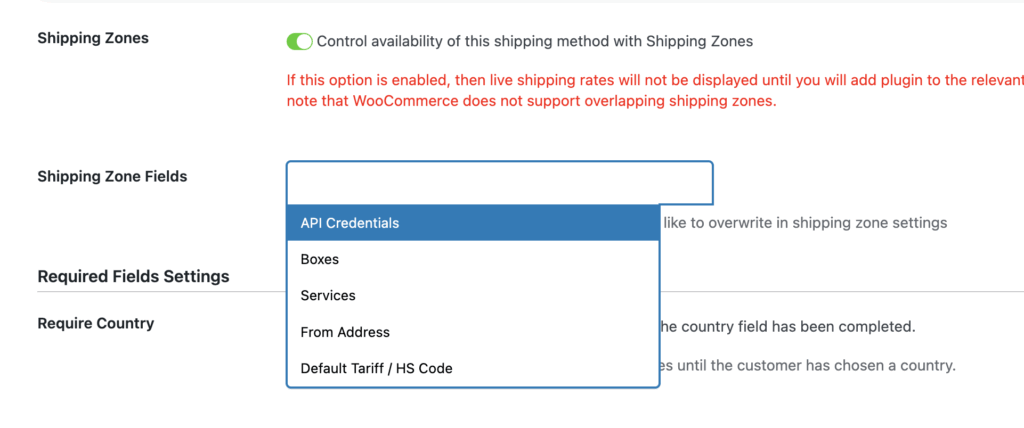
For example, if you ship from both the USA and Canada, each shipping zone can use its own multi-carrier API key and configuration. This ensures that live shipping rates are calculated based on the correct carrier account and regional settings.
This is especially useful for multi-location businesses that need accurate, location-based live shipping rates and compliance.
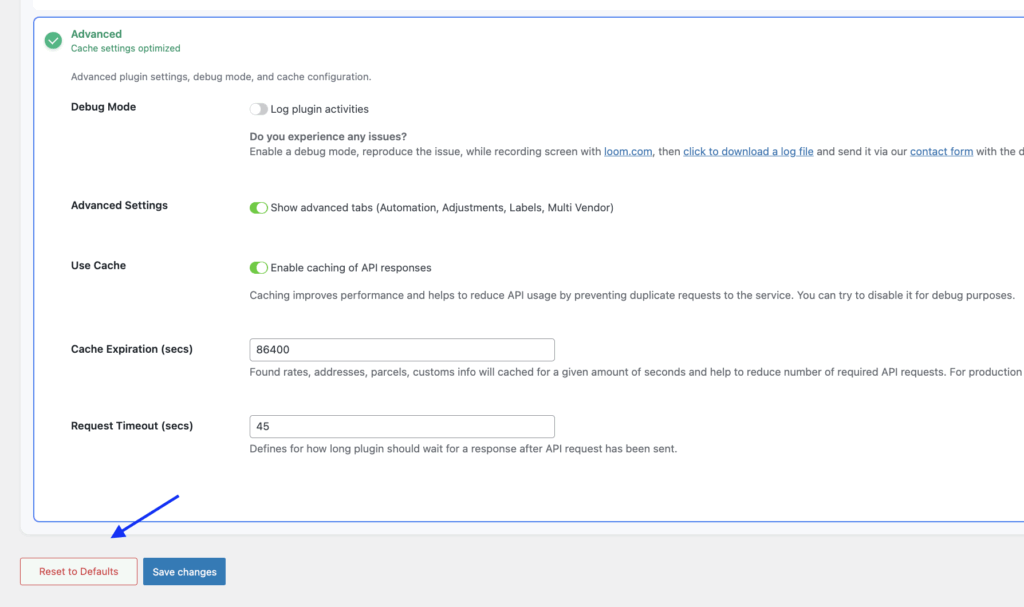
🔄 Reset to Defaults (Start Fresh in Seconds)
We’ve added a new “Reset to Defaults” option in the Advanced Settings to help you quickly recover from configuration issues.
If you’ve been testing different settings and suddenly shipping rates stop showing at checkout, it can be difficult to identify what caused the issue.
Instead of spending time troubleshooting every setting, you can now:
- Reset the plugin to a clean default state
- Eliminate hidden misconfigurations instantly
- Start fresh with a working baseline
This is especially useful when:
- Rates are not displaying in the cart or checkout
- You’ve made multiple configuration changes during testing
- You want to quickly rebuild your setup from scratch
⚠️ Important Note
Resetting will remove all current plugin settings, so we recommend:
- Testing this on a staging site first, or
- Taking note of your existing configuration before resetting
What This Update Means for Your WooCommerce Store
- Faster and easier setup
- Fewer configuration errors
- Clear visibility into what needs fixing
- Same powerful features, now easier to use
Important:
This update only improves the interface.
Your existing settings and functionality remain unchanged.
How to Safely Update Your WooCommerce Live Shipping Rates Plugin
Before updating your live WooCommerce store, we recommend testing everything first.
Best practice:
- Install the updated WooCommerce live shipping rates plugin on your staging site
- Make sure your staging and live sites are on the same domain so they can share the same license key.
- Test:
- Live Shipping rates in the cart and checkout page
- Shipping Label creation with test orders (if applicable)
Once everything looks good → update your live site.
Use Sandbox / Test Mode (Recommended)
If you’re using:
- Shippo Shipping PRO
- EasyPost Shipping PRO
- ChitChats Shipping PRO
- ShipEngine Shipping PRO
- Stallion Express Shipping PRO
You can enable sandbox/test mode to:
- Test live shipping rates safely
- Purchase test shipping labels (no cost)
- Validate your setup without affecting real orders
Need Help?
If you have any questions or run into issues after updating, we’re here to help.
Just reach out through our contact form, and our team will assist you as quickly as possible.
Final Thoughts
This update is all about making powerful WooCommerce shipping plugins easier to use, whether you’re just starting out or managing a more complex WooCommerce store.
With the new UI, you’ll spend less time figuring things out and more time running your business.
Faster setup. Fewer mistakes. Better results.