


ShipEngine (ShipStation API) Shipping Pro for WooCommerce
From: $0.00 for 1 year
Live Multi-Carrier Shipping Rates at WooCommerce Checkout
Show real ShipEngine (ShipStation API) rates from USPS, UPS, FedEx, DHL and 100+ carriers, then buy and print labels inside WooCommerce.
Live rates at checkout. One-click labels. Your ShipEngine API key still works.
- Live rates from 100+ carriers at cart and checkout
- Buy and print labels from the order screen, single or bulk (Pro)
- Address validation before the order is placed
- Automatic tracking emails
- Multivendor: Dokan, WCFM, MultiVendorX, YITH (Pro)
Free on WordPress.org. Pro adds labels, returns, bulk printing, and multivendor support.
Works With Your ShipEngine Carriers



 …and 100+ more
In production since 2021. Free on WordPress.org. No per-label markup. Cancel anytime.
Why Stores Trust It
One Proven Engine
Built on the same multi-carrier shipping engine as our ShipStation, Shippo, EasyPost, ChitChats, Stallion Express, and Shipmondo plugins.
Shipping Since 2021
In production since 2021, and updated for HPOS and the WooCommerce Blocks checkout.
Try Before You Pay
The free version on WordPress.org lets you verify live rates on your real store before you spend a cent.
Honest Pricing
One plugin fee. You pay ShipEngine directly for carrier access, with no per-label markup from us.
ShipEngine Gives You the Rates. WooCommerce Can’t Show Them.
ShipEngine quotes discounted rates from 100+ carriers. But there is no official plugin that puts those rates at your WooCommerce checkout. So you are stuck with one of these:
- Flat rates that lose money on every heavy or long-distance order
- Surprise shipping costs that get carts abandoned
- Generic carrier plugins that ignore your ShipEngine account
ShipEngine Shipping PRO fixes it: your real rates at checkout, your labels from the order screen. It uses the ShipEngine account and carriers you already have, so the rate a buyer sees is the rate you pay, and nothing leaves WooCommerce.
We build WooCommerce shipping plugins and little else, so this is the checkout integration we wished Auctane shipped.
What You Get
One WooCommerce-native plugin that uses your ShipEngine (ShipStation API) key.
Live Rates at Checkout
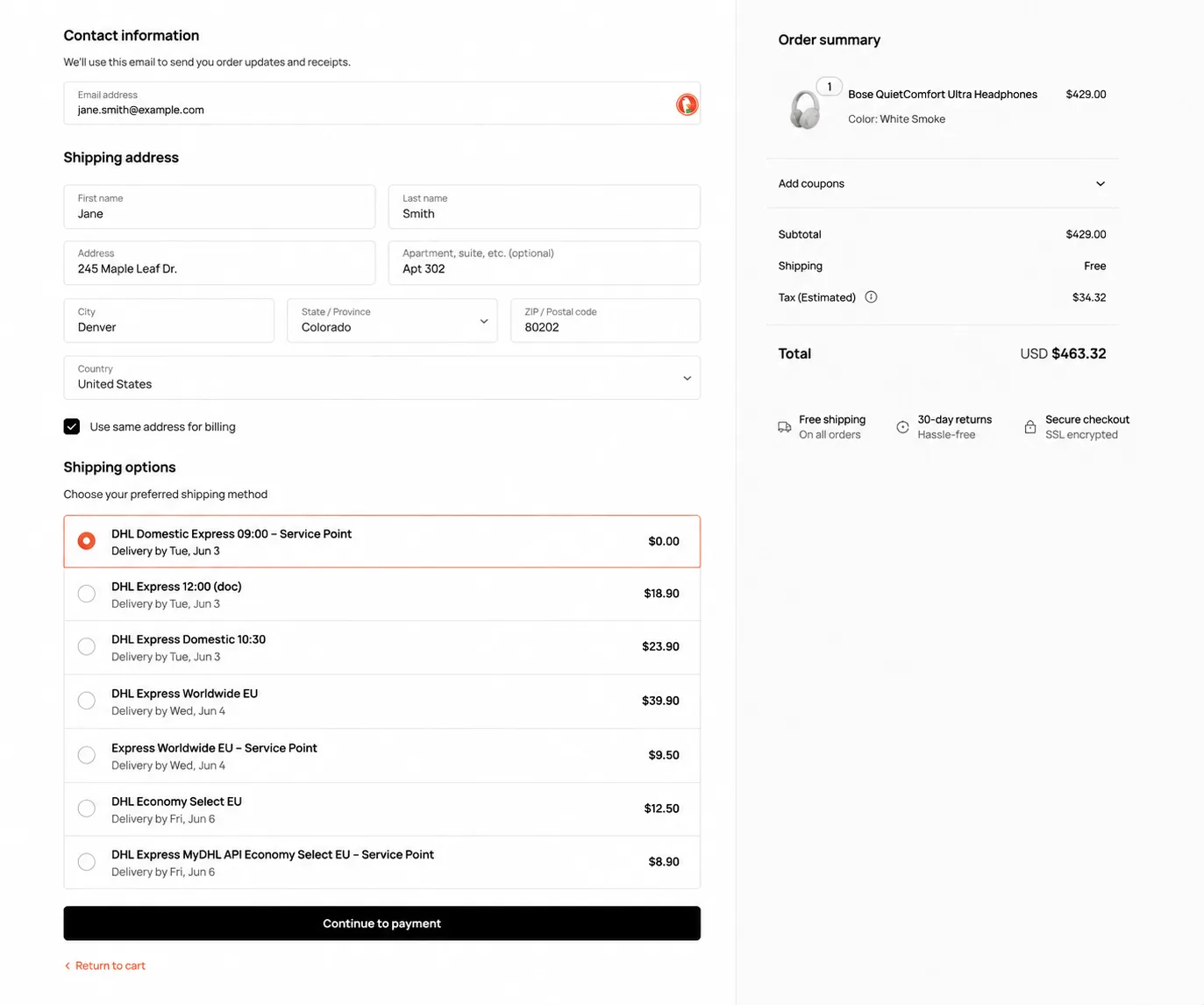
Buyers pay what shipping actually costs. Real carrier quotes appear the moment they enter an address, priced on the cart weight and the boxes you defined. No flat-rate guesswork, no margin leak on heavy or distant orders.
One-Click Labels
Fulfill in seconds, not browser tabs. Buy and print labels from the order screen using the carriers in your account, and bulk-print the day’s orders as one PDF (Pro). Return labels print with a click too.
Address Validation
Cut failed deliveries and reships. Addresses are checked before the order is placed, so a typo never becomes a return-to-sender and a support ticket.
Automatic Tracking
Spend less time on status questions. Tracking numbers and emails fire on their own as the carrier scans the parcel, so “where is my order?” tickets drop and buyers self-serve from the email.
Multivendor Ready
Give every seller accurate rates. Each vendor quotes and ships from their own origin address across Dokan, WCFM, MultiVendorX, and YITH (Pro), and margin protection stops a vendor paying more for a label than the customer did.
ShipEngine and ShipStation API
Nothing to migrate. Auctane is consolidating ShipEngine into the ShipStation API (announced March 2025); the plugin works under either name and your existing key keeps working.
Every Feature, in Plain English
Everything the plugin does, grouped by what it changes for your store.
Live Rates and Checkout
Quote the real price for every cart, then control exactly which rates a buyer sees.
- Live carrier rates the moment a buyer enters their address
- Enable rates globally or per shipping zone
- Cap how many carrier options appear at checkout
- Show only the carrier services you sell
- Custom display names for any service
- Min and max rate cost band to protect margin
- Per-service product conditions by attribute or category
- Rate caching for fast checkout under load
- Asynchronous requests for faster quotes
- HPOS and Blocks checkout supported
- APO and FPO military addresses supported
- Carrier delivery estimate shown next to each rate
- Quote at cart, checkout, or both (Page Condition)
- Company-name handling with residential fallback
- Downloadable debug log of every API call
Box Packing and Rate Rules
Pack the cart the way you actually ship it, then tune the cost down to the cent.
- Accurate rates from real box packing
- Combine parcels to find the cheaper multi-box quote
- Cube fallback so a rate always comes back
- Per-box product conditions and item-count caps
- Default and minimum parcel weight
- Weight adjustments: multiply, add, then enforce a minimum
- Handling fees, markups, and currency conversion
- Insurance and signature rules per service
- Order processing time for realistic delivery dates
- Free-shipping floor stops negative rates
Labels and Fulfillment
Buy postage and finish orders inside WooCommerce, one at a time or in bulk.
- One-click label printing from the order screen
- Instant labels with the previously selected service
- Bulk label printing as one consolidated PDF
- Configurable purchase-postage workflow
- Return labels without leaving the order
- Per-item customs fields (origin, SKU, tariff, description)
- Auto-print script opens the print dialog on load
- Insurance and signature on demand per order
- Choose the actual ship date
Tracking and Notifications
Keep buyers informed automatically and keep your support inbox quiet.
- Tracking on the order and the customer’s My Account
- Automatic tracking emails on every status change
- Carrier tracking links inside notifications
- Per-status notification control
- Background status polling until delivered
Multivendor
Run a marketplace where every seller ships from their own address at their own rates.
- Per-vendor origin rates for Dokan, WCFM, MultiVendorX, YITH
- Vendor-aware label printing add-ons
- Print with a vendor’s settings from admin
- Vendor margin protection on every label
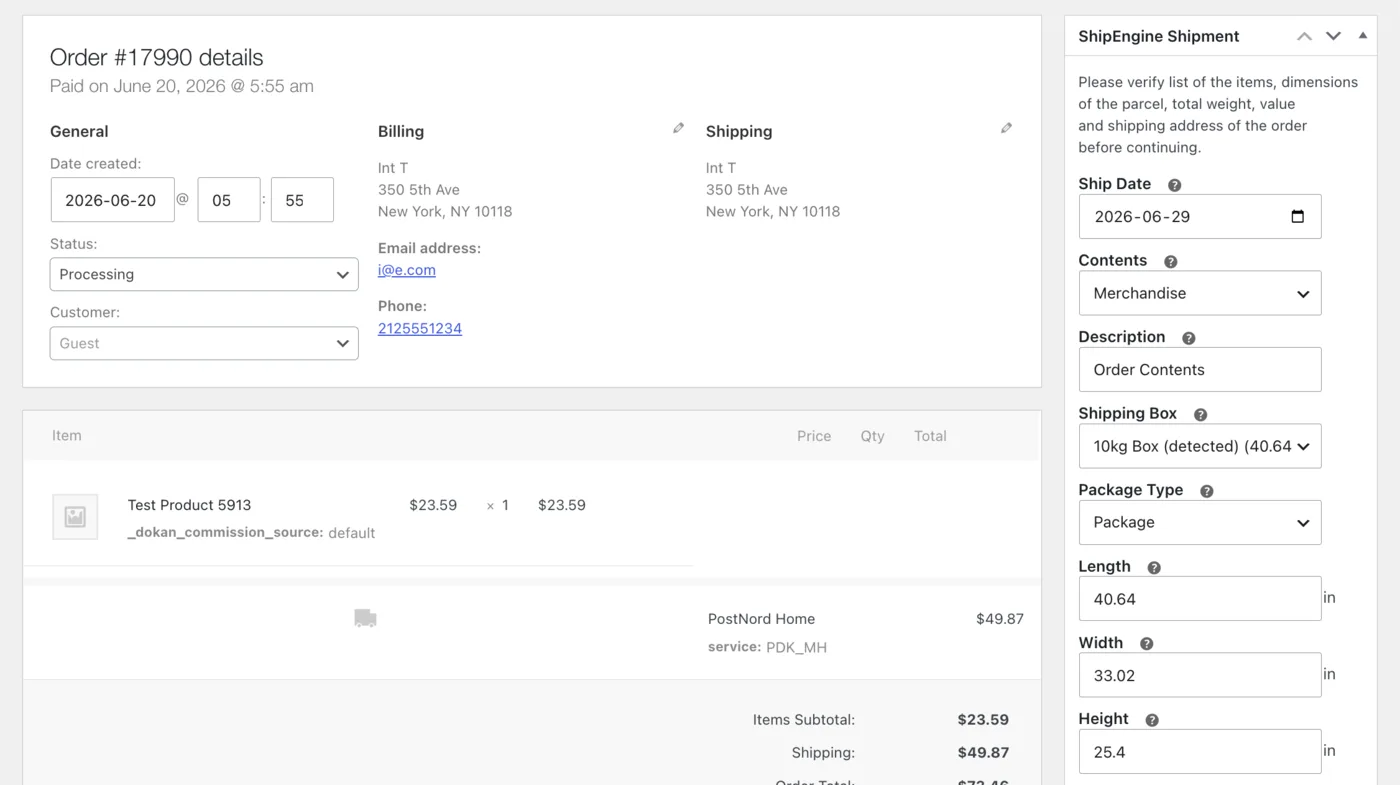
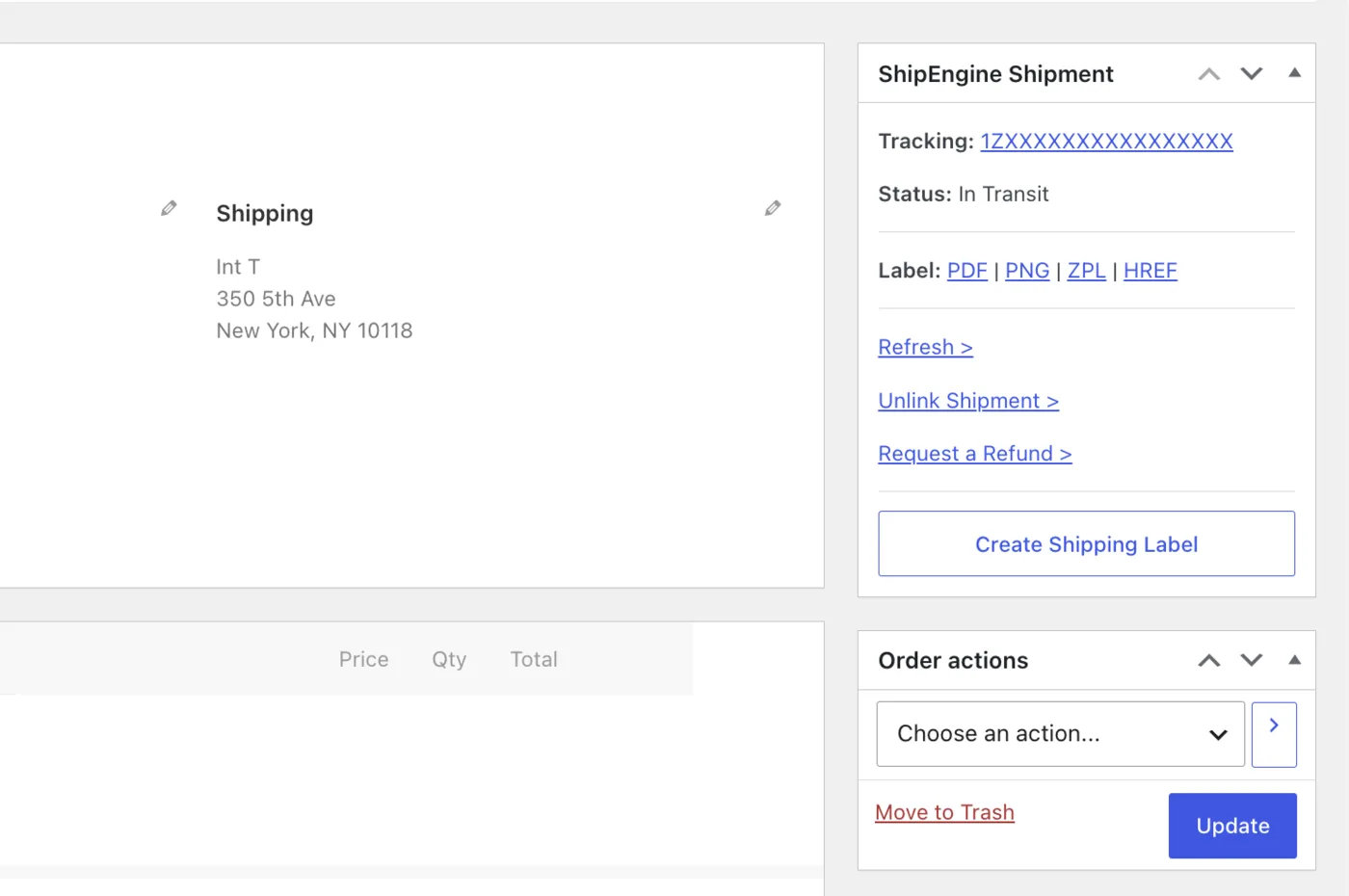
Every item here is in the shipping plugin today, not on a roadmap. The free version covers live rates at checkout, and Pro unlocks the label, tracking, and multivendor tools.
How ShipEngine Rates Work in WooCommerce
There is no guessing and no flat-rate table. The plugin asks the carrier for a real price on the actual parcel, every time. Here is the path a quote takes:
- The buyer enters a shipping address at cart or checkout.
- The plugin packs the cart into the box sizes you defined, applying weight and packing rules.
- It calls the ShipEngine (ShipStation API) with the parcel and destination.
- Real carrier rates come back and appear as WooCommerce shipping methods, filtered by your service and price rules.
- The buyer picks a rate and pays. You buy the matching label from the order screen, single or in bulk.
Because the same packing and weight adjustments apply to both the quote and the label, what the buyer pays matches what you pay the carrier. Per-zone rules let one store quote domestic and international orders from different origins and box sets. Rates are cached and fetched asynchronously, so a busy checkout stays fast even when several shipments are quoted at once.
How It Works
Three steps from install to live rates.
Connect Your API Key
Bring your carriers and negotiated rates in one step. Paste your ShipEngine (ShipStation API) key, and use sandbox mode to confirm everything before you go live. Setup guide.
Set Carriers and Boxes
Quote accurately from day one. Choose which services to show, add your box sizes, and set any markups or weight rules. Per-zone overrides let one store handle domestic and international.
Go Live
Start charging the right amount. Buyers see real rates at checkout, and you buy and print labels from the order screen, single or in bulk, with tracking emails sent automatically.
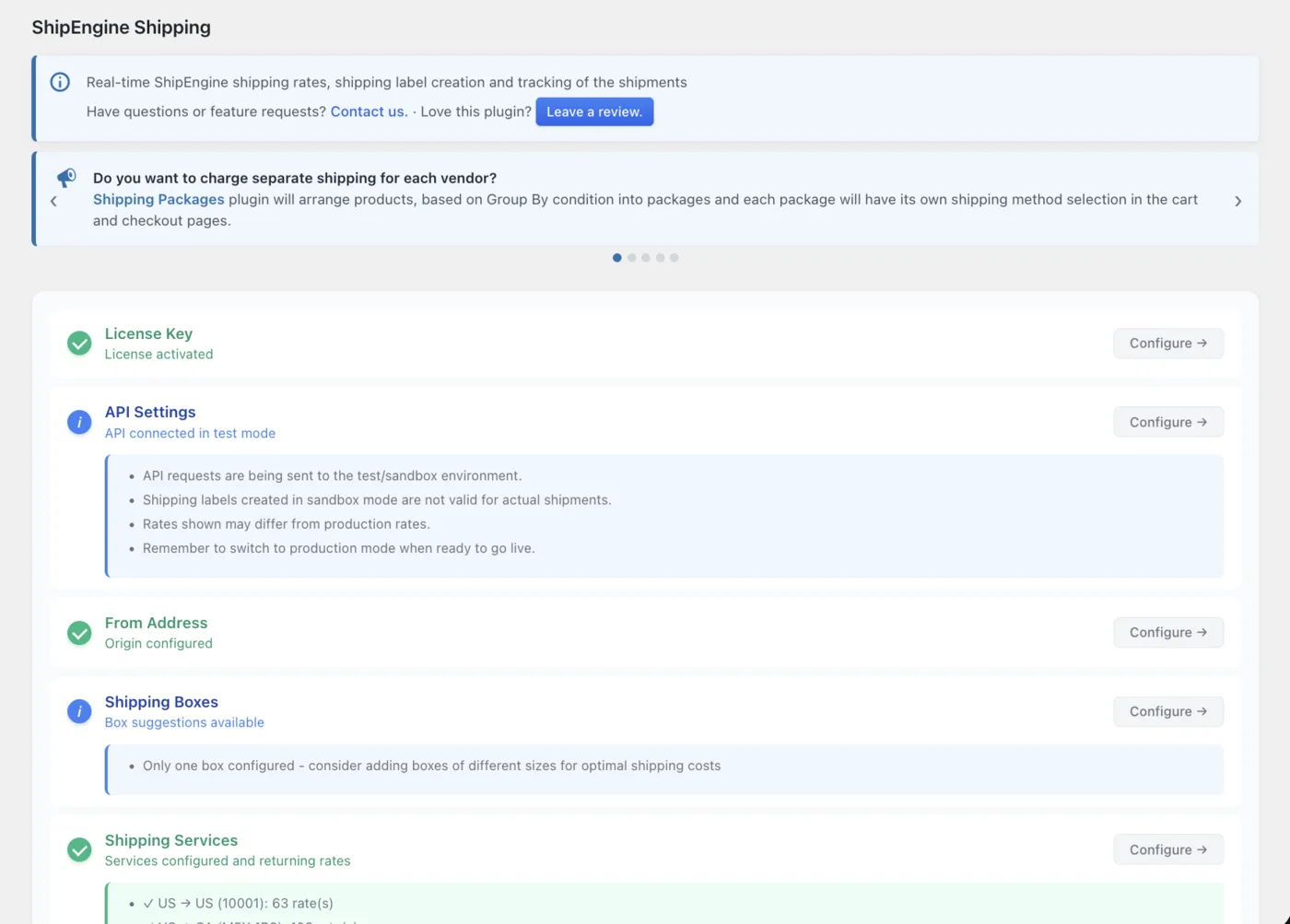
Watch How to Configure the Plugin with the CLI or AI Agent
Prefer code or AI? Configure live rates, boxes, and labels from the command line or with an AI agent, no UI clicks needed.
How We Compare
ShipEngine is the carrier engine. The question is which WooCommerce plugin uses it best.
| Capability | 1TS ShipEngine PRO | Custom-built API integration | Official ShipStation Woo plugin | PluginHive / ELEX multi-carrier |
|---|---|---|---|---|
| Live rates at cart and checkout | Yes, native | Build it yourself | No (imports orders after checkout) | Per-carrier modules, not the full catalog |
| Carriers supported | All ShipEngine carriers (100+) via one key | Whatever you wire up | All ShipStation carriers (in dashboard) | Limited to per-plugin add-ons |
| Per shipping zone configuration | Yes (boxes, services, FROM address per zone) | Build it yourself | No (single dashboard) | Partial |
| Multivendor origin (Dokan, WCFM, MVX, YITH) | Yes, shared adapter | Build it per vendor plugin | No | No |
| Bulk PDF label generation | Yes, in WP admin | Build it yourself | Yes (in dashboard, not WP admin) | Varies |
| Address validation at checkout | Yes | Build it yourself | No | Varies |
| Documented WordPress hooks | Yes (filter/action driven) | Whatever you write | Limited | Limited |
| Free tier on WordPress.org | Yes | No | Yes (the SaaS dashboard is paid) | Limited free tiers |
| WooCommerce Blocks checkout | Yes | Build it yourself | n/a (no checkout integration) | Varies |
| HPOS (High-Performance Order Storage) | Yes | Build it yourself | Yes | Varies |
| Time to production | Hours | Weeks to months | Hours, but no live rates | Hours per carrier add-on |
A custom build means weeks of work and ongoing maintenance, the official ShipStation plugin never shows live rates at checkout, and generic carrier plugins cover only part of the catalog. ShipEngine PRO is the one Woo-native option that uses your existing key and is live in hours. See how the underlying carrier APIs differ in our ShipStation vs Shippo vs EasyPost writeup.
Who It’s For
If you already use ShipEngine for fulfillment, this plugin is the checkout layer you have been missing. It uses your existing account and carriers, so the rate a buyer sees is the rate you pay.
High-Volume US Shippers
Clear the fulfillment queue faster. Quote real USPS, UPS, and FedEx rates per order and bulk-print the day’s labels as one PDF, with instant labels for busy desks. Rate caching and async requests keep checkout fast on your biggest days.
Cross-Border Sellers
Charge correctly across borders. Show DHL and international rates at checkout, validate addresses, and set customs fields per item before you buy the label. Service and product rules keep restricted goods off the wrong carriers.
Multi-Warehouse and Marketplaces
Ship accurately from many origins. Per-zone origins and per-vendor rates cover Dokan, WCFM, MultiVendorX, and YITH, with margin protection on every label. One cart can merge rates from several vendor warehouses.
Developers and Agencies
Build it your way and hand it off. Documented hooks, wp-config.php constants, sandbox mode, and a downloadable debug log let you customize and audit without forking. Roll the same setup across every client store.
Built for Developers and Agencies
Built to be extended, deployed, and audited by people who ship code for a living. The same hooks and constants documented here apply across our whole WooCommerce shipping line, so what you learn once carries over.
WordPress Hooks API
Customize anything without forking the plugin. Documented filter and action hooks cover every rate, label, and tracking call, so you can adjust markups, swap services per zone, or push tracking to your own ERP. Sample hooks include wc_shipengine_shipping_calculate_shipping and wc_shipengine_shipping_purchasePostageForShipment.
wp-config.php Constants
Keep secrets out of the database. Define the API key and advanced flags as PHP constants for managed hosts and CI/CD, so staging and production stay in sync without touching the settings screen.
Sandbox and Debug Log
Launch with no surprises. Validate the full flow against the carrier sandbox, and debug mode logs every request and response to wp-content/uploads/wc-logs/, downloadable in one click.
Configurable Request Timeout
Stay reliable on slow networks. Set the API request timeout to balance checkout speed against retry behavior, so a slow carrier response never hangs the cart.
Add-On Ecosystem
Let marketplace vendors print their own labels. Pairs with the free “Shipping Labels for WCFM” and “Shipping Labels for Dokan” add-ons, so each seller works from their own dashboard.
Free Tier on WordPress.org
Try before you license. Install the free version, test live rates on your real store, then upgrade to Pro. See the setup guide.
Configure with the CLI or AI Agent
Manage every setting from the command line or hand it to an AI agent. The same wp-config.php constants and hooks work headless, so you can script setup across stores or let an agent configure it for you.
Moving From ShipEngine to the ShipStation API
Auctane announced the ShipStation API in March 2025 and is consolidating ShipEngine into it through the year. The branding and documentation moved, but the underlying service is the same: the same carriers, the same rates, and the same V1 and V2 endpoints.
Your existing ShipEngine API key keeps working. The plugin accepts keys under either name and shows both labels in the admin UI, so there is nothing to migrate and no checkout downtime. Both the V1 and V2 endpoints are supported, so you can stay on what you have or move to V2 features at your own pace. If you are weighing the wider carrier-API options, our ShipStation vs Shippo vs EasyPost comparison covers the trade-offs.
Pricing
Plans from $19 a month or $99 a year. You pay ShipEngine separately for carrier access.
The plugin is $19 a month or $99 a year. You pay ShipEngine separately for carrier access. One predictable plugin fee, no per-label markup.
The free version on WordPress.org shows live rates at checkout so you can confirm they work on your real store. Pro adds label printing, return labels, bulk PDF labels, automatic tracking, and multivendor support. Monthly billing exists as a low-cost way to trial Pro before you commit to a year, and a 3-domain license covers agencies running several stores.
Frequently Asked Questions
Common questions about ShipEngine and WooCommerce.
No. Auctane doesn’t publish an official ShipEngine WooCommerce plugin that quotes live rates at checkout, and the official ShipStation Woo plugin only imports orders after checkout. ShipEngine Shipping PRO fills that gap.
They are the same product line. Auctane is consolidating ShipEngine into the ShipStation API (announced March 2025), with the same carriers, rates, and V1/V2 endpoints. Existing ShipEngine API keys keep working.
Yes. Your existing keys authenticate against both V1 and V2 endpoints under the ShipStation API name. The plugin accepts them under either label, so nothing changes in your settings.
Yes. The plugin requests live rates from the ShipEngine (ShipStation API) and displays them in the WooCommerce shipping methods at cart and checkout, scoped to the customer’s destination, weight, and packing rules.
Every carrier the ShipEngine (ShipStation API) supports, including USPS, UPS, FedEx, DHL Express, Canada Post, Royal Mail, Australia Post, GLS, DPD, and 100+ regional carriers. Carrier availability depends on your Auctane account.
The official ShipStation plugin imports your orders into the ShipStation dashboard for fulfillment after checkout. It does not show live rates at the WooCommerce checkout. ShipEngine PRO does the live-rates-at-checkout job and the label-printing-inside-WooCommerce job.
Yes. The plugin is $19/mo or $99/yr to us. Your ShipEngine (ShipStation API) account is billed separately by Auctane on flat tiers. We keep the line clear so finance has no surprises.
Yes. Vendor-origin rate quoting and vendor-scoped label printing are first-class across Dokan, WCFM, WCMP / MultiVendorX (MVX), and YITH. Rates from each vendor’s warehouse merge into one cart.
Yes. Sandbox mode and debug mode are built in. The plugin logs every API request and response to wp-content/uploads/wc-logs/ so engineers can trace issues without raising a support ticket.
Yes. HPOS (High-Performance Order Storage, WooCommerce’s custom-table order schema introduced in 8.2) is supported. Order meta reads and writes go through the WooCommerce CRUD layer.
Yes, annual plans include a 30-day money-back guarantee. If we can’t resolve a qualifying issue within 30 days of purchase, you get a full refund (conditions apply; see our refund policy). Monthly plans are non-refundable, since they exist as a low-cost way to trial the plugin. Because the plugin depends on the ShipEngine (ShipStation API), we can’t refund issues caused by ShipEngine or ShipStation plan or tier limits. Verify your tier before purchase.
Yes. The plugin calls the ShipEngine (ShipStation API) for rates and labels, so you need an active Auctane API account. Carrier access and pricing depend on your tier, so verify your plan before purchase.
Yes. Live rates appear on both the classic shortcode checkout and the newer Blocks-based cart and checkout pages, with no extra setup.
Yes. Whitelist the carrier services you use and hide the rest, globally or per shipping zone. You can also rename services and cap how many rates appear at checkout.
Yes. Define your real box sizes and the plugin packs the cart into them before requesting rates, so quotes match the parcel you ship. It can combine parcels to find a cheaper multi-box rate.
Rate responses are cached and API calls run asynchronously, so checkout stays fast even during traffic spikes. The cache holds even when a quote returns no rates.
Show Real Rates. Print Labels. Stop Guessing.
Add live ShipEngine rates and one-click labels to your WooCommerce store today. Start free on WordPress.org, confirm the rates on your own products, and upgrade to Pro when you are ready to print labels.
30-day money-back guarantee on annual plans (conditions apply; see refund policy). Free version on WordPress.org.
| License Type | Free Version, Single Domain / Site – Monthly Subscription, Single Domain / Site, Three Domains / Sites, Ten Domains / Sites |
|---|
1 review for ShipEngine (ShipStation API) Shipping Pro for WooCommerce
Add a review
You must be logged in to post a review.
Related products
WooCommerce Shipping Plugins
WooCommerce Multi-Vendor Marketplace Plugins
Shipping Labels for WCFM WooCommerce Multivendor Marketplace PRO
WooCommerce Order Fulfillment Plugins
WooCommerce Shipping Plugins
WooCommerce Multi-Vendor Marketplace Plugins
Shipping Labels for MultiVendorX WooCommerce Multivendor Marketplace PRO
WooCommerce Shipping Plugins
WooCommerce Multi-Vendor Marketplace Plugins
Shipping Labels for Dokan WooCommerce Multivendor Marketplace PRO
richard cannon (verified owner) –
Works as anticipated. I wanted 6 shipping options for my customer, that I chose. They appear in my customer’s cart with rates. Rates can be adjusted up or down for future orders if necessary.