
UPS Shipping PRO for WooCommerce
From: $17.00 / month
Live UPS Rates, Labels and Tracking at Checkout
The UPS shipping plugin for WooCommerce shows real UPS rates for the buyer’s address, prints shipping and return labels from the order screen, and emails customers tracking updates automatically. It all runs on your own UPS account and negotiated rates.
Current UPS OAuth 2.0 API. No per-label fees from us.
- Live UPS rates at cart and checkout for 12 UPS services, domestic and worldwide
- Your negotiated UPS account rates instead of the published rate
- Buy and print labels in PDF, PNG or ZPL, single or bulk, plus return labels
- Automatic UPS tracking, with customer emails when the shipment status changes
Test in the UPS sandbox before you go live.
WooCommerce UPS Plugin: Live Rates, Print Labels & Tracking
Your customers see live UPS rates at checkout. You print UPS labels and returns from the order screen, and tracking emails go out without you touching them. It runs on your own UPS account through UPS’s current OAuth 2.0 API.
Built and supported by the team behind our FedEx, EasyPost, ShipStation, ShipEngine, Shippo and Stallion Express plugins.
Works With Your UPS Account
What It Is Built On
One Shared Engine
It runs on the same WooCommerce shipping engine as our FedEx, EasyPost, ShipStation, ShipEngine, Shippo and Stallion Express plugins. The UPS part is new; the engine underneath is not.
Current UPS API
Uses UPS’s OAuth 2.0 REST APIs for rating, shipping, tracking and address validation, not the retired XML access-key API.
Your Account, Your Rates
It connects to your own UPS account, so checkout can show your negotiated rates. UPS bills you directly and we add nothing per label.
Test Before You Go Live
Use UPS’s sandbox (CIE) with separate test credentials to try rates and labels before you switch to production.
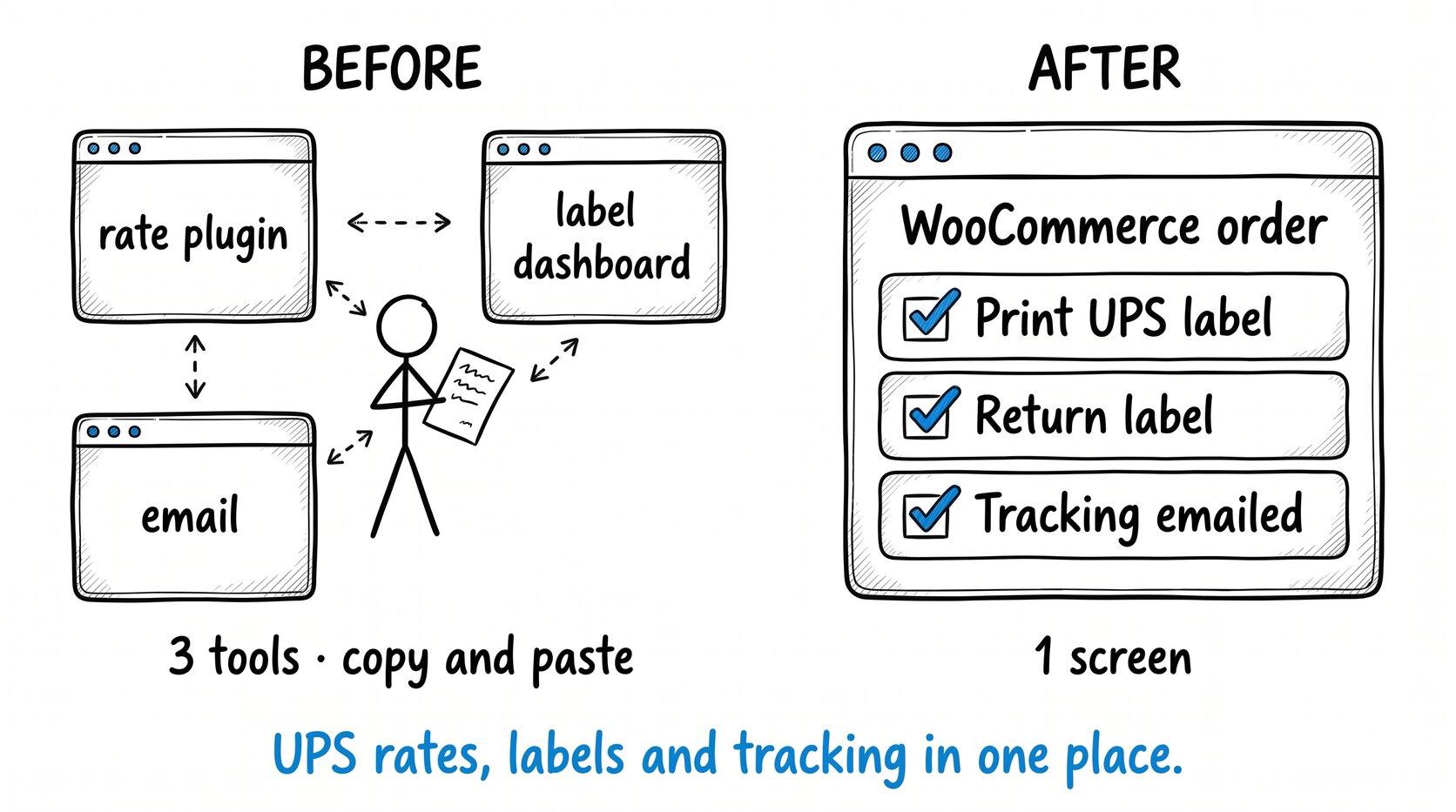
UPS Rates in One Tool, UPS Labels in Another, Tracking in Your Inbox
Without one plugin for the whole job, UPS ends up in pieces. The rate plugin quotes shipping but cannot print a label. The label tool lives in a separate dashboard that copies your orders out of WooCommerce. And every tracking number gets pasted into an email by hand. Meanwhile at checkout:
- Flat rates undercharge on heavy orders and overcharge on light ones
- Buyers see retail UPS prices, not the discount you negotiated
- Buyers cannot see when an order will arrive
UPS Shipping PRO keeps all of it inside WooCommerce. Customers see live UPS rates at checkout, you print labels and returns from the order screen, and tracking updates automatically, with customer emails for the shipment statuses you choose.
What You Get
Everything runs inside WooCommerce, on the UPS account you already have.
Live UPS Rates at Checkout
Real UPS prices for the buyer’s address, calculated on the packed boxes. 12 UPS services, domestic and worldwide.
Your Negotiated Rates
Turn on account rates and checkout requests your negotiated UPS price instead of the published rate (published rates are used if UPS returns none).
Labels From the Order Screen
Buy and print UPS labels in PDF, PNG or ZPL for Zebra thermal printers. Bulk-print labels from the Orders list. Void labels and create return labels.
Tracking That Runs Itself
UPS tracking is checked automatically, customers get an email when the shipment status changes (statuses you choose), tracking shows in WooCommerce emails and My Account, and delivered orders can complete themselves.
Estimated Delivery Time
Show the estimated business days for each UPS service at checkout, from UPS transit-time data.
International Shipments
Commercial invoice with HS tariff codes generated with the label, plus COD, declared value, signature, Saturday delivery, alcohol and dry ice options.
Every Feature, in Plain English
Included with an active UPS Shipping PRO licence.
Live Rates & Checkout
- Live UPS rates at cart and checkout
- 12 services: Ground, Next Day Air, Next Day Air Saver, Next Day Air Early, 2nd Day Air, 2nd Day Air A.M., 3 Day Select, Standard, Worldwide Express, Worldwide Expedited, Worldwide Express Plus, Worldwide Saver
- Negotiated (account) rates, shown instead of retail when enabled
- Estimated delivery time (business days) next to each rate
- Show only the services you sell; rename them
- Handling fee, rate multiplier, min/max rate, cap on number of rates shown
- Enable per shipping zone
- Rate caching with an expiry time you set
Labels & Fulfillment
- Buy and print UPS labels from the order screen
- PDF, PNG and ZPL (Zebra thermal); 4×6, 6×4, 4×8 and 8×4 label stock
- Bulk label printing from the Orders list (HPOS and legacy screens)
- Automatic shipment and label creation for chosen order statuses
- Void labels; domestic and international return labels
Tracking & Customer Updates
- UPS tracking with automatic status updates
- Customer email when the shipment status changes, for the statuses you choose
- Tracking details in WooCommerce emails and the customer’s My Account
- Auto-complete orders when UPS reports them delivered
- UPS address validation for US and Puerto Rico addresses
Shipment Options & International
- Commercial invoice with reason for export and HS tariff codes
- COD, declared value (insurance), signature or adult signature
- Saturday delivery, alcohol and dry ice shipments
- Box packing with your own boxes (max weight per box) plus UPS box presets: Express Envelope, Pak, Tube, Express Box S/M/L, 10 kg and 25 kg boxes
Marketplaces, Developers & AI
- Ship from each vendor’s address: Dokan, WCFM, MultiVendorX, YITH Multi Vendor, WooCommerce Product Vendors
- HPOS compatible; PHP 7.4+
- UPS sandbox (CIE) test mode with separate test credentials
- WP-CLI commands for rates, labels, tracking, address checks, boxes, settings and status
- 29 WordPress Abilities, so AI assistants can quote rates, create labels and check tracking through the Abilities API / MCP
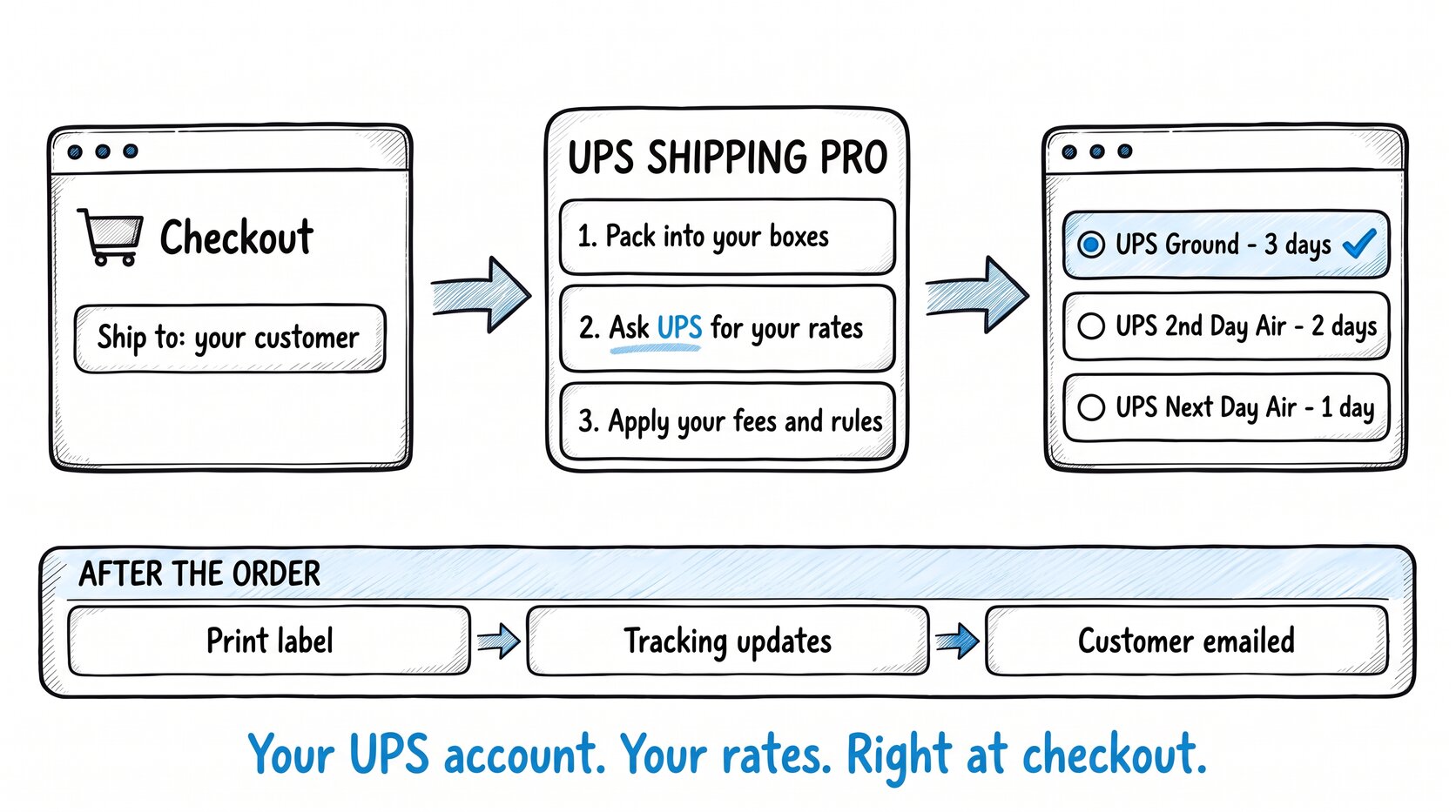
How Live UPS Rates Are Calculated at Your WooCommerce Checkout
- Address. The buyer enters an address at checkout.
- Pack. The plugin packs the cart into your boxes (or UPS box presets).
- Ask UPS. It asks UPS for rates on your account, negotiated rates included if enabled.
- Show the right options. Checkout shows the services you allow, with your fees applied and estimated business days to delivery.
- Fulfill. After the order, you print the UPS label from the order screen; tracking updates reach the customer by email and in My Account.
How It Works
Three steps from install to live rates.
Connect Your UPS Account
Create a free app on the UPS Developer Portal and paste the client ID, client secret and account number. Test in the UPS sandbox first. See the setup guide.
Set Services and Boxes
Choose which UPS services to show, add your boxes, and set any handling fees.
Go Live
Buyers see real UPS rates; you print labels from the order screen, one at a time or in bulk.
How We Compare
UPS is the carrier you already have. The question is which WooCommerce plugin covers rates, labels, returns and tracking without a second tool.
| Capability | 1TS UPS PRO | PluginHive | Octolize | WooCommerce (by Woo) | UPS official plugin |
|---|---|---|---|---|---|
| Live UPS rates at checkout | Yes | Yes | Yes | Yes | No |
| Print UPS labels in WooCommerce | Yes, included | Yes | Paid add-on | No | No (external UPS dashboard) |
| Return labels | Yes | Yes | See vendor | No | See vendor |
| UPS Access Points | No | Yes | Yes | See vendor | See vendor |
| UPS SurePost | No | Yes | See vendor | Yes | See vendor |
| UPS Freight / LTL | No | Yes | See vendor | No (its page: no freight, 150 lb limit) | See vendor |
Compared from each vendor’s public page in November 2026. “See vendor” means we could not confirm it. UPS PRO does not do Access Points, SurePost or freight today.
Who It’s For
Stores Shipping UPS Daily
Bulk labels, ZPL thermal printing and automatic label creation for chosen order statuses cut the clicks per order.
Stores With a UPS Discount
Your negotiated UPS rates at checkout instead of published prices.
Cross-Border Sellers
Commercial invoices, HS codes, and Worldwide Express, Expedited and Saver services.
Marketplaces, Developers & Agencies
Per-vendor origin, WP-CLI, AI Abilities, and a 3-site plan.
What Store Owners Say About UPS Shipping PRO
Choose Your Plan
Pick a plan by how many stores you run. Every plan has the same features. You bring your own UPS account; the UPS API credentials are free.
Monthly
$17/mo
One site, billed every month. Good for a trial run or a short project.
Choose MonthlyUp to 3 sites
$187/yr
Billed once a year. For agencies and owners running more than one store.
Choose 3 SitesFrequently Asked Questions
Common questions about the UPS plugin for WooCommerce.
Does this plugin print UPS labels, or just show rates?
Both. It shows live UPS rates at checkout and prints labels from the order screen in PDF, PNG or ZPL, one at a time or in bulk, plus voids and return labels.
Do I need a UPS account and API key?
Yes: your own UPS shipper account and free OAuth credentials (client ID and secret) from the UPS Developer Portal. The plugin does not use the old UPS access key; it connects through UPS’s current OAuth API.
Can it show my negotiated UPS rates?
Yes. Turn on account rates and checkout shows your negotiated UPS price instead of the published rate, when UPS returns one.
Why don’t the rates match ups.com?
The plugin asks UPS for rates on the packed boxes from your account. Box sizes, negotiated-rate settings and any handling fee or multiplier you set change the checkout price; published rates are used if UPS returns no negotiated price.
Does it send UPS tracking to customers?
Yes. Tracking is checked automatically, customers are emailed when the shipment status changes (statuses you choose), tracking appears in WooCommerce emails and My Account, and delivered orders can be completed automatically.
Can I print UPS labels on a Zebra thermal printer?
Yes. Choose ZPL and 4×6 label stock.
Does it validate addresses?
Yes, through UPS address validation, which UPS offers for US and Puerto Rico addresses.
Is there a weight limit like the WooCommerce UPS extension?
You set a maximum weight for each box, and UPS’s own per-package limits apply. UPS Freight (LTL) is not supported.
Does it support UPS Access Points, SurePost or scheduled pickups?
Not today. If you need them now, choose a plugin that lists them; we would rather say so than overpromise.
Can I test it before going live?
Yes. Turn on test mode and enter your UPS sandbox (CIE) credentials to try rates and labels against UPS’s test environment, then switch to your production credentials when you are ready.
Live UPS Rates, Labels and Tracking in One WooCommerce Plugin
Connect your UPS account, try everything in the UPS sandbox, then switch on live rates.
| License Type | Single Domain / Site – Monthly Subscription, Single Domain / Site, Three Domains / Sites, Ten Domains / Sites |
|---|
Be the first to review “UPS Shipping PRO for WooCommerce”
You must be logged in to post a review.
Related products
WooCommerce Order Fulfillment Plugins
WooCommerce Shipping Plugins
WooCommerce Shipping Plugins
WooCommerce Shipping Plugins
WooCommerce Multi-Vendor Marketplace Plugins
Shipping Labels for Dokan WooCommerce Multivendor Marketplace PRO
WooCommerce Shipping Plugins
WooCommerce Order Fulfillment Plugins
Reviews
There are no reviews yet.